On This Page
After Capture Workflow
This workflow identifies the order of events that occur after an authorization is
captured. The workflow shows how the order status is updated when the captured
transaction is refunded or voided).
- The merchant selects one of these actions:
- Standard refund is initiated by clickingStandard refund.
- Partial refund is initiated by clickingPartial refund.
- Void of the capture is initiated by clickingVoid capture.

- If the merchant decides to void the capture, the captured transactions are voided.When all quantities of the transaction are captured, the entire order is voided and the order status is set toPayment cancelled.
 If only a few quantities are captured, only the captured quantities are voided and the order status is set toPartial payment accepted.

- This image shows how a standard refund is initiated.If the merchant decides to initiate a standard refundbeforeupdating the order status toshipped, the order status is set toPartial refunded (before shipped)until the refunded amount is equal to the captured amount. After the refunded amount is equal to the captured amount, the order status is set toRefunded.This image shows how a partial refund is initiated.
 This image shows the order status when partial refund is issued before the product is shipped.
 This images shows the order status when a full refund is issued before the product is shipped.
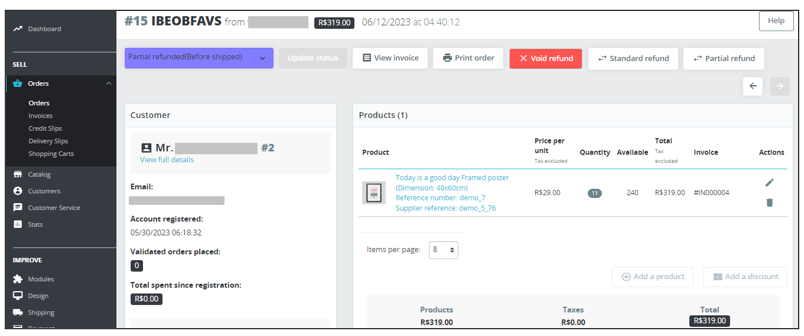

- This image shows the order status when a standard refund is issued after the product is shipped.When the merchant selects a refundafterupdating the order status toshipped, the order status is set toPartial refunded (after shipped)until the refunded amount is equal to the captured amount. After the refunded amount is equal to the captured amount, the order status is set toRefunded.This image shows the order status when a partial refund is issued after the product is shipped.

 To refund the amount of an order, merchants can either generate a voucher or a credit slip for the refund. Depending on the type of refund they select and whether they issue a voucher or a credit slip, one of these actions occurs:
- WhenGenerate a voucheris selected for a partial refund, the sum of the items will not be refunded. Instead, a voucher is generated that can be used for future transactions.
- WhenGenerate a voucheris selected and amount is entered in shipping costs field for a partial refund, then a voucher equal to the sum of the items and the shipping amount is generated.
- WhenGenerate a credit slipis selected for a standard refund, the sum of the items will be refunded.
- WhenGenerate a credit slipandRepay shipping costsare both selected for a standard refund, the sum of the items and the shipping amount are both refunded.
- WhenGenerate a voucherandRepay shipping costsare both selected for a standard refund, a voucher equal to the sum of the items and shipping amount is generated.
- WhenGenerate a voucherandGenerate credit slipare both selected for a standard refund, a voucher is generated and a refund for the sum of the items will not be refunded.