On This Page
Test the Plug-In
If you have not done so already, configure these settings
using PrestaShop Back Office. See Configure Plug-In Settings for
information about how to access these settings:
- General Settings:merchant ID, merchant key ID, and/or merchant secret key
- Payment Settings:applicable payment methods
After configuring the plug-in, complete this task to test the configuration using
PrestaShop Front Office to place an order and PrestaShop Back Office to manage the
order.
- Open PrestaShop Front Office to place an order:
ADDITIONAL INFORMATION
- Enter any required personal information and select the payment method you want to use to place the order.
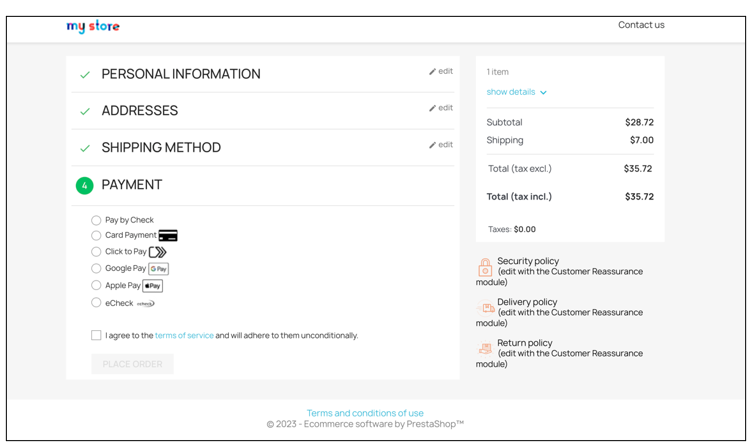
- Enter the card information you want to use to place the order and clickPay.

Step Result
If the order is successful, an order confirmation message displays as shown below.
- Open PrestaShop Back Office to mange the order:
ADDITIONAL INFORMATION
- SelectOrders > Ordersfrom the Dashboard. The Orders page displays and lists all active orders.

- Select and open the order you processed in step 1. The order status for the order should displayAwaiting payment.
- ClickStandard Captureicon to capture the authorized amount, and clickYesto capture the entire order.The order status changes to
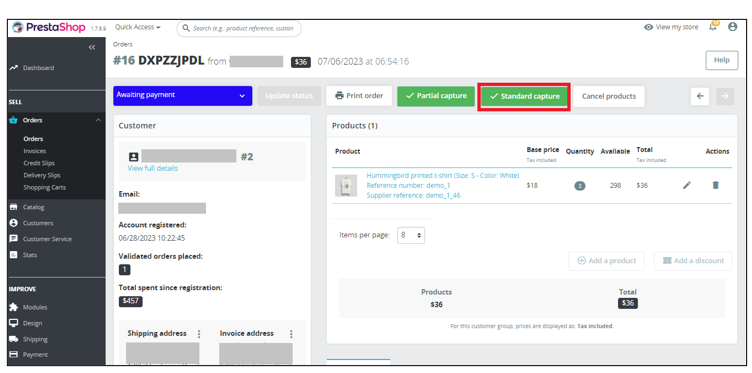 Payment accepted.
- ClickStandard Refundto refund the full captured amount.The order status changes to
 Refunded.
- ClickVoid Refundto void the refunded amount.The order status changes to
 Refund cancelled.