On This Page
Cancel an Order
This task provides the steps a customer takes to cancel an
order. They cannot cancel an order if the order is in review with the
merchant.
- Open PrestaShop Front Office.
- SelectMy Account > Order History. The Order history page displays the customer's orders.
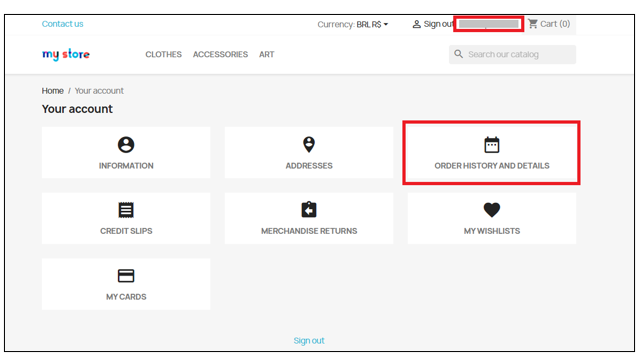
- Select theDetailsicon for the order you want to cancel. The Order details page displays.

- Click theCancelicon to cancel the order.

ADDITIONAL INFORMATION
An Order cancellation confirmation notice displays.
- ClickYeson the Order cancellation confirmation notice to cancel the order.
ADDITIONAL INFORMATION
The order is cancelled and the order status is set to Cancelled.
ADDITIONAL INFORMATION
If the order was a sales transaction or was captured, the cancellation is sent to the merchant and the status is set toAwating cancel.
RESULT
After the customer cancels an order, the merchant can accept or reject the order
cancellation (as instructed in Process a Cancelled Order).
If
the merchant accepts the cancellation request, a refund for the order amount is
initiated and the order status is set to 
Cancelled, refund initiated
.
If the merchant rejects the cancellation request,
the order status is set to 
Cancel rejected
.