On This Page
Create a Payment Processing Certificate
The payment processing certificate is used to establish secure communication
between Apple Pay and
Cybersource
.- Log into yourCybersourceBusiness Centeraccount.
- SelectPayment Configuration > Digital Payment Solutionsfrom the left navigation pane.
- Click theConfigureicon for Apple Pay. The Apple Pay Registration menu displays.
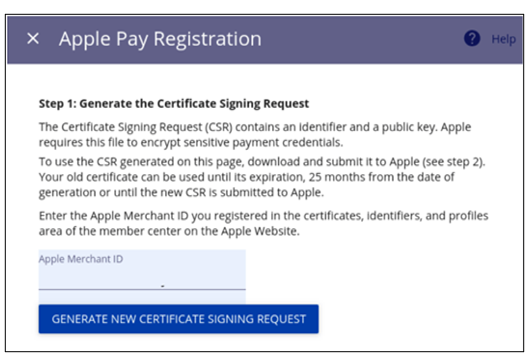
- Enter the Apple Pay merchant ID you created and registered in Create a Merchant ID and clickGenerate New Certificate Signing Request. The certificate is generated and displays.
- Save the generated certificate to your local system.
- Log into your Apple Developer account and go to the Certificates, Identifiers & Profiles page.
- SelectIdentifiersfrom the sidebar and select the merchant ID from the list.
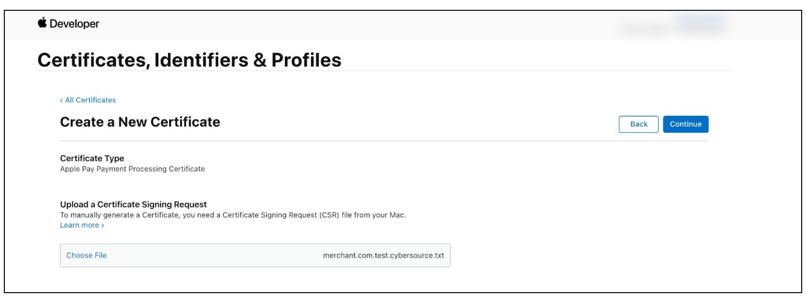
- ClickCreate Certificatefrom the Apple Pay Payment Processing Certificate section. The Create a New Certificate menu displays.
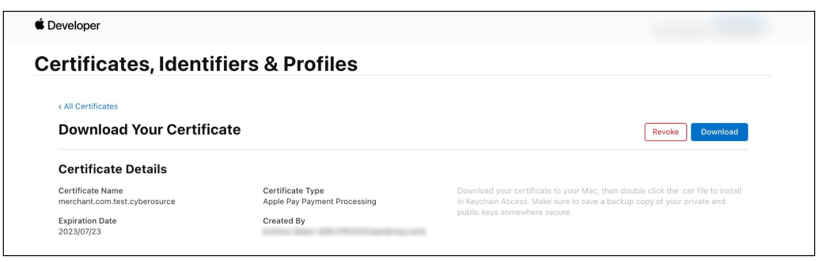
- ClickChoose File, go to and select the certificate you downloaded to your local system, and clickContinue. The certificate is generated and displays is the Download Your Certificate menu.
- ClickDownloadto download the certificate.