On This Page
Afterpay and Clearpay Developer Guide
This section describes how to use this guide and where to find further information.
- Audience and Purpose
- This guide is written for application developers who want to integrate Afterpay and Clearpay into their order management system.
- Conventions
- The following special statement is used in this document:IMPORTANTAnImportantstatement contains information essential to successfully completing a task or learning a concept.
- Related Documentation
- Refer to the Support Center for complete technical documentation:
- Customer Support
- For support information about any service, visit the Support Center:
Recent Revisions to This Document
24.02
Added support for REST API integration for these services:
24.01
Updated the example response for creating a session. See afterpay-session-ex-so.dita.
23.01
Added the transaction workflow and graphic. See Afterpay and Clearpay Workflow.
Added the Create a Session section. See Create a Session.
Added an Authorization example that includes optional line items. See afterpay-auth-init-ex-xml-so.dita.
Updated the Sales section to support the new Session service. See Process a Sale.
21.01
Initial release.
VISA Platform Connect: Specifications and Conditions for
Resellers/Partners
The following are specifications and conditions that apply to a Reseller/Partner enabling
its merchants through
Cybersource for
. Failure to meet any of the specifications and conditions below is
subject to the liability provisions and indemnification obligations under
Reseller/Partner’s contract with Visa/Cybersource.Visa Platform Connect
(“VPC”)
processing- Before boarding merchants for payment processing on a VPC acquirer’s connection, Reseller/Partner and the VPC acquirer must have a contract or other legal agreement that permits Reseller/Partner to enable its merchants to process payments with the acquirer through the dedicated VPC connection and/or traditional connection with such VPC acquirer.
- Reseller/Partner is responsible for boarding and enabling its merchants in accordance with the terms of the contract or other legal agreement with the relevant VPC acquirer.
- Reseller/Partner acknowledges and agrees that all considerations and fees associated with chargebacks, interchange downgrades, settlement issues, funding delays, and other processing related activities are strictly between Reseller and the relevant VPC acquirer.
- Reseller/Partner acknowledges and agrees that the relevant VPC acquirer is responsible for payment processing issues, including but not limited to, transaction declines by network/issuer, decline rates, and interchange qualification, as may be agreed to or outlined in the contract or other legal agreement between Reseller/Partner and such VPC acquirer.
DISCLAIMER: NEITHER VISA NOR CYBERSOURCE WILL BE RESPONSIBLE OR LIABLE FOR ANY ERRORS OR
OMISSIONS BY THE
Visa Platform Connect
ACQUIRER IN PROCESSING TRANSACTIONS. NEITHER VISA
NOR CYBERSOURCE WILL BE RESPONSIBLE OR LIABLE FOR RESELLER/PARTNER BOARDING MERCHANTS OR
ENABLING MERCHANT PROCESSING IN VIOLATION OF THE TERMS AND CONDITIONS IMPOSED BY THE
RELEVANT Visa Platform Connect
ACQUIRER. Introduction to Afterpay and Clearpay
Afterpay and Clearpay are Buy Now Pay Later (BNPL) payment methods you can offer your
customers through
Cybersource
. The pay later service enables online
customers to purchase a product immediately and pay for it later with four equal
repayments. The repayments are interest-free, as long as the customer pays on time.Supported Services
These are the API services you must integrate with to process a transaction using
Afterpay and Clearpay:
- Options
- Session
- Authorization
- Capture
- Sale
- Refund
- Authorization-reversal
- Check status
Requirements
Your merchant account must be configured to process Afterpay and Clearpay payments.
Contact your
Cybersource
account manager for further details.Supported Countries and Currencies
Afterpay is available in Australia, Canada, New Zealand, and the United States.
Clearpay is available in the United Kingdom. This table shows the country codes and
currency codes supported by Afterpay and Clearpay.
Country | Country Code | Currency | Currency Code |
|---|---|---|---|
Australia | AU | Australian dollar | AUD |
Canada | CA | Canadian dollar | CAN |
New Zealand | NZ | New Zealand dollar | NZD |
United Kingdom | GB | United Kingdom pound | GBP |
United States | US | United States dollar | USD |
Afterpay and Clearpay Workflow
This workflow describes the sequence of events that comprise a successful Afterpay
and Clearpay payment.
Figure:
Workflow
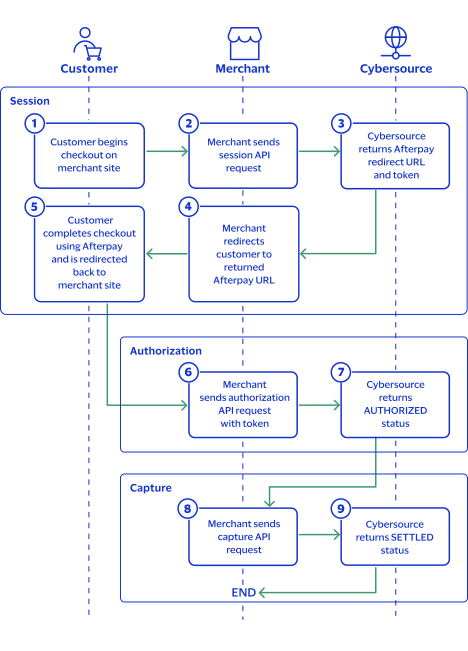
- The customer begins to checkout on the merchant site.
- The merchant sends a session API request. See Create a Session.
- Cybersourcereturns a redirect Afterpay or Clearpay URL to the merchant and a token.
- The merchant redirects the customer to the unique Afterpay or Clearpay URL for the customer to complete the payment.
- The customer logs into their Afterpay or Clearpay account and completes the checkout. The customer is then redirected back to the merchant site.
- The merchant sends an authorization API request with the token from the session response. See Authorize a Payment.
- Cybersourcereturns anAUTHORIZEDresponse.
- The merchant sends a capture API request to complete the payment. See Capture a Payment.
- Cybersourcereturns aSETTLEDresponse.
Afterpay and Clearpay Services
The following services are available:
Create a Session
Creating a session is mandatory for processing a payment. To create a session, you must
include shipping fields in your request. The shipping field values are included in the
invoice Afterpay and Clearpay send to the customer.
A successful session response includes an Afterpay or Clearpay redirect URL and a token.
Send the customer to the redirect URL to approve the payment using their Afterpay or
Clearpay account. Use the token in the authorization request to link the authorization
to the session.
Endpoints
Production:
POST
https://api.cybersource.com
/pts/v2/payment-referencesTest:
POST
https://apitest.cybersource.com
/pts/v2/payment-referencesResponse Status
The session service responds with this status as the
status
field
value:- PENDING: The Afterpay or Clearpay redirect URL is generated. Redirect the customer to the Afterpay or Clearpay URL.
Line Items
Afterpay and Clearpay use optional line item fields when you send a session
request.
Line items are used to include information about the goods that your customers purchase,
such as product name, quantity, and price.
Line items are represented as the fields,
starting with , and increasing in numerical
order.
These fields are required for each line item that you use:
Including Line Items
This example shows three valid line items.
Creating a Session
Follow these steps to successfully complete a session request.
- Send aPOSTrequest to thehttps://apitest.cybersource.com/pts/v2/payment-referencesendpoint and include these required fields:
ADDITIONAL INFORMATION
- Set toAFTERPAY.
- Set toINVOICE.
- Set toAP_SESSIONS.
- Include any of these optional fields in the request:
ADDITIONAL INFORMATION
- Store the value in theprocessorInformation.tokenfield from the session response. You must include this value in the follow-on authorization request.
ADDITIONAL INFORMATION
"token": "0d97aa1b-a9dd-4e9c-b60c-b1157470d034" - Redirect the customer to the returned Afterpay or Clearpay URL contained in theprocessorInformation.paymentURLresponse field.
ADDITIONAL INFORMATION
"paymentUrl": "https://portal.sandbox.afterpay.com/us/checkout/?token=002.kfl0qoc9q5tarv41p34s1dvbrk62iflv382j1sd0ot7o5s82" - When the customer completes the checkout using their Afterpay or Clearpay credentials, Afterpay or Clearpay redirects the customer to the success URL specified in the session request. You can now send an authorization request.
- When you send the authorization request, set theprocessorInformation.preApprovalTokenfield to theprocessorInformation.tokenfield value you stored from the session response.
REST API Example: Create Session
REST API
Example: Create SessionRequest
{ "clientReferenceInformation": { "code": "refnum-1234" }, "orderInformation": { "billTo": { "firstName": "John", "lastName": "Smith", "address1": "Happy St", "city": "Sunnyville", "administrativeArea": "TX", "postalCode": "55555", "country": "US", "email": "" }, "shipTo": { "firstName": "John", "lastName": "Smith", "address1": "Happy St", "city": "Sunnyville", "administrativeArea": "TX", "postalCode": "55555", "country": "US" }, "amountDetails": { "totalAmount": "102.21", "currency": "USD" } }, "paymentInformation": { "paymentType": { "name": "INVOICE", "method": { "name": "AFTERPAY" } } }, "processingInformation": { "actionList": "AP_SESSIONS" }, "merchantInformation": { "cancelURL": "https://www.test0.com", "successURL": "https://www.test1.com", "failureURL": "https://www.test2.com" } }
Response to a Successful Request
{
    "_links": {
        "self": {
            "method": "GET",
            "href": "/pts/v2/payment-references"
        },
        "updateSession": {
            "method": "PATCH",
            "href": "/pts/v2/payment-references/7117580946066126403954"
        },
        "status": {
            "method": "POST",
            "href": "/pts/v2/status/7117580946066126403954/refresh"
        },
        "order": {
            "method": "POST",
            "href": "/pts/v2/payments/7117580946066126403954/intents"
        }
    },
    "clientReferenceInformation": {
        "code": "refnum-1234"
    },
    "id": "7117580946066126403954",
    "orderInformation": {
        "amountDetails": {
            "totalAmount": "102.21",
            "currency": "USD"
        }
    },
    "processorInformation": {
        "paymentUrl": "https://portal.sandbox.afterpay.com/us/checkout/?token=002.7uvnjm49feem2epsgandc6god33oprp32d6mla0ir036u181",
        "responseCode": "00001",
        "token": "3d331d44-a09c-4c25-9630-ed7193d52055"
    },
    "reconciliationId": "XFZ55U75AF7X",
    "status": "PENDING",
    "submitTimeUtc": "2024-03-30T002135Z"
}
REST API Example: Create Session with Line
Items
REST API
Example: Create Session with Line
ItemsRequest
{ "clientReferenceInformation": { "code": "refnum-1234" }, "orderInformation": { "billTo": { "firstName": "John", "lastName": "Smith", "street1": "Happy St", "city": "Sunnyville", "state": "TX", "postalCode": "55555", "country": "US", "email": "" }, "shipTo": { "firstName": "John", "lastName": "Smith", "street1": "Happy St", "city": "Sunnyville", "state": "TX", "postalCode": "55555", "country": "US" }, "amountDetails": { "currency": "USD" }, "lineItems": [ { "productCode": "4564", "productName": "TV", "quantity": "10", "unitPrice": "1", "productSku": "testI", "totalAmount": "10" }, { "productCode": "65432", "productName": "TV", "quantity": "1", "unitPrice": "15", "productSku": "testJ", "totalAmount": "15" } ] }, "paymentInformation": { "paymentType": { "name": "INVOICE", "method": { "name": "AFTERPAY" } } }, "processingInformation": { "actionList": "AP_SESSIONS" }, "merchantInformation": { "cancelURL": "https://www.test0.com", "successURL": "https://www.test1.com", "failureURL": "https://www.test2.com" } }
Response to a Successful Request
{
    "_links": {
        "self": {
            "method": "POST",
            "href": "/pts/v2/payment-references"
        },
        "updateSession": {
            "method": "PATCH",
            "href": "/pts/v2/payment-references/7138872813806339404953"
        },
        "status": {
            "method": "POST",
            "href": "/pts/v2/refresh-payment-status/7138872813806339404953"
        },
        "order": {
            "method": "POST",
            "href": "/pts/v2/payment-references/7138872813806339404953/intents"
        }
    },
    "clientReferenceInformation": {
        "code": "refnum-1234"
    },
    "id": "7138872813806339404953",
    "orderInformation": {
        "amountDetails": {
            "totalAmount": "25.00",
            "currency": "USD"
        }
    },
    "processorInformation": {
        "responseDetails": "00001",
        "paymentUrl": "https://portal.sandbox.afterpay.com/us/checkout/?token=002.lu9cqikv022heqt1aq5o0ik5uu4g8encdhvvj6r5v68n4mgi",
        "responseCode": "00001",
        "token": "bcb5d37d-0043-46be-aa10-dc9858df99aa"
    },
    "reconciliationId": "XFZ55VAJVS0I",
    "status": "PENDING",
    "submitTimeUtc": "2024-04-23T154801Z"
}
Authorize a Payment
Use the authorization service to process a payment request to Afterpay or Clearpay. You
must include the token received from the session response in the authorization request
to receive a successful response.
Endpoints
Production:
POST
https://api.cybersource.com
/pts/v2/payments/Test:
POST
https://apitest.cybersource.com
/pts/v2/payments/Response Statuses
Cybersource
responds to your request with one of these statuses in the
status
.- AUTHORIZED: the payment is authorized.
- PENDING: the authorization request is accepted, but the payment is not authorized. To authorize the payment, complete the authorization using the payment redirection URL that you received in the authorization response.
- FAILED: the authorization request fails when there are invalid or missing fields.
Required Fields for Authorizing a Payment
Include these required fields in the authorization request.
- This field becomes optional if theorderInformation.lineItems[].totalAmountfield is present.
- Set toAFTERPAY.
- Set toINVOICE.
- Set toAP_AUTH.
- Set to theprocessorInformation.tokenfield value from the session response.
Optional Fields for Authorizing a Payment
Choose from these optional fields to include in the authorization request.
- If this field is present, theorderInformation.amountDetails.totalAmountfield is optional.
REST API Example: Authorizing a
Payment
REST API
Example: Authorizing a
PaymentRequest
{ "clientReferenceInformation": { "code": "refnum-1234" }, "merchantInformation": { "successUrl": "https://www.test.com", "cancelUrl": "https://www.test.com" }, "processorInformation": { "preApprovalToken": "519ff272-d850-4c81-ab65-674f670063c7" }, "paymentInformation": { "paymentType": { "name": "INVOICE", "method": { "name": "AFTERPAY" } } }, "processingInformation": { "actionList": "AP_AUTH" }, "orderInformation": { "amountDetails": { "totalAmount": "75.00", "currency": "USD" }, "billTo": { "firstName": "John", "lastName": "Smith", "address1": "123 Happy St", "locality": "Sunnyville", "administrativeArea": "TX", "postalCode": "55555", "country": "US", "email": "" }, "shipTo": { "firstName": "John", "lastName": "Smith", "address1": "123 Happy St", "locality": "Sunnyville", "administrativeArea": "TX", "postalCode": "55555", "country": "US" } } }
Response to a Successful Request
{
    "_links": {
        "authReversal": {
            "method": "POST",
            "href": "/pts/v2/payments/7138874556236173004951/reversals"
        },
        "capture": {
            "method": "POST",
            "href": "/pts/v2/payments/7138874556236173004951/captures"
        },
        "self": {
            "method": "POST",
            "href": "/pts/v2/payments/7138874556236173004951"
        },
        "status": {
            "method": "POST",
            "href": "/pts/v2/refresh-payment-status/7138874556236173004951"
        }
    },
    "clientReferenceInformation": {
        "code": "refnum-1234"
    },
    "id": "7138874556236173004951",
    "orderInformation": {
        "amountDetails": {
            "totalAmount": "102.21",
            "currency": "USD"
        }
    },
    "processorInformation": {
        "responseDetails": "00003",
        "transactionId": "c5d7271f-cd59-4bd7-bf03-836b4d5318df",
        "responseCode": "00003"
    },
    "reconciliationId": "XFZ40VALUOWO",
    "status": "AUTHORIZED",
    "submitTimeUtc": "2024-04-23T15:50:56Z"
}
REST API Example: Authorizing a Payment
with Line Items
REST API
Example: Authorizing a Payment
with Line ItemsRequest
{ "clientReferenceInformation": { "code": "refnum-1234" }, "merchantInformation": { "successUrl": "https://www.test.com", "cancelUrl": "https://www.test1.com" }, "processorInformation": { "preApprovalToken": "519ff272-d850-4c81-ab65-674f670063c7" }, "paymentInformation": { "paymentType": { "name": "INVOICE", "method": { "name": "AFTERPAY" } } }, "processingInformation": { "actionList": "AP_AUTH" }, "orderInformation": { "amountDetails": { "currency": "USD" }, "billTo": { "firstName": "John", "lastName": "Smith", "address1": "123 Happy St", "locality": "Sunnyville", "administrativeArea": "TX", "postalCode": "55555", "country": "US", "email": "" }, "shipTo": { "firstName": "John", "lastName": "Smith", "address1": "123 Happy St", "locality": "Sunnyville", "administrativeArea": "TX", "postalCode": "55555", "country": "US" }, "lineItems": [ { "unitPrice": "1.00", "quantity": "10", "productSKU": "testI", "productName": "TV", "productCode": "4564" }, { "unitPrice": "15.00", "quantity": "1", "productSKU": "testJ", "productName": "TV", "productCode": "65432" } ] } }
Response to a Successful Request
{
  "clientReferenceInformation": {
    "code": "refnum-1234"
  },
  "id": "6977375233876065503009",
  "status": "AUTHORIZED",
  "submitTimeUtc": "2024-10-19T17:45:24Z",
  "processorInformation": {
    "responseCode": "00003",
    "transactionId": "0d97aa1b-a9dd-4e9c-b60c-b1157470d034"
  },
  "reconciliationId": "XEKWVNIRQRHD",
  "orderInformation": {
    "amountDetails": {
      "totalAmount": "25.00",
      "currency": "USD"
    }
  },
  "_links": {
    "self": {
      "href": "/pts/v2/payments/6977375233876065503009",
      "method": "GET"
    },
    "authReversal": {
      "href": "/pts/v2/payments/6977375233876065503009/reversals",
      "method": "POST"
    },
    "capture": {
      "href": "/pts/v2/payments/6977375233876065503009/captures",
      "method": "POST"
    },
    "checkStatus": {
      "href": "/pts/v2/refresh-payment-status/6977375233876065503009",
      "method": "POST"
    }
  }
}
Process a Sale
This service enables you to send both a payment authorization request and a capture
request as a single transaction using the sale service. You must include the token
received from the session response in the sale request to receive a successful response.
Endpoints
Production:
POST
https://api.cybersource.com
/pts/v2/paymentsTest:
POST
https://apitest.cybersource.com
/pts/v2/paymentsResponse Status
Cybersource
responds to your request with one of these statuses in the
status
. - FAILED: the sale request fails when there are invalid or missing fields.
- PENDING: the sale request is accepted but is not settled. To settle the payment, check out using the payment redirect URL that you received in the sale response.
IMPORTANT
When the sale status updates to
SETTLED
, the sale cannot be reversed using the
authorization-reversal request. You must send a refund request to refund the
settled amount. Required Fields for a Sale
Include these required fields in the sale request.
- This field becomes optional if theorderInformation.lineItems[].totalAmountfield is present.
- Set toAFTERPAY.
- Set toINVOICE.
- Set toAP_SALE.
- Set to theprocessorInformation.tokenreturned in the session response.
Optional Fields for a Sale
Choose from these optional fields to include in the sale request.
- If this field is present, theorderInformation.amountDetails.totalAmountfield is optional.
REST API Example: Processing a
Sale
REST API
Example: Processing a
SaleRequest
{ "clientReferenceInformation": { "code": "refnum-1234" }, "merchantInformation": { "successUrl": "https://www.test.com", "failureUrl": "https://www.test.com", "cancelUrl": "https://www.test.com" }, "processorInformation": { "preApprovalToken": "95820cec-1846-4f70-a5c4-c04b09e79e74" }, "paymentInformation": { "paymentType": { "name": "INVOICE", "method": { "name": "AFTERPAY" } } }, "processingInformation": { "actionList": "AP_SALE" }, "orderInformation": { "amountDetails": { "totalAmount": "102.21", "currency": "USD" }, "billTo": { "firstName": "John", "lastName": "Smith", "address1": "123 Happy St", "locality": "Happyville", "administrativeArea": "TX", "postalCode": "55555", "country": "US", "email": "" }, "shipTo": { "firstName": "John", "lastName": "Smith", "address1": "123 Happy", "locality": "Happyville", "administrativeArea": "TX", "postalCode": "55555", "country": "US" } } }
Response to a Successful Request
{
    "_links": {
        "void": {
            "method": "POST",
            "href": "/pts/v2/payments/7138922745236263804951/voids"
        },
        "billingAgreement": {
            "method": "POST",
            "href": "/pts/v2/billing-agreements/7138922745236263804951"
        },
        "self": {
            "method": "POST",
            "href": "/pts/v2/payments/7138922745236263804951"
        },
        "refund": {
            "method": "POST",
            "href": "/pts/v2/payments/7138922745236263804951/refunds"
        },
        "status": {
            "method": "POST",
            "href": "/pts/v2/refresh-payment-status/7138922745236263804951"
        }
    },
    "clientReferenceInformation": {
        "code": "refnum-1234"
    },
    "id": "7138922745236263804951",
    "message": "Request was processed successfully.",
    "orderInformation": {
        "amountDetails": {
            "totalAmount": "102.21",
            "currency": "USD"
        }
    },
    "processorInformation": {
        "responseDetails": "00004",
        "transactionId": "95820cec-1846-4f70-a5c4-c04b09e79e74",
        "responseCode": "00004"
    },
    "reconciliationId": "XFZ55VAJVSL5",
    "status": "SETTLED",
    "submitTimeUtc": "2024-04-23T17:11:15Z"
}
REST API Example: Processing a Sale with
Line Items
REST API
Example: Processing a Sale with
Line ItemsRequest
{ "clientReferenceInformation": { "code": "refnum-1234" }, "merchantInformation": { "successUrl": "https://www.test.com", "failureUrl": "https://www.test.com", "cancelUrl": "https://www.test.com" }, "processorInformation": { "preApprovalToken": "b35c3837-5e1b-4ed6-8494-b2a6744fcc58" }, "paymentInformation": { "paymentType": { "name": "INVOICE", "method": { "name": "AFTERPAY" } } }, "processingInformation": { "actionList": "AP_SALE" }, "orderInformation": { "amountDetails": { "totalAmount": "25.00", "currency": "USD" }, "billTo": { "firstName": "John", "lastName": "Smith", "address1": "123 Happy St", "locality": "Austin", "administrativeArea": "TX", "postalCode": "55555", "country": "US", "email": "" }, "shipTo": { "firstName": "John", "lastName": "Smith", "address1": "123 Happy", "locality": "Austin", "administrativeArea": "TX", "postalCode": "55555", "country": "US" }, "lineItems": [ { "unitPrice": "1.00", "quantity": "10", "productSKU": "testI", "productName": "TV", "productCode": "4564", "totalAmount": "10" }, { "unitPrice": "15.00", "quantity": "1", "productSKU": "testJ", "productName": "TV", "productCode": "65432", "totalAmount": "15" } ] } }
Response to a Successful Request
{
    "_links": {
        "void": {
            "method": "POST",
            "href": "/pts/v2/payments/7139031022186616204951/voids"
        },
        "billingAgreement": {
            "method": "POST",
            "href": "/pts/v2/billing-agreements/7139031022186616204951"
        },
        "self": {
            "method": "POST",
            "href": "/pts/v2/payments/7139031022186616204951"
        },
        "refund": {
            "method": "POST",
            "href": "/pts/v2/payments/7139031022186616204951/refunds"
        },
        "status": {
            "method": "POST",
            "href": "/pts/v2/refresh-payment-status/7139031022186616204951"
        }
    },
    "clientReferenceInformation": {
        "code": "refnum-1234"
    },
    "id": "7139031022186616204951",
    "message": "Request was processed successfully.",
    "orderInformation": {
        "amountDetails": {
            "totalAmount": "25.00",
            "currency": "USD"
        }
    },
    "processorInformation": {
        "responseDetails": "00004",
        "transactionId": "b35c3837-5e1b-4ed6-8494-b2a6744fcc58",
        "responseCode": "00004"
    },
    "reconciliationId": "XFZ55VAJVTTZ",
    "status": "SETTLED",
    "submitTimeUtc": "2024-04-23T20:11:43Z"
}
Refund a Payment
Send a refund request to credit a
SETTLED
capture. A refund request
requires the request ID and reconciliation ID returned in the capture response.Endpoints
Production:
POST
https://api.cybersource.com
/pts/v2/payments/{id}
/refundsTest:
POST
https://apitest.cybersource.com
/pts/v2/payments/{id}
/refundsThe is the request ID
contained in the original transaction request.
{id}
Response Status
Cybersource
responds to your request with one of these statuses in the
status
.- FAILED: The refund request failed.
- PENDING: The refund request is accepted but is not refunded. Request the check status service to retrieve status updates.
- REFUNDED: The captured payment is successfully refunded.
Required Fields for Refunding a Payment
REST API Example: Refunding a
Payment
REST API
Example: Refunding a
PaymentRequest
{
  "clientReferenceInformation": {
    "code": "refnum-1234"
  },
  "paymentInformation": {
    "paymentType": {
      "name": "INVOICE",
      "method": {
        "name": "AFTERPAY"
      }
    }
  },
  "processingInformation": {
    "actionList": "AP_AUTH_REVERSAL"
  },
  "orderInformation": {
    "amountDetails": {
      "totalAmount": "1.00",
      "currency": "USD"
    }
  }
}
Response to a Successful Request
{
  "clientReferenceInformation": {
    "code": "refnum-1234",
    "returnReconciliationId": "EE3FLQ9GXCWH"
  },
  "id": "6246062044236748603086",
  "reconciliationId": "XFZOSQ97H6UE",
  "orderInformation": {
    "amountDetails": {
      "totalAmount": "1.00"
    }
  },
  "submitTimeUtc": "2024-10-19T17:45:24Z",
  "status": "PENDING",
  "processorInformation": {
    "responseCode": "00006",
    "transactionId": "47797f6a-d894-428b-91d2-",
    "responseDetails": "00006"
  },
  "_links": {
    "self": {
      "href": "/pts/v2/payments/6246062044236748603086",
      "method": "GET"
    },
    "checkStatus": {
      "href": "/pts/v2/refresh-payment-status/6246062044236748603086",
      "method": "POST"
    }
  }
}
Reverse an Authorized Payment
Use this service to reverse an unnecessary or undesired authorization.
Endpoints
Production:
POST
https://api.cybersource.com
/pts/v2/payments/{id}
/reversalsTest:
POST
https://apitest.cybersource.com
/pts/v2/payments/{id}
/reversalsSet the to the request ID
returned in the authorization request.
{id}
Response Statuses
Cybersource
responds to your request with one of these statuses in the
status
.- AUTH_REVERSED: The authorization is successfully reversed.
- FAILED: The authorization reversal failed.
The authorization reversal service also responds with a reason code as the field value.
Required Fields for Reversing an Authorization
Include these required fields in the authorization-reversal request.
- Set toAFTERPAY.
- Set toINVOICE.
- Set toAP_AUTH_REVERSAL.
REST API Example: Reversing an
Authorization
REST API
Example: Reversing an
AuthorizationRequest
{
  "clientReferenceInformation": {
    "code": "refnum-1234"
  },
  "paymentInformation": {
    "paymentType": {
      "Name": "INVOICE",
      "method": {
        "name": "AFTERPAY"
      }
    }
  },
  "processingInformation": {
    "actionList": "AP_AUTH_REVERSAL"
  }
}
Response to a Successful Request
{
    "_links": {
        "self": {
            "method": "POST",
            "href": "/pts/v2/reversals/7121627791506263403954"
        },
        "status": {
            "method": "POST",
            "href": "/pts/v2/refresh-payment-status/7121627791506263403954"
        }
    },
    "clientReferenceInformation": {
        "code": "refnum-1234"
    },
    "id": "7121627791506263403954",
    "processorInformation": {
        "responseDetails": "00007",
        "responseCode": "00007"
    },
    "reconciliationId": "XFZ40UH7TBAI",
    "reversalAmountDetails": {
        "reversedAmount": "0"
    },
    "status": "AUTH_REVERSED",
    "submitTimeUtc": "2024-04-03T16:46:19Z"
}
Check a Request Status
This service returns the current status of an Afterpay or Clearpay transaction. Use the
request ID value returned by the individual service to check the status of the service
request.
Endpoints
Production:
POST
https://api.cybersource.com
/pts/v2/refresh-payment-status/{id}
Test:
POST
https://apitest.cybersource.com
/pts/v2/refresh-payment-status/{id}
Set the
to the request ID of the API service you are retrieving.
{id}
Response Statuses
Cybersource
responds to your request with one of these statuses in the
status
. - AUTHORIZED: you have successfully completed the authorization or sale using the redirection URL sent in response.
- AUTH-REVERSED: the authorization is successfully reversed.
- FAILED: the service request is rejected due to missing fields, invalid fields, or downtime.
- PENDING: the payment is waiting for authentication or approval. When you receive a pending status, wait a short time and request the check status service.
- REFUNDED: the refund is successfully completed.
- SETTLED: the payment is successfully completed.
Required Fields for Checking Status
- Set toAFTERPAY.
- Set toINVOICE.
- Set toAP_STATUS.
REST API Example: Checking Status
REST API
Example: Checking StatusRequest
{
  "clientReferenceInformation": {
    "code": "refnum-1234"
  },
  "paymentInformation": {
    "paymentType": {
      "name": "INVOICE",
      "method": {
        "name": "AFTERPAY"
      }
    }
  },
  "processingInformation": {
    "actionList": "AP_STATUS"
  }
}
Response to a Successful Request
{
    "clientReferenceInformation": {
        "code": "refnum-1234"
    },
    "id": "7117622159336850603955",
    "processorInformation": {
        "responseCode": "00003"
    },
    "reconciliationId": "XFZ3YU79ASG0",
    "status": "AUTHORIZED"
}
Reference Information
This section contains reference information that is useful when using Afterpay or
Clearpay.
Generating Reports Using the Business Center
Business Center
You can generate various types of reports for your financial and reconciliation data. For
more information about how to automate your reports, see the
Reporting Developer
Guide
. For more information about how to use your Business Center
account to generate reports, see the Reporting User
Guide
.The
Reporting User Guide
contains these relevant topics:- How and When Reports Are Generated
- Downloading Available Reports
- Subscribing to Standard Reports
Additional Resources
For additional information about how to use the
Business Center
and manage
reports, see these helpful resources.- Business CenterNavigation
- For an overview of the various resources available in theBusiness Center, see this YouTube video:
- Getting Started with theBusiness Center
- For a step-by-step demonstration of how to navigate in theBusiness Center, see this YouTube video:
- Managing Report Subscriptions
- For an overview of how to manage report subscriptions in the Downloadable Reports section in theBusiness Center, see this YouTube video:
- Downloading Reports
- For an overview of how to download available reports in the Reports section in theBusiness Center, see this YouTube video:
Options
Use the options service to request the minimum amount, maximum amount, and currency for
the day from your Afterpay and Clearpay account.
Endpoints
Production:
POST
https://api.cybersource.com
/pts/v2/payments-optionsTest:
POST
https://apitest.cybersource.com
/pts/v2/payments-optionsCapture a Payment
Use this service to capture an authorized payment. Partial captures and full-amount
captures are both supported.
Endpoints
Production:
POST
https://api.cybersource.com
/pts/v2/payments/{id}
/capturesTest:
POST
https://apitest.cybersource.com
/pts/v2/payments/{id}
/capturesSet the to the request ID
contained in the authorization response.
{id}
Response Statuses
Cybersource
responds to your request with one of these statuses in the
status
.- FAILED: The capture request failed.
- PENDING: The capture request is accepted but is not captured. Request the check status service to retrieve status updates.
- SETTLED: The capture request is settled for the requested amount.