On This Page
Transaction Statuses Workflow
This workflow describes the sequence of possible statuses you can receive when processing
a Klarna transaction.
Figure:
Transaction Statuses Workflow
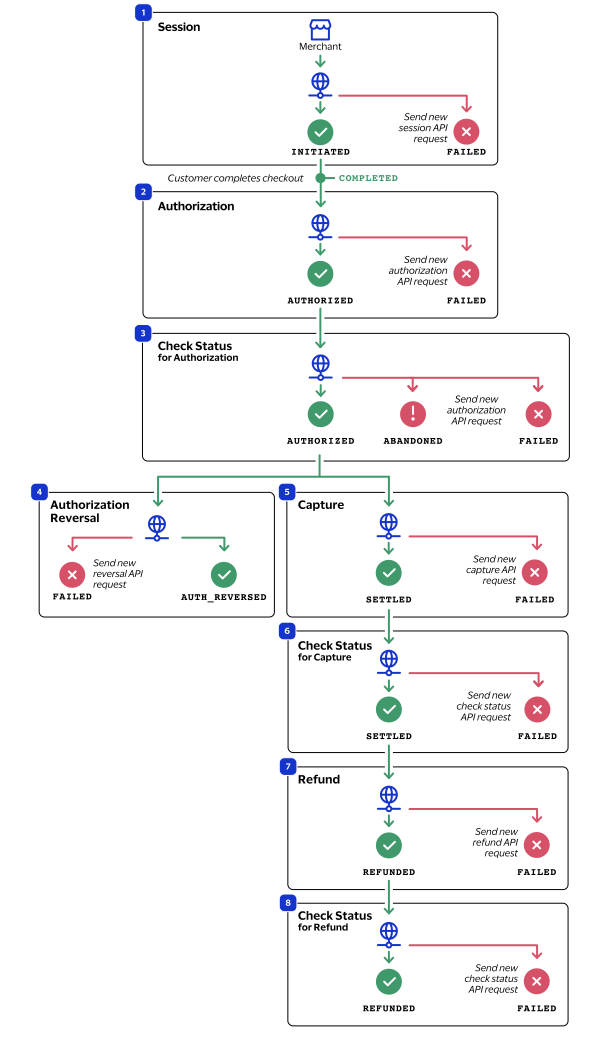
- The merchant sends a session API request toCybersourceand receives one of these possible statuses:
- COMPLETED: The customer completed the checkout process. You can now authorize the funds.
- FAILED: The session request is not successful. Send a new session request.
- INITIATED: The session is initiated and the customer may now checkout. Send periodic check status requests until the status updates toCOMPLETED. For more information, see Check a Request Status.
- The merchant sends an authorization API request toCybersourceand receives one of these possible statuses:
- FAILED: The authorization request is not successful. Send a new authorization request. A failed request can be due to either Klarna rejecting the transaction or a technical error.
- AUTHORIZED: The customer's funds are authorized. You can now capture the authorized amount.
- The merchant sends a check status API request toCybersourceand receives one of these possible statuses:
- ABANDONED: The customer did not complete the payment using the redirect URL or widget.
- AUTHORIZED: The customer's funds are authorized. You can now capture the authorized amount.
- FAILED: The authorization request is not successful. Send a new authorization request. A failed request can be due to either Klarna rejecting the transaction or a technical error.
- If the customer or merchant decides to cancel the purchase, the merchant sends an authorization reversal API request toCybersourceand receives one of these possible statuses:
- FAILED: The authorization reversal is not successful. Send a new request. A failed request can be due to either Klarna rejecting the transaction or a technical error.
- AUTH_REVERSED: The authorization is successfully reversed.
- The merchant sends a capture API request toCybersourceand receives one of these possible statuses:
- FAILED: The capture request is not successful. Send a new capture request. A failed request can be due to either Klarna rejecting the transaction or a technical error.
- SETTLED: The capture request is settled for the requested amount.
- The merchant sends a check status for the capture API request toCybersourceand receives one of these possible statuses:
- CHARGEBACK: The customer submitted a payment dispute for the purchase, and Klarna reviewed and approved a chargeback to the customer. For more information about chargebacks, see Klarna Chargebacks.
- FAILED: The capture request is not successful. Send a new capture request. A failed request can be due to either Klarna rejecting the transaction or a technical error.
- SETTLED: The capture request is settled for the requested amount.
- If the customer returns a purchase, the merchant sends a refund API request toCybersourceand receives one of these possible statuses:
- FAILED: The refund request is not successful. Send a new refund request. A failed request can be due to either Klarna rejecting the transaction or a technical error.
- REFUNDED: The captured payment is successfully refunded.
- The merchant sends a check status for the refund API request toCybersourceand receives one of these possible statuses:
- FAILED: The refund request is not successful. Send a new refund request. A failed request can be due to either Klarna rejecting the transaction or a technical error.
- REFUNDED: The captured payment is successfully refunded.