On This Page
Payments Developer Guide
This section describes how to use this guide and where to find further
information.
- Audience and Purpose
- This guide is written for application developers who want to use theREST APIto integrate payment card processing into an order management system.This guide describes merchant integrations with theNational Payment Gatewayprocessor.Implementing theCybersourcepayment services requires software development skills. You must write code that uses the API request and response fields to integrate the payment card services into your existing order management system.
- Conventions
- These statements appear in this document:IMPORTANTAnImportantstatement contains information essential to successfully completing a task or learning a concept.WARNINGAWarningcontains information or instructions, which, if not heeded, can result in a security risk, irreversible loss of data, or significant cost in time or revenue or both.
- Related Documentation
- Visit theCybersourcedocumentation hub to find additional processor-specific versions of this guide and additional technical documentation.
- Customer Support
- For support information about any service, visit the Support Center:
Pilot Release
This document is for the pilot release of Payments for the
National Payment Gateway
processor.Recent Revisions to This Document
26.06.01
This revision contains only editorial changes and no technical updates.
26.04.01
Initial pilot release for
National Payment Gateway
.Introduction to Payments
This introduction provides the basic information that you need to successfully
process payment transactions. It also provides an overview of the payments industry
and provides workflows for each process.
With
Cybersource
payment services, you can process payment cards
(tokenized or non-tokenized), digital payments such as Apple Pay and Google Pay, and
customer ID transactions. You can process payments across the globe and across
multiple channels with scalability and security. Cybersource
supports a large number of payment cards and offers a wide choice of gateways and
financial institutions, all through one connection.Visit the
Cybersource
documentation hub to find additional processor-specific versions
of this guide and additional technical documentation.National Payment Gateway Processor Overview
National Payment Gateway
Processor OverviewThe
Saudi Arabian government requires that all payment data generated within the kingdom
be stored and processed locally. To support this, they’ve introduced the National
Payment Gateway (NPG). It is the central hub for all card and digital payments in
Saudi Arabia.
All payment service providers—including gateways, acquiring
banks, issuing banks, and fintechs—must connect to National Payment Gateway. This is
a regulatory requirement enforced by Saudi Payments, under the supervision of the
Saudi Arabian Monetary Authority (SAMA).
Cybersource
has
established a secure connection to National Payment Gateway. All domestic
transactions (Visa, Mastercard, and Mada) in Saudi Arabia are routed through NPG to
the respective card schemes. Other card schemes will continue using existing routes
until NPG expands its coverage.Cybersource
has migrated key
components of its platform—including processing, settlement, and reporting—into a
private cloud data center located in Saudi Arabia. This ensures full compliance with
local data residency laws. Integrations in this Saudi cloud are available only
through REST APIs and for payment methods approved by the kingdom.Financial Institutions and Payment Networks
Financial institutions and payment networks enable payment services to function. These
entities work together to complete the full payment cycle.
Merchant Financial Institutions (Acquirers)
A merchant financial institution, also known as an
acquirer
, offers accounts to
businesses that accept payments. Before you can accept payments, you must have a merchant
account from an acquirer. Your merchant account must be configured to process card-not-present
or mail-order/telephone-order (MOTO) transactions.You can expect to pay these fees:
- Discount rates: your acquirer charges a fee and collects a percentage of every transaction. The combination of the fee and the percentage is called thediscount rate. These charges can bebundled(combined into a single charge) orunbundled(charged separately).
- Interchange fees: payment networks, such as Visa or Mastercard, each have a base fee, called theinterchange fee, for each type of transaction. Your acquirer and processor can show you ways to reduce this fee.
- Chargebacks: when cardholders dispute charges, you can incurchargebacks. A chargeback occurs when a charge on a customer’s account is reversed. Your acquirer removes the money from your account and could charge you a fee for processing the chargeback.
Take these precautions to prevent chargebacks:
- Use accurate merchant descriptors so that customers can recognize the transactions on their statements.
- Provide good customer support.
- Ensure rapid problem resolution.
- Maintain a high level of customer satisfaction.
- Minimize fraudulent transactions.
If excessive chargebacks or fraudulent changes occur, these actions might be taken:
- You might be required to change your business processes to reduce the number chargebacks, fraud, or both.
- Your acquiring institution might increase your discount rate.
- Your acquiring institution might revoke your merchant account.
Contact your sales representative for information about products that can help prevent
fraud.
Customer Financial Institutions (Issuers)
A customer financial institution, also known as an
issuer
, provides payment cards to
and underwrites lines of credit for their customers. The issuer provides monthly statements
and collects payments. The issuer must follow the rules of the payment card companies to which
they belong. Payment Networks
Payment networks manage communications between acquirers and issuing banks. They also develop
industry standards, support their brands, and establish fees for acquiring institutions.
Some payment networks, such as Visa and Mastercard, are trade associations that do not issue
cards. Issuers are members of these associations, and they issue cards under license from the
association.
Payment Processors
Payment processors connect with acquirers. Before you can accept payments, you must
register with
a payment processor
. An acquirer might
require you to use a payment processor with an existing relationship with the
acquirer.
Your payment processor
assigns one or more merchant IDs (MIDs) to your
business. These unique codes identify your business during payment transactions.This table lists the processors and corresponding card types that are supported for
payment services.
IMPORTANT
Only the card types explicitly listed here are
supported.
Payment Processor | Supported Card Types | Notes |
|---|---|---|
National Payment Gateway | mada, Mastercard, Visa | Supported currency: Saudi Riyal
(SAR) |
Card Types
You can process payments with these kinds of cards:
- Credit cards
- Debit cards
- Prepaid cards
For a list of supported card types, see Payment Processors.
Co-Badged Cards
Co-badged cards are credit and debit cards that integrate two or more payment networks.
Co-Branded Cards
Co-branded cards are credit cards that are branded with a merchant's logo, brand, or other identifier as well as the payment network logo. These cards are not limited for use at the branded merchant and can be used at any merchant that accepts credit cards.
Credit Cards
Cardholders use credit cards to borrow money from issuing banks to pay for goods and services offered by merchants that accept credit cards.
Debit Cards
A debit card is linked to a cardholder's bank account. The funds are taken out of
the customer's bank account, and the transaction is included on the customer's bank account
statement. The customer does not receive a credit card bill as with a regular credit
card.
Transaction Types
This topic provides information about transaction types that are supported by your processor.
Card-Not-Present Transactions
When a customer provides a card number, but the card and the
customer are not physically present at the merchant's location, the purchase is known as a
card-not-present transaction
. National Payment Gateway
card-not-present transactions can be initiated either by the
cardholder or the merchant. National Payment Gateway
transactions and card types are list in this
table:
mada | Mastercard | Visa | |
|---|---|---|---|
Account Verification | NA | Yes | Yes |
Pre-Authorization | Yes | Yes | Yes |
Pre-Authorization Extension | Yes | Yes | Yes |
Authorizatin Reversal | Yes | Yes | Yes |
Sale | Yes | Yes | Yes |
Refund | Yes | Yes | Yes |
Capture | Yes | Yes (Offline) | Yes (Offline) |
Multiple Partial Capture | Yes | Yes (Offline) | Yes (Offline) |
Refund (Pre-auth Completion/Capture) | Yes | Yes (Offline) | Yes (Offline) |
Refund a Sale due to time-out, format error, or authorization extension
response | Yes | NA | NA |
Payment Services
Various services are involved in processing payments.
These services enable customers to purchase goods and services. They also enable merchants to
receive payments from customer accounts, to provide refunds, and to void transactions.
Authorization
An authorization confirms that a payment card account holds enough funds to pay
for a purchase. Authorizations can be made online or offline.
Account Verification
Account verification is available for international cards only, not for mada cards.
Pre-Authorization
A pre-authorization enables you to authorize a payment when the final amount is unknown. The system places the funds on hold until you request a follow-up transaction. Pre-authorizations are typically used for lodging, auto rental, e-commerce, and restaurant transactions.
IMPORTANT
Payment Services Directive 2 (PSD2) rules in the European Union (EU) and European Economic Area (EEA) require the initial pre-authorization to use strong customer authentication for merchants or customers in PSD2-applicable countries.
When you have a specific merchant category code (MCC) assigned to your account, you
are allowed to capture up to 20% more than the cumulatively authorized amount on
Visa, Diners Club, Discover, and JCB cards. Contact your account manager to have your
account enabled for this option.
The pre-authorization lasts for 14 calendar days unless you capture the payment, void it, or extend it. After 14 days, if you do not request a follow-up transaction, the system releases the hold and the funds become available to the cardholder again.
Pre-Authorization Extension
A pre-authorization extension is a follow-up to a pre-authorization that keeps the hold in place for an additional 14 days, giving you a maximum hold of 28 days. You are allowed to send only one extension for each pre-authorization. With Visa and Mastercard you may also change the held amount when you request the extension. With Mada you can only extend the time, not change the amount.
Authorization Workflow
This image and description show the authorization workflow:

The
National Payment Gateway
authorization flow includes authentication using VISA,
Mastercard, or mada directory servers.- The cardholder enters card details on the merchant website or app to make a purchase. Merchant stores transaction data, including card information and PII data.
- The merchant sends the authorization request toCybersource.
- Cybersourceprocesses the authentication request using the directory servers.Cybersourcealso processes the payment request and sends it toNational Payment Gateway.
- National Payment Gatewayprocesses the request and sends it to the card network for further processing. The card network also stores the transaction data for settlement processing.
- The card network sends the authorization request to the issuer for approval. The issuer also stores the data for further settlement process.
- The issuer sends the authorization response (transaction approved or rejected) to the card network.
- The card network sends the response toNational Payment Gateway.
- National Payment Gatewaystores the response data and sends it toCybersource.
- Cybersourcestores the response data and sends it to the merchant.
- The merchant stores the response data and sends a payment confirmation to the cardholder.
Sale
A sale is a bundled authorization and capture. Some processors and acquirers require a sale
transaction instead of using separate authorization and capture requests. For other processors
and acquirers, you can request a sale instead of a separate authorization and capture when you
provide the goods or services immediately after taking an order.
National Payment Gateway
requires payer authentication data in sale
requests. After a successful sale the only action you can take later is to issue a
refund.
Single-Message Processing
Single-message processing treats the
authorization and capture as a single transaction. There are important differences between dual-message processing and single-message
processing:
- Single-message processing treats the request as a full-financial transaction, and with a successful transaction, funds are immediately transferred from the customer account to the merchant account.
- Authorization and capture amounts must be the same.
- Some features cannot be used with single-message processing.
Authorization Reversal
The authorization reversal service releases the hold that an authorization placed on a
customer’s payment card funds.
Each card-issuing financial institution has its own rules for deciding whether an
authorization reversal succeeds or fails. When a reversal fails, contact the card-issuing
financial institution to learn whether there is a different way to reverse the
authorization.
An authorization reversal is a follow-on transaction that uses the request ID returned from
an authorization. The main purpose of a follow-on transaction is to link two transactions. The
request ID links the follow-on transaction to the original transaction. The authorization
request ID is used to look up the customer’s billing and account information in the
Cybersource
database. You are not required to include those fields in the full
authorization reversal request. The original transaction and follow-on transaction are linked
in the database and in the
Business Center
.For processors that support debit cards and prepaid cards, the full
authorization reversal service works for debit cards and prepaid cards in addition to credit
cards.
IMPORTANT
You cannot perform an authorization reversal if a transaction is in a
review state, which can occur if you use a fraud management service. You must reject the
transaction prior to authorization reversal. For more information, see the fraud management
documentation in
the
Business Center
.Capture
A capture is a follow-on transaction to an authorization. It is used to transfer the
authorized funds from the customer's account to the merchant account. To link the
authorization transaction to the capture transaction, you include a request ID in your capture
request. This request ID is returned to you in the authorization response.
The capture, also called a completion, must be sent before the 14-day hold
created by the pre-authorization expires. You can request a single final capture for the full
amount, or one or more partial captures for smaller amounts. When you are processing a mada
card transaction, the total captured amount can not exceed the original authorization. Visa
and Mastercard allow captures above the authorized amount, also known as over captures, but
mada does not support this and advises acquirers to not allow merchants to use it. Over captures typically occur during a capture when merchants finalize the transaction for more than the initial authorization amount. There are strict rules and limits for over captures, and you must follow the
National Payment Gateway
guidelines. When fulfilling only part of a customer’s order, do not capture the full amount of the authorization. Capture only the cost of the delivered items. When you deliver the remaining items, request a new authorization, and then capture the new authorization.
IMPORTANT
It is not possible to perform a capture if a transaction is in a review state, which can
occur if you use a fraud management service. You must accept the transaction prior to capture.
For more information, see the fraud management documentation in
the
Business Center
.Capture Workflow
The capture workflow begins when you send a request for a capture.
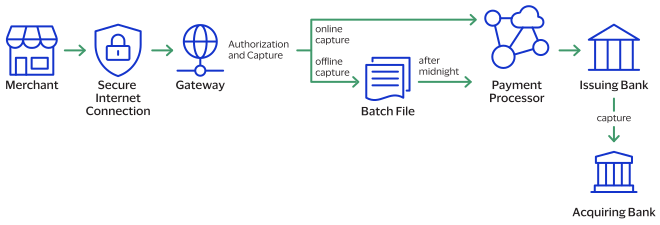
- The merchant sends a request for a capture to theCybersourcegateway.
- For online captures,Cybersourcevalidates the order information then sends an online capture to the payment processor.
- The processor validates the request and forwards it to the issuing bank.
- The issuing bank transfers funds to the acquiring bank.
For
National Payment Gateway
, Cybersource
handles captures for
Mastercard and Visa offline through the TC33 capture file with your acquirer. National Payment Gateway
handles mada card captures online with your acquirer.IMPORTANT
The payment processor does not notify
Cybersource
that the money has been transferred. To ensure that all captures
are processed correctly, you should reconcile your capture requests with the capture reports
from your processor.Refund
Refund
Refunds are payment refunds from a merchant to the cardholder after a
cardholder pays for a product or service and that payment is captured by the merchant. When a
refund request is successful, the issuer transfers funds from the merchant bank (acquirer)
account to the customer's account. It typically takes 2 to 4 days for the acquirer to transfer
funds from your merchant account.
There are two types of refunds: a
follow-on refund
that is linked to
an original capture or sale, and a stand-alone credit
that is not linked to an original
capture or sale.IMPORTANT
National Payment Gateway
does not support stand-alone credits.WARNING
You should carefully control access to your
refund and
credit services. Do not request
this service directly from your customer interface. Instead, incorporate this service as part
of your customer service process. This process reduces the potential for fraudulent
transactions.Follow-on Refund
Follow-on Refund
For
National Payment Gateway
, a refund
is the only way to reverse a payment after clearing
and settlement are complete. The request must reach the issuer within 30 calendar days of
the original payment date—counted from the sale date or the capture date for a
pre-authorization. After 30 days, the merchant must contact its acquirer, who can work with
mada through the Claim Processing System (CPS) to arrange the follow-on refund
offline. A refund can cover the full amount or
just part of it, and it must go to the same card and be in the same currency as the original
transaction. Multiple follow-on refunds
transactions are allowed as long as their total does not exceed the amount
that was captured. When multiple captures exist, each capture requires its own linked
refund. National Payment Gateway
does not allow fees deducted from the amount returned to the
customer. If a merchant shows an unusually high or repetitive follow-on refunds
pattern, the acquirer should alert National Payment Gateway
.Refund and Credit Workflow
This workflow applies to follow-on credits, also known as refunds, and stand-alone credits.
It begins when you send a request for a refund or credit.
Refunds and credits do not happen in real time. All of the credit requests for a day are
typically placed in a file and sent to the processor as a single
batch
transaction. In
most cases, the batch transaction is settled overnight.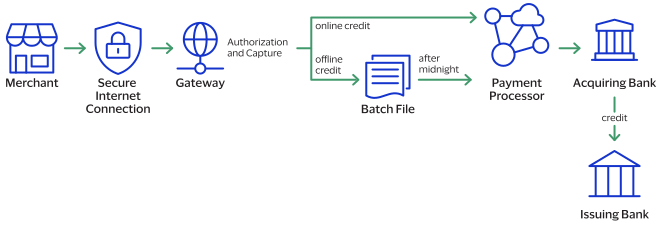
- The merchant sends the refund or credit request toCybersource.
- For online refunds and credits,Cybersourcevalidates the order information then sends the request to the payment processor.For offline refunds and credits,Cybersourcestores the request in a batch file and sends the batch file to the payment processor after midnight.
- The processor validates the request and forwards it to the acquiring bank.
- The acquiring bank transfers funds to the issuing bank.
IMPORTANT
Not all processors support stand-alone credits.
For
National Payment Gateway
, Cybersource
processes refunds and
credits for Mastercard and Visa offline. National Payment Gateway
processes mada card refunds
and credits online with your acquirer.Payment Features
You can apply features to different payment services to enhance the customer payment
processing experience. This section includes an overview of these features:
3-D Secure Authentication for National Payment Gateway
3-D Secure
Authentication for National Payment Gateway
Cybersource
supports both bundled and unbundled authentications for
card transactions.- Mastercard and Visa cards: No changes to the existing authentication process.
- mada cards: A dedicated mada directory server handles authentication.National Payment Gatewayregulations allow only fully authenticated mada transactions. If authentication fails, the transaction will be rejected at theCybersourcelevel.
- Co-Badged Cards (mada + Visa or Mastercard)
- If the mada directory server is unavailable, authentication falls back to the co-badged card brand’s directory server (Visa or Mastercard).
- In these cases, additional authentication data must be included in the authorization request soNational Payment Gatewaycan identify which party performed the authentication.
Bundled and Unbundled Authentications
- Bundled authentication:Cybersourceautomatically processes and maps the required authentication data to the authorization request.
- Unbundled authentication: Retrieve these field values from the authentication response and include them in your authorization request:
- consumerAuthenticationInformation.acsOperatorID
- consumerAuthenticationInformation.acsReferenceNumber
- consumerAuthenticationInformation.authenticationBrand
- consumerAuthenticationInformation.dsReferenceNumber
- consumerAuthenticationInformation.threeDSServerOperatorID
Use CaseDetailsI include3-D Securefor payer authentication in authorization requests.Cybersourcepayer authentication service maps the authentication data into the authorization request on your behalf.I requestCybersourcepayer authentication and the payment authorization separately in unbundled requests.The payer authentication response includes the values for these fields:- consumerAuthenticationInformation.acsReferenceNumber: required for the separate authorization.
- consumerAuthenticationInformation.dsReferenceNumber: required for the separate authorization request.
- consumerAuthenticationInformation.acsOperatorID: for reference only.
- consumerAuthenticationInformation.threeDSServerOperatorID: for reference only.
- consumerAuthenticationInformation.authenticationBrand: identifies the card brand that performed authentication during fall back.
Fallback occurs when the directory server is unavailable and authentication falls back to a different directory server.I useCybersourcefor payer authentication only. I have a different provider for authorization.The payer authentication response includes the values for these fields:- consumerAuthenticationInformation.acsReferenceNumber: required for the separate authorization.
- consumerAuthenticationInformation.dsReferenceNumber: required for the separate authorization request.
- consumerAuthenticationInformation.acsOperatorID: for reference only.
- consumerAuthenticationInformation.threeDSServerOperatorID: for reference only.
- consumerAuthenticationInformation.authenticationBrand: identifies the card brand that performed authentication during fall back.
Fallback occurs when the directory server is unavailable and authentication falls back to a different directory server.I have a direct connection to an authentication provider and useCybersourcefor authorization only.Provide all the authentication details required to process transaction throughNational Payment Gatewayto be compliant withNational Payment Gatewaystandards.
Testing the Payment Services
To ensure that requests are processed correctly, you must test the basic success and error
conditions for each service you plan to use.
Requirements for Testing
Before you can test, contact customer support to activate the credit
card services and configure your account for testing. You must also contact your processor
to set up your processor account.
IMPORTANT
When building your connection to the
Cybersource
payment gateway, ensure that you have implemented controls to prevent card testing or card
enumeration attacks on your platform. For more information, see the best practices guide.
When we detect suspicious
transaction activity associated with your merchant ID, including a card testing or card
enumeration attack, Cybersource
reserves the right to enable fraud
management tools on your behalf in order to mitigate the attack. The fraud team might also
implement internal controls to mitigate attack activity. These controls block traffic that
is perceived as fraudulent. Additionally, if you are using one of our fraud tools and
experience a significant attack, our internal team might modify or add rules to your
configuration to help prevent the attack and minimize the threat to our infrastructure.
However, any actions taken by Cybersource
would not replace the need for you
to follow industry standard best practices to protect your systems, servers, and
platforms.Follow these requirements when you test your system:
- Use your regular merchant ID.
- Use a real combination for the city, state, and postal code.
- Use a real combination for the area code and telephone number.
- Use a nonexistent account and domain name for the customer’s email address.
- REST API test endpoint:POSThttps://apitest.sa.cybersource.com/pts/v2/payments
Test Card Numbers
Use these payment card numbers to test the authorization, capture, and credit services.
Remove the spaces from the test card numbers when sending them to the test system. Do not use
real payment card numbers. To test card types that are not included in the list, use an
account number that is in the card’s BIN range. For best results, try each test with a
different service request and with different test payment card numbers.
IMPORTANT
The test card numbers that are provided are
formatted with Xs for zeroes in the card number. When testing with these card numbers, remove the spaces and replace each X with a 0 (zero).
- mada Prepaid: 9682 X873 4543 324X
- mada Token: 5X69 6831 4127 7723
- Visa-mada Co-badged: 42X1 3220 3021 7878
- Mastercard-mada Co-badged: 5297 41X9 81X4 4847
- Visa: 4111 1111 1111 1111
- Mastercard: 5555 5555 5555 4444
Using Amounts to Simulate Errors
You can simulate error messages by requesting authorization, capture, or credit services with specific amounts that trigger the error messages. These triggers work only on the test server, not on the production server.
Each payment processor uses its own error messages.
For more
information, see:
REST API Testing Guide
Standard Payment Processing
This section shows you how to process various authorization, capture, credit, and sales
transactions.
Account Verification with a Zero Amount Authorization
Account verification with zero amount authorization is a standard e-commerce practice
where you send a zero amount transaction to verify a card is valid and whether the card
is lost or stolen. You cannot capture a zero amount authorization.
Most card networks refer to card account validation as zero amount authorization (ZAA).
These card networks have their own names for the service:
- Discover Zero Dollar Authorization
- Visa Account Verification
Processor-Specific Information
- National Payment Gateway
- AVS and CVN are supported.
- Card types: Mastercard and Visa international cards. Not available for mada cards.
Endpoint
Production:
POST
https://api.sa.cybersource.com
/pts/v2/paymentsTest:
POST
https://apitest.sa.cybersource.com
/pts/v2/paymentsRequired Fields for Account Verification with Zero Amount Authorization
- clientReferenceInformation.code
- consumerAuthenticationInformation.acsReferenceNumber
- consumerAuthenticationInformation.acsTransactionId
- consumerAuthenticationInformation.authenticationDate
- consumerAuthenticationInformation.cavv
- consumerAuthenticationInformation.directoryServerTransactionId
- consumerAuthenticationInformation.dsReferenceNumber
- consumerAuthenticationInformation.paresStatus
- consumerAuthenticationInformation.paSpecificationVersion
- consumerAuthenticationInformation.xid
- merchantInformation.merchantDescriptor.locality
- orderInformation.amountDetails.currency
- orderInformation.amountDetails.totalAmount
- Set the value to0.
- paymentInformation.card.expirationMonth
- paymentInformation.card.expirationYear
- paymentInformation.card.number
- paymentInformation.card.securityCode
- paymentInformation.card.type
- processingInformation.authorizationOptions.cardVerificationIndicator
- Set the value totrue.
- processingInformation.commerceIndicator
- Set the value to one of these:
- internet
- mada
- moto
- moto_cc
- spa
- vbv
- vbv_attempted
- vbv_failure
REST Example: Account Verification with
3-D Secure
3-D Secure
Request
This example includes optional fields.
{ "clientReferenceInformation" : { "code" : "TC_SPG_FE_VI-2" }, "consumerAuthenticationInformation" : { "cavv" : "107b965bd3e20645afa84e63b91c03cc05050409", "dsReferenceNumber" : "dsReferenceNumber-3DS-mada123", "paresStatus" : "Y", "acsReferenceNumber" : "3DS_LOA_ACS_201_13579", "paSpecificationVersion" : "2", "xid" : "lEmYpm61EduaVZjPG1/HsgkAAQc=", "authenticationDate" : "20230413121212", "directoryServerTransactionId" : "f25084f0-5b16-4c0a-ae5d-b24808a95e4b", "acsTransactionId" : "f25084f0-5b16-4c0a-ae5d-b248083334b2" }, "processingInformation" : { "commerceIndicator" : "vbv", "authorizationOptions" : { "cardVerificationIndicator": true }, "industryDataType" : "auto_rental" }, "orderInformation" : { "billTo" : { "firstName" : "Abdullah", "lastName" : "Muhammad", "phoneNumber" : "01-4844094", "address2" : "P.O.Box: 16335", "address1" : "Al Dariyah Dist.", "postalCode" : "22028", "email" : "" }, "amountDetails" : { "totalAmount" : "0", "currency" : "SAR" } }, "merchantInformation" : { "transactionLocalDateTime" : "20991212121212", "categoryCode" : 4999, "merchantDescriptor" : { "country" : "SA", "address1" : "Kharj Road", "postalCode" : "12211", "locality" : "Riyadh", "name" : "Al Madina" } }, "paymentInformation" : { "card" : { "expirationYear" : "2025", "number": "CARD_NUMBER", "securityCode" : "123", "expirationMonth" : "12", "type" : "001" } } }
Response to a Successful Request
{
    "paymentInformation": {
        "bin": "411111",
        "issuer": "CONOTOXIA SP. Z O.O",
        "binCountry": "PL",
        "accountType": "Visa Classic",
        "cardBrand": "VISA",
        "cardType": "001"
    },
    "submitTimeUtc": "2025-08-29T05:46:12Z",
    "processorInformation": {
        "paymentAccountReferenceNumber": "ZEqueBNWFY660ddzGPTL9oz2WetSx",
        "approvalCode": "830SPG",
        "transactionId": "NE6VFfD5vsl4jj7",
        "merchantAdvice": {
            "code": "01",
            "codeRaw": "01"
        },
        "consumerAuthenticationResponse": {
            "code": "2",
            "codeRaw": "2"
        },
        "cardVerification": {
            "resultCodeRaw": "N",
            "resultCode": "N"
        },
        "settlementDate": "220915",
        "avs": {
            "code": "M",
            "codeRaw": "M"
        },
        "retrievalReferenceNumber": "524105500232",
        "responseCode": "00"
    },
    "_links": {
        "extension": {
            "method": "POST",
            "href": "/pts/v2/payments"
        },
        "void": {
            "method": "POST",
            "href": "/v2/payments/7564463720976144703812/reversals"
        },
        "captures": {
            "method": "POST",
            "href": "/v2/payments/7564463720976144703812/captures"
        },
        "self": {
            "method": "GET",
            "href": "/pts/v2/payments/7564463720976144703812"
        }
    },
    "paymentAccountInformation": {
        "card": {
            "type": "001"
        }
    },
    "clientReferenceInformation": {
        "code": "TC_SPG_FE_VI-1"
    },
    "consumerAuthenticationInformation": {
        "token": "7564463720976144703812",
        "eciRaw": "05A"
    },
    "id": "7564463720976144703812",
    "orderInformation": {
        "amountDetails": {
            "currency": "SAR"
        }
    },
    "reconciliationId": "7564463720976144703812",
    "status": "AUTHORIZED"
}
Pre-Authorization
This section provides the information you need in order to process a pre-authorization.
A pre-authorization enables you to authorize a payment when the final amount is unknown. The system places the funds on hold until you request a follow-up transaction. Pre-authorizations are typically used for lodging, auto rental, e-commerce, and restaurant transactions.
IMPORTANT
Payment Services Directive 2 (PSD2) rules in the European Union (EU) and European Economic Area (EEA) require the initial pre-authorization to use strong customer authentication for merchants or customers in PSD2-applicable countries.
When you have a specific merchant category code (MCC) assigned to your account, you
are allowed to capture up to 20% more than the cumulatively authorized amount on
Visa, Diners Club, Discover, and JCB cards. Contact your account manager to have your
account enabled for this option.
The pre-authorization lasts for 14 calendar days unless you capture the payment, void it, or extend it. After 14 days, if you do not request a follow-up transaction, the system releases the hold and the funds become available to the cardholder again.
Processor-Specific Information
National Payment Gateway
requires 3-D Secure
authentication data in
pre-authorization requests.Endpoint
Production:
POST
https://api.sa.cybersource.com
/pts/v2/paymentsTest:
POST
https://apitest.sa.cybersource.com
/pts/v2/paymentsRequired Fields for a Pre-Authorization
Use these required fields for processing a pre-authorization.
- clientReferenceInformation.code
- consumerAuthenticationInformation.acsReferenceNumber
- consumerAuthenticationInformation.acsTransactionId
- consumerAuthenticationInformation.authenticationDate
- consumerAuthenticationInformation.cavv
- consumerAuthenticationInformation.directoryServerTransactionId
- consumerAuthenticationInformation.dsReferenceNumber
- consumerAuthenticationInformation.paSpecificationVersion
- Set the value to2.
- consumerAuthenticationInformation.paresStatus
- Set the value toY.
- merchantInformation.merchantDescriptor.locality
- orderInformation.amountDetails.currency
- orderInformation.amountDetails.totalAmount
- paymentInformation.card.expirationMonth
- paymentInformation.card.expirationYear
- paymentInformation.card.number
- paymentInformation.card.securityCode
- paymentInformation.card.type
- processingInformation.commerceIndicator
- Set the value to one of these:
- internet
- mada
- moto
- moto_cc
- spa
- vbv
- vbv_attempted
- vbv_failure
REST Example: Processing a MOTO Pre-Authorization
Request for a Mastercard
{
  "clientReferenceInformation": {
    "code": "TC_SPG_FE_MC-3"
  },
  "processingInformation": {
    "commerceIndicator": "moto",
    "industryDataType": "auto_rental",
    "transactionTypeIndicator": "209"
  },
  "orderInformation": {
    "billTo": {
      "firstName": "Abdullah",
      "lastName": "Muhammad",
      "phoneNumber": "01-4844094",
      "address2": "(PO)Box 16335",
      "address1": "Al Dariyah Dist",
      "postalCode": "22028",
      "email": "[email protected]"
    },
    "amountDetails": {
      "totalAmount": "20101.00",
      "currency": "SAR"
    }
  },
  "merchantInformation": {
    "categoryCode": 4999,
    "merchantDescriptor": {
      "country": "SA",
      "address1": "Kharj Road",
      "postalCode": "12211",
      "locality": "Riyadh",
      "name": "Al Madina"
    }
  },
  "paymentInformation": {
    "card": {
      "expirationYear": "2026",
      "number": "CARD_NUMBER",
      "securityCode": "123",
      "expirationMonth": "12",
      "type": "002"
    }
  }
}
Response to a Successful Request for a Mastercard
{
  "paymentInformation": {
    "bin": "555555",
    "issuer": "CONOTOXIA SP. Z O.O",
    "binCountry": "PL",
    "accountType": "MASTERCARD",
    "cardBrand": "MASTERCARD",
    "cardType": "002"
  },
  "submitTimeUtc": "2025-08-29T05:46:12Z",
  "processorInformation": {
    "paymentAccountReferenceNumber": "ZEqueBNWFY660ddzGPTL9oz2WetSx",
    "approvalCode": "830SPG",
    "transactionId": "NE6VFfD5vsl4jj7",
    "merchantAdvice": {
      "code": "01",
      "codeRaw": "01"
    },
    "consumerAuthenticationResponse": {
      "code": "2",
      "codeRaw": "2"
    },
    "cardVerification": {
      "resultCodeRaw": "N",
      "resultCode": "N"
    },
    "settlementDate": "220915",
    "avs": {
      "code": "M",
      "codeRaw": "M"
    },
    "retrievalReferenceNumber": "524105500232",
    "responseCode": "00"
  },
  "_links": {
    "extension": {
      "method": "POST",
      "href": "/pts/v2/payments"
    },
    "void": {
      "method": "POST",
      "href": "/v2/payments/7564463720976144703812/reversals"
    },
    "captures": {
      "method": "POST",
      "href": "/v2/payments/7564463720976144703812/captures"
    },
    "self": {
      "method": "GET",
      "href": "/pts/v2/payments/7564463720976144703812"
    }
  },
  "paymentAccountInformation": {
    "card": {
      "type": "002"
    }
  },
  "clientReferenceInformation": {
    "code": "TC_SPG_FE_VI-1"
  },
  "consumerAuthenticationInformation": {
    "token": "7564463720976144703812",
    "eciRaw": "05A"
  },
  "id": "7564463720976144703812",
  "orderInformation": {
    "amountDetails": {
      "currency": "SAR",
      "authorizedAmount": "20100.00"
    }
  },
  "reconciliationId": "7564463720976144703812",
  "status": "AUTHORIZED"
}
Request a Visa Card
{
  "clientReferenceInformation": {
    "code": "TC_SPG_FE_VI-1"
  },
  "processingInformation": {
    "commerceIndicator": "moto",
    "capture": false,
    "industryDataType": "auto_rental"
  },
  "aggregatorInformation": {
    "subMerchant": {
      "id": "SubMerId123"
    }
  },
  "orderInformation": {
    "billTo": {
      "firstName": "Abdullah",
      "lastName": "Muhammad",
      "phoneNumber": "01-4844094",
      "address2": "(PO)Box 16335",
      "address1": "Al Dariyah Dist",
      "postalCode": "22028",
      "email": "[email protected]"
    },
    "amountDetails": {
      "totalAmount": "20100.00",
      "currency": "SAR"
    }
  },
  "merchantInformation": {
    "categoryCode": 4999,
    "merchantDescriptor": {
      "country": "SA",
      "address1": "Kharj Road",
      "postalCode": "12211",
      "locality": "Riyadh",
      "name": "Al Madina"
    }
  },
  "paymentInformation": {
    "card": {
      "expirationYear": "2026",
      "number": "CARD_NUMBER",
      "securityCode": "123",
      "expirationMonth": "12",
      "type": "001"
    }
  }
}
Response to a Successful Request for a Visa Card
{
  "paymentInformation": {
    "bin": "411111",
    "issuer": "CONOTOXIA SP. Z O.O",
    "binCountry": "PL",
    "accountType": "Visa Classic",
    "cardBrand": "VISA",
    "cardType": "001"
  },
  "submitTimeUtc": "2025-08-29T05:46:12Z",
  "processorInformation": {
    "paymentAccountReferenceNumber": "ZEqueBNWFY660ddzGPTL9oz2WetSx",
    "approvalCode": "830SPG",
    "transactionId": "NE6VFfD5vsl4jj7",
    "merchantAdvice": {
      "code": "01",
      "codeRaw": "01"
    },
    "consumerAuthenticationResponse": {
      "code": "2",
      "codeRaw": "2"
    },
    "cardVerification": {
      "resultCodeRaw": "N",
      "resultCode": "N"
    },
    "settlementDate": "220915",
    "avs": {
      "code": "M",
      "codeRaw": "M"
    },
    "retrievalReferenceNumber": "524105500232",
    "responseCode": "00"
  },
  "_links": {
    "extension": {
      "method": "POST",
      "href": "/pts/v2/payments"
    },
    "void": {
      "method": "POST",
      "href": "/v2/payments/7564463720976144703812/reversals"
    },
    "captures": {
      "method": "POST",
      "href": "/v2/payments/7564463720976144703812/captures"
    },
    "self": {
      "method": "GET",
      "href": "/pts/v2/payments/7564463720976144703812"
    }
  },
  "paymentAccountInformation": {
    "card": {
      "type": "001"
    }
  },
  "clientReferenceInformation": {
    "code": "TC_SPG_FE_VI-1"
  },
  "consumerAuthenticationInformation": {
    "token": "7564463720976144703812",
    "eciRaw": "05A"
  },
  "id": "7564463720976144703812",
  "orderInformation": {
    "amountDetails": {
      "currency": "SAR",
      "authorizedAmount": "20100.00"
    }
  },
  "reconciliationId": "7564463720976144703812",
  "status": "AUTHORIZED"
}
REST Example: Processing a Pre-Authorization with 3-D Secure for a mada Card
3-D Secure
for a mada CardRequest
This example includes optional fields.
{
  "clientReferenceInformation": {
    "code": "SPG_REQ_01"
  },
  "consumerAuthenticationInformation": {
    "cavv": "EHuWW9PiBkWvqE5juRwDzAUFBAk=",
    "dsReferenceNumber": "dsReferenceNumber-3DS-mada123",
    "paresStatus": "Y",
    "acsReferenceNumber": "3DS_LOA_ACS_201_13579",
    "paSpecificationVersion": "2",
    "authenticationDate": "20230413121212",
    "directoryServerTransactionId": "f25084f0-5b16-4c0a-ae5d-b24808a95e4b",
    "acsTransactionId": "f25084f0-5b16-4c0a-ae5d-b248083334b2"
  },
  "processingInformation": {
    "commerceIndicator": "mada"
  },
  "orderInformation": {
    "billTo": {
      "firstName": "Abdullah",
      "lastName": "Muhammad",
      "phoneNumber": "01-4844094",
      "address2": "P.O.Box: 16335",
      "address1": "Al Dariyah Dist.",
      "postalCode": "22028",
      "email": "[email protected]"
    },
    "amountDetails": {
      "totalAmount": "3001",
      "currency": "SAR"
    },
    "invoiceDetails": {
      "purchaseOrderNumber": "PurchaseOrderNumber123"
    }
  },
  "aggregatorInformation": {
    "subMerchant": {
      "id": "001"
    }
  },
  "merchantInformation": {
    "categoryCode": 5411,
    "merchantDescriptor": {
      "country": "SA",
      "address1": "API Address",
      "postalCode": "12987-7318",
      "locality": "Riyadh",
      "name": "API Merchant-Name1"
    }
  },
  "paymentInformation": {
    "card": {
      "expirationYear": "2031",
      "number": "CARD_NUMBER",
      "securityCode": "123",
      "expirationMonth": "12",
      "type": "060"
    }
  }
}
Response to a Successful Request
{
  "paymentInformation": {
    "bin": "968208",
    "issuer": "Al Bank Al Saudi Al Fransi",
    "binCountry": "SA",
    "cardBrand": "MADA",
    "cardType": "PREPAID"
  },
  "paymentAccountInformation": {
    "card": {
      "currency": "SAR",
      "type": "060"
    }
  },
  "orderInformation": {
    "amountDetails": {
      "currency": "SAR",
      "authorizedAmount": "100.00"
    }
  },
  "processorInformation": {
    "approvalCode": "830SPG",
    "retrievalReferenceNumber": "334210123456",
    "cardVerification": {
      "resultCode": "M",
      "resultCodeRaw": "M"
    },
    "responseCode": "00",
    "consumerAuthenticationResponse": {
      "code": "2",
      "codeRaw": "2"
    },
    "settlementDate": "220915"
  },
  "_links": {
    "self": {
      "method": "GET",
      "href": "/pts/v2/payments/7020303222541234567890"
    },
    "refund": {
      "method": "POST",
      "href": "/pts/v2/payments/7020303222541234567890/refunds"
    }
  },
  "clientReferenceInformation": {
    "code": "TC_SPG_BASIC-1"
  },
  "consumerAuthenticationInformation": {
    "token": "abc"
  },
  "reconciliationId": "7020303222541234567890",
  "status": "AUTHORIZED",
  "id": "7020303222541234567890",
  "submitTimeUtc": "2023-12-08T10:12:02Z"
}
Pre-Authorization Bundled with Payer Authentication
Enroll Service
When a customer is authenticated without a challenge, the transaction can be authorized
either in the same request or in a separate authorization request. Whether authorization
occurs in the same request or a separate request, the values from the check enrollment
response must be passed to the authorization request to qualify for a liability shift.
This section provides information on how to process a pre-authorization combined with
authentication of the cardholder that does not require additional authentication.
For more information about Payer Authentication, see the
Payer Authentication Developer Guide
. Processor-Specific Information
National Payment Gateway
requires payer authentication data in customer-initiated transactions.When the domestic scheme directory server for mada cards is not available and
authentication falls back to the global scheme directory server, the authentication
brand response field indicates which directory server was used during the
authentication process.
Endpoint
Production:
POST
https://api.sa.cybersource.com
/pts/v2/paymentsTest:
POST
https://apitest.sa.cybersource.com
/pts/v2/paymentsRequired Fields for a Pre-Authorization with Payer Authentication Enroll Service
REST Example: Pre-Authorization with Payer Authentication
Enroll Service
Request
This example includes optional fields.
{
  "clientReferenceInformation": {
    "code": "SPG_REQ_01"
  },
  "consumerAuthenticationInformation": {
    "referenceId": "CybsCruiseTester-da287c74",
    "overrideCountryCode": "SA",
    "deviceChannel": "Browser",
    "challengeCode": "04"
  },
  "processingInformation": {
    "actionList": [
      "CONSUMER_AUTHENTICATION"
    ],
  },
  "orderInformation": {
    "billTo": {
      "firstName": "Abdullah",
      "lastName": "Muhammad",
      "phoneNumber": "01-4844094",
      "address2": "P.O.Box: 16335",
      "address1": "Al Dariyah Dist.",
      "postalCode": "22028",
      "email": "[email protected]"
    },
    "amountDetails": {
      "totalAmount": "3001",
      "currency": "SAR"
    },
    "invoiceDetails": {
      "purchaseOrderNumber": "PurchaseOrderNumber123"
    }
  },
  "aggregatorInformation": {
    "subMerchant": {
      "id": "001"
    }
  },
  "merchantInformation": {
    "categoryCode": 5411,
    "merchantDescriptor": {
      "country": "SA",
      "address1": "API Address",
      "postalCode": "12987-7318",
      "locality": "Riyadh",
      "name": "API Merchant-Name1"
    }
  },
  "paymentInformation": {
    "card": {
      "expirationYear": "2031",
      "number": "CARD_NUMBER",
      "securityCode": "123",
      "expirationMonth": "12",
      "type": "060"
    }
  }
}
Response to a Successful Request
{
  "paymentInformation": {
    "bin": "968208",
    "issuer": "Al Bank Al Saudi Al Fransi",
    "binCountry": "SA",
    "cardBrand": "MADA",
    "cardType": "PREPAID"
  },
  "consumerAuthenticationInformation": {
    "challengeRequired": "N",
    "authenticationTransactionId": "rx39Q8ZN7aPE0bHxoSe1",
    "strongAuthentication": {
      "OutageExemptionIndicator": "0"
    },
    "acsUrl": "https://1merchantacsstag.cardinalcommerce.com/MerchantACSWeb/creq.jsp",
    "acsReferenceNumber": "Cardinal ACS",
    "stepUpUrl": "https://centinelapistag.cardinalcommerce.com/V2/Cruise/StepUp",
    "pareq": "eyJtZXNzYWdl-short-example",
    "directoryServerTransactionId": "b435dda8-a2b0-490e-ae39-1b7e01d1dc4e",
    "veresEnrolled": "Y",
    "threeDSServerTransactionId": "0cd884bb-c8ef-4dfc-97e1-a78b741c42b8",
    "acsOperatorID": "MerchantACS",
    "specificationVersion": "2.2.0",
    "acsTransactionId": "1231149d-299b-4a64-ba89-3ab10e538b48"
  },
  "embeddedActions": {
    "CONSUMER_AUTHENTICATION": {
      "reason": "CONSUMER_AUTHENTICATION_REQUIRED",
      "message": "The cardholder is enrolled in Payer Authentication. Please authenticate the cardholder before continuing with the transaction.",
      "status": "PENDING_AUTHENTICATION"
    }
  },
  "submitTimeUtc": "2024-01-29T14:43:14Z",
  "id": "7065393947881234567890",
  "errorInformation": {
    "reason": "CONSUMER_AUTHENTICATION_REQUIRED",
    "message": "The cardholder is enrolled in Payer Authentication. Please authenticate the cardholder before continuing with the transaction."
  },
  "status": "PENDING_AUTHENTICATION",
  "clientReferenceInformation": {
    "code": "TC_SPG_REQUEST_PB-159"
  }
}
Pre-Authorization Bundled with Payer Authentication
Validate Service
When a customer is authenticated after a challenge, the transaction can be authorized in
the same request or in a separate authorization request. Whether authorization is
combined with validation or occurs in a separate request, the values from the validation
response must be passed to the authorization request to qualify for a liability shift to
the issuing bank. This section provides information on how to process that type of
transaction.
For more information about Payer Authentication, see the
Payer Authentication Developer
Guide
. Processor-Specific Information
National Payment Gateway
requires payer authentication data in customer-initiated transactions.When the domestic scheme directory server for mada cards is not available and
authentication falls back to the global scheme directory server, the authentication
brand response field indicates which directory server was used during the
authentication process.
Endpoint
Production:
POST
https://api.sa.cybersource.com
/pts/v2/paymentsTest:
POST
https://apitest.sa.cybersource.com
/pts/v2/paymentsRequired Fields for a Pre-Authorization with Payer Authentication Validate Service
REST Example: Pre-Authorization with Payer Authentication
Validate Service
Request
This example includes optional fields.
{
  "clientReferenceInformation": {
    "code": "SPG_REQ_01"
  },
  "consumerAuthenticationInformation": {
    "referenceId": "CybsCruiseTester-d47f8d5c",
    "overrideCountryCode": "SA",
    "deviceChannel": "Browser",
    "authenticationTransactionId": "8HuyDYiugte0I1RxiRU1",
    "challengeCode": "04"
  },
  "processingInformation": {
    "actionList": [
      "VALIDATE_CONSUMER_AUTHENTICATION"
    ],
  },
  "orderInformation": {
    "billTo": {
      "firstName": "Abdullah",
      "lastName": "Muhammad",
      "phoneNumber": "01-4844094",
      "address2": "P.O.Box: 16335",
      "address1": "Al Dariyah Dist.",
      "postalCode": "22028",
      "email": "[email protected]"
    },
    "amountDetails": {
      "totalAmount": "3001",
      "currency": "SAR"
    },
    "invoiceDetails": {
      "purchaseOrderNumber": "PurchaseOrderNumber123"
    }
  },
  "aggregatorInformation": {
    "subMerchant": {
      "id": "001"
    }
  },
  "merchantInformation": {
    "categoryCode": 5411,
    "merchantDescriptor": {
      "country": "SA",
      "address1": "API Address",
      "postalCode": "12987-7318",
      "locality": "Riyadh",
      "name": "API Merchant-Name1"
    }
  },
  "paymentInformation": {
    "card": {
      "expirationYear": "2031",
      "number": "CARD_NUMBER",
      "securityCode": "123",
      "expirationMonth": "12",
      "type": "060"
    }
  }
}
Response to a Successful Request
{
  "paymentInformation": {
    "bin": "968208",
    "issuer": "AlBankAlSaudiAlFransi",
    "binCountry": "SA",
    "cardBrand": "MADA",
    "cardType": "PREPAID"
  },
  "consumerAuthenticationInformation": {
    "eciRaw": "05",
    "authenticationTransactionId": "fggOjcMXWKXFpxzAI0N1",
    "strongAuthentication": {
      "OutageExemptionIndicator": "0"
    },
    "effectiveAuthenticationType": "FR",
    "authorizationPayload": "eyJjb250YWluZXJWZXJ-short-example",
    "eci": "05",
    "cavv": "AJkBBkhgQQAAAE4gSEJydQAAAAA=",
    "paresStatus": "Y",
    "acsReferenceNumber": "Cardinal ACS",
    "xid": "AJkBBkhgQQAAAE4gSEJydQAAAAA=",
    "directoryServerTransactionId": "e6a43429-7310-4ea1-b903-6a35941d9150",
    "veresEnrolled": "Y",
    "threeDSServerTransactionId": "827d03b1-e93b-4b81-9086-f0d257640e8b",
    "acsOperatorID": "MerchantACS",
    "ecommerceIndicator": "mada",
    "specificationVersion": "2.2.0",
    "acsTransactionId": "33c16320-5b5c-4569-9703-fb1a4c6f8858"
  },
  "embeddedActions": {
    "CONSUMER_AUTHENTICATION": {
      "status": "AUTHENTICATION_SUCCESSFUL"
    }
  },
  "paymentAccountInformation": {
    "card": {
      "currency": "SAR",
      "type": "060"
    }
  },
  "orderInformation": {
    "amountDetails": {
      "currency": "SAR",
      "authorizedAmount": "100.00"
    }
  },
  "processorInformation": {
    "approvalCode": "830SPG",
    "retrievalReferenceNumber": "333417123456",
    "cardVerification": {
      "resultCode": "M",
      "resultCodeRaw": "M"
    },
    "responseCode": "00",
    "consumerAuthenticationResponse": {
      "code": "2",
      "codeRaw": "2"
    },
    "settlementDate": "220915"
  },
  "_links": {
    "self": {
      "method": "GET",
      "href": "/pts/v2/payments/7013657600822661348823"
    },
    "refund": {
      "method": "POST",
      "href": "/pts/v2/payments/7013657600822661348823/refunds"
    }
  },
  "clientReferenceInformation": {
    "code": "TC_SPG_REQUEST_PB-54"
  },
  "consumerAuthenticationInformation": {
    "token": "abc"
  },
  "reconciliationId": "7013657600822661348823",
  "status": "COMPLETED",
  "id": "7013657600822661348823",
  "submitTimeUtc": "2023-11-30T17:36:00Z"
}
Pre-Authorization Extension
A pre-authorization extension is a follow-up to a pre-authorization that keeps the hold in place
for another 14 days. This gives you a maximum hold of 28 days in total. You are allowed to
send only one extension for each pre-authorization. For Mastercard and Visa cards, you can
also change the held amount when you request the extension. For mada cards, you can only
extend the hold time, not adjust the amount.
Endpoint
Production:
POST
https://api.sa.cybersource.com
/pts/v2/paymentsTest:
POST
https://apitest.sa.cybersource.com
/pts/v2/paymentsRequired Fields for a Pre-Authorization Extension
- clientReferenceInformation.code
- orderInformation.amountDetails.currency
- orderInformation.amountDetails.totalAmount
- processingInformation.authorizationOptions.extendAuthIndicator
- Set the value totrue.
- processingInformation.originalPaymentId
- Set the value to the request ID of the pre-authorization.
REST Example: Pre-Authorization Extension with Zero
Amount
Request
{
  "clientReferenceInformation" : {
    "code" : "Test"
  },
  "processingInformation" : {
    "authorizationOptions" : {
      "extendAuthIndicator" : "true"
    },
    "originalPaymentId" : "7429112613411234567890"
  },
  "orderInformation" : {
    "amountDetails" : {
      "totalAmount" : "0",
      "currency" : "SAR"
    }
  }
}
Response to a Successful Request
{
  "orderInformation": {
    "amountDetails": {
      "totalAmount": "100.00",
      "currency": "SAR",
      "authorizedAmount": "0.00"
    }
  },
  "processorInformation": {
    "paymentAccountReferenceNumber": "KUMsXUeemNQ4ylkiiOBhP8TfQUgFX",
    "approvalCode": "830SPG",
    "retrievalReferenceNumber": "424009035276",
    "responseCode": "00",
    "settlementDate": "220915"
  },
  "_links": {
    "capture": {
      "method": "POST",
      "href": "/pts/v2/payments/7247511738451234567890/captures"
    },
    "self": {
      "method": "GET",
      "href": "/pts/v2/payments/7247511926041234567890"
    }
  },
  "clientReferenceInformation": {
    "code": "TC_SPG_REQUEST_PB-64"
  },
  "consumerAuthenticationInformation": {
    "token": "7247511926041234567890"
  },
  "reconciliationId": "7247511738451234567890",
  "status": "AUTHORIZED",
  "id": "7247511926041234567890",
  "submitTimeUtc": "2024-08-27T09:33:13Z"
}
Authorization Reversal
This section provides the information about how to process an authorization reversal.
For
National Payment Gateway
, the authorization reversal is sometimes referred
to as a pre-authorization void. National Payment Gateway
supports full and partial
reversals.Reversing an authorization releases the hold on the customer’s payment card funds that the
issuing bank placed when processing the authorization.
For a debit card or prepaid card in which only a partial amount was approved, the amount of
the reversal must be the amount that was authorized, not the amount that was requested.
All supported card types can process authorization reversals.
Endpoint
Production:
POST
https://api.sa.cybersource.com
/pts/v2/payments/{id}
/reversalsTest:
POST
https://apitest.sa.cybersource.com
/pts/v2/payments/{id}
/reversalsThe
is the transaction ID returned in the authorization
response.
{id}
Required Fields for Processing an Authorization Reversal
- The amount of the reversal must be the same as the authorization amount that was included in the authorization response message. Do not use the amount that was requested in the authorization request message.
REST Example: Processing an Authorization Reversal
Request
{
    "reversalInformation" : {
        "amountDetails" : {
            "totalAmount" : "100.00"
        }
    }
}
Response to a Successful Request
{
  "processorInformation": {
    "paymentAccountReferenceNumber": "QHD47E209drPQ9yJD9ddnaFZuSUXu",
    "approvalCode": "830SPG",
    "retrievalReferenceNumber": "424009035280",
    "responseCode": "00",
    "settlementDate": "220915"
  },
  "reversalAmountDetails": {
    "currency": "SAR",
    "reversedAmount": "100.00"
  },
  "clientReferenceInformation": {
    "code": "TC_SPG_REQUEST_PB-64"
  },
  "consumerAuthenticationInformation": {
    "token": "7247516416161234567890"
  },
  "reconciliationId": "7247516248131234567890",
  "status": "REVERSED",
  "id": "7247516416161234567890",
  "submitTimeUtc": "2024-08-27T09:40:42Z"
}
Sale
This section provides the information you need in order to process a sale
transaction.
A sale combines an authorization and a capture into a single transaction.
Processor-Specific Information
National Payment Gateway
requires payer authentication data in customer-initiated transactions.When the domestic scheme directory server for mada cards is not available and
authentication falls back to the global scheme directory server, the authentication
brand response field indicates which directory server was used during the
authentication process.
Endpoint
Production:
POST
https://api.sa.cybersource.com
/pts/v2/paymentsTest:
POST
https://apitest.sa.cybersource.com
/pts/v2/paymentsRequired Fields for a Sale with 3-D Secure
with
3-D Secure
- clientReferenceInformation.code
- consumerAuthenticationInformation.acsReferenceNumber
- Required for 3-D Secure transactions.
- consumerAuthenticationInformation.acsTransactionId
- Required for 3-D Secure transactions.
- consumerAuthenticationInformation.authenticationDate
- Required for 3-D Secure transactions.
- consumerAuthenticationInformation.cavv
- Required for 3-D Secure transactions.
- consumerAuthenticationInformation.directoryServerTransactionId
- Required for 3-D Secure transactions.
- consumerAuthenticationInformation.dsReferenceNumber
- Required for 3-D Secure transactions.
- consumerAuthenticationInformation.paresStatus
- Required for 3-D Secure transactions. Set the value toY.
- consumerAuthenticationInformation.specificationVersion
- Required for 3-D Secure transactions. Set the value to2.
- merchantInformation.merchantDescriptor.locality
- orderInformation.amountDetails.currency
- orderInformation.amountDetails.totalAmount
- paymentInformation.card.expirationMonth
- paymentInformation.card.expirationYear
- paymentInformation.card.number
- paymentInformation.card.securityCode
- paymentInformation.card.type
- processingInformation.capture
- Set the value totrue.
- processingInformation.commerceIndicator
- Set the value to one of these:
- internet
- moto
- vbv
- spa
- mada
REST Example: Sale with 3-D Secure
3-D Secure
Request for a mada Card
This example includes optional fields.
{
    "clientReferenceInformation": {
        "code": "SPG_REQ_01"
    },
    "consumerAuthenticationInformation": {
        "cavv": "EHuWW9PiBkWvqE5juRwDzAUFBAk=",
        "dsReferenceNumber": "dsReferenceNumber-3DS-mada123",
        "paresStatus": "Y",
        "acsReferenceNumber": "3DS_LOA_ACS_201_13579",
        "paSpecificationVersion": "2",
        "authenticationDate": "20230413121212",
        "directoryServerTransactionId": "f25084f0-5b16-4c0a-ae5d-b24808a95e4b",
        "acsTransactionId": "f25084f0-5b16-4c0a-ae5d-b248083334b2"
    },
    "processingInformation": {
        "commerceIndicator": "mada",
        "capture": true
    },
    "orderInformation": {
        "billTo": {
            "firstName": "Abdullah",
            "lastName": "Muhammad",
            "phoneNumber": "01-4844094",
            "address2": "P.O.Box: 16335",
            "address1": "Al Dariyah Dist.",
            "postalCode": "22028",
            "email": "[email protected]"
        },
        "amountDetails": {
            "totalAmount": "3001",
            "currency": "SAR"
        },
        "invoiceDetails": {
            "purchaseOrderNumber": "PurchaseOrderNumber123"
        }
    },
    "aggregatorInformation": {
        "subMerchant": {
            "id": "001"
        }
    },
    "travelInformation": {
        "transit": {
            "airline": {
                "ticketNumber": "PNR123"
            }
        }
    },
    "merchantInformation": {
        "categoryCode": 5411,
        "merchantDescriptor": {
            "country": "SA",
            "address1": "API Address",
            "postalCode": "12987-7318",
            "locality": "Riyadh",
            "name": "API Merchant-Name1"
        }
    },
    "paymentInformation": {
        "card": {
            "expirationYear": "2031",
            "number": "CARD_NUMBER",
            "securityCode": "123",
            "expirationMonth": "12",
            "type": "060"
        }
    }
}
Response to a Successful Request for a mada Card
{
    "paymentInformation": {
        "bin": "968208",
        "issuer": "Al Bank Al Saudi Al Fransi",
        "binCountry": "SA",
        "cardBrand": "MADA",
        "cardType": "PREPAID"
    },
    "paymentAccountInformation": {
        "card": {
            "currency": "SAR",
            "type": "060"
        }
    },
    "orderInformation": {
        "amountDetails": {
            "currency": "SAR",
            "authorizedAmount": "100.00"
        }
    },
    "processorInformation": {
        "approvalCode": "830SPG",
        "retrievalReferenceNumber": "334210123456",
        "cardVerification": {
            "resultCode": "M",
            "resultCodeRaw": "M"
        },
        "responseCode": "00",
        "consumerAuthenticationResponse": {
            "code": "2",
            "codeRaw": "2"
        },
        "settlementDate": "220915"
    },
    "_links": {
        "self": {
            "method": "GET",
            "href": "/pts/v2/payments/7020303222541234567890"
        },
        "refund": {
            "method": "POST",
            "href": "/pts/v2/payments/7020303222541234567890/refunds"
        }
    },
    "clientReferenceInformation": {
        "code": "TC_SPG_BASIC-1"
    },
    "consumerAuthenticationInformation": {
        "token": "abc"
    },
    "reconciliationId": "7020303222541234567890",
    "status": "COMPLETED",
    "id": "7020303222541234567890",
    "submitTimeUtc": "2023-12-08T10:12:02Z"
}
Request for a Mastercard
This example includes optional fields.
{
  "clientReferenceInformation" : {
    "code" : "TC_SPG_FE_MC-3"
  },
  "consumerAuthenticationInformation" : {
    "dsReferenceNumber" : "dsReferenceNumber-3DS-vbv123",
    "paresStatus" : "Y",
    "acsReferenceNumber" : "3DS_LOA_ACS_201_13579",
    "authenticationDate" : "20230413121212",
    "ucafCollectionIndicator" : "2",
    "ucafAuthenticationData" : "EHuWW9PiBkWvqE5juRwDzAUFBAk=",
    "directoryServerTransactionId" : "f25084f05b164c0aae5db24808a95e4b",
    "specificationVersion" : "2",
    "acsTransactionId" : "f25084f0-5b16-4c0a-ae5d-b248083334b2"
  },
  "processingInformation" : {
    "commerceIndicator" : "spa",
    "capture" : true,
    "industryDataType" : "auto_rental",
    "transactionTypeIndicator" : "209"
  },
  "orderInformation" : {
    "billTo" : {
      "firstName" : "Abdullah",
      "lastName" : "Muhammad",
      "phoneNumber" : "01-4844094",
      "address2" : "(PO)Box 16335",
      "address1" : "Al Dariyah Dist",
      "postalCode" : "22028",
      "email" : "[email protected]"
    },
    "amountDetails" : {
      "totalAmount" : "20101.00",
      "currency" : "SAR"
    }
  },
  "merchantInformation" : {
    "categoryCode" : 4999,
    "merchantDescriptor" : {
      "country" : "SA",
      "address1" : "Kharj Road",
      "postalCode" : "12211",
      "locality" : "Riyadh",
      "name" : "Al Madina"
    }
  },
  "paymentInformation" : {
    "card" : {
      "expirationYear" : "2026",
       "number": "CARD_NUMBER",
      "securityCode" : "123",
      "expirationMonth" : "12",
      "type" : "002"
    }
  }
}
Response to a Successful Request for a Mastercard
{
    "paymentInformation": {
        "bin": "555555",
        "issuer": "CONOTOXIA SP. Z O.O",
        "binCountry": "PL",
        "accountType": "MASTERCARD Classic",
        "cardBrand": "MASTERCARD",
        "cardType": "002"
    },
    "submitTimeUtc": "2025-08-28T11:40:39Z",
    "processorInformation": {
        "paymentAccountReferenceNumber": "8atcUKA55teOnsvajmkfaY8Rosg2Z",
        "approvalCode": "830SPG",
        "transactionId": "WsPI4kVYXSlXPPK",
        "merchantAdvice": {
            "code": "01",
            "codeRaw": "01"
        },
        "consumerAuthenticationResponse": {
            "code": "2",
            "codeRaw": "2"
        },
        "cardVerification": {
            "resultCodeRaw": "N",
            "resultCode": "N"
        },
        "settlementDate": "220915",
        "avs": {
            "code": "M",
            "codeRaw": "M"
        },
        "retrievalReferenceNumber": "524011500230",
        "responseCode": "00"
    },
    "_links": {
        "self": {
            "method": "GET",
            "href": "/pts/v2/payments/7563812390036731704807/captures"
        },
        "refund": {
            "method": "POST",
            "href": "/pts/v2/payments/7563812390036731704807/refunds"
        },
        "void": {
            "method": "POST",
            "href": "/pts/v2/captures/7563812390036731704807/voids"
        }
    },
    "paymentAccountInformation": {
        "card": {
            "type": "002"
        }
    },
    "clientReferenceInformation": {
        "code": "TC_SPG_FE_VI-1"
    },
    "consumerAuthenticationInformation": {
        "token": "7563812390036731704807",
        "eciRaw": "05A"
    },
    "id": "7563812390036731704807",
    "orderInformation": {
        "amountDetails": {
            "currency": "SAR",
            "authorizedAmount": "20100.00",
            "totalAmount": "20100.00"
        }
    },
    "reconciliationId": "7563812390036731704807",
    "status": "PENDING",
    "embeddedActions": {
        "CAPTURE": {
            "status": "PENDING"
        }
    }
}
Request for a Visa Card
This example includes optional fields.
{
  "clientReferenceInformation" : {
    "code" : "TC_SPG_FE_VI-1"
  },
  "consumerAuthenticationInformation" : {
    "cavv" : "107b965bd3e20645afa84e63b91c03cc05050409",
    "dsReferenceNumber" : "dsReferenceNumber-3DS-vbv123",
    "paresStatus" : "Y",
    "acsReferenceNumber" : "3DS_LOA_ACS_201_13579",
    "xid" : "lEmYpm61EduaVZjPG1/HsgkAAQc=",
    "authenticationDate" : "20230413121212",
    "directoryServerTransactionId" : "f25084f05b164c0aae5db24808a95e4b",
    "specificationVersion" : "2",
    "acsTransactionId" : "f25084f0-5b16-4c0a-ae5d-b248083334b2"
  },
  "processingInformation" : {
    "commerceIndicator" : "vbv",
    "capture" : true,
    "industryDataType" : "auto_rental"
  },
  "aggregatorInformation" : {
    "subMerchant" : {
      "id" : "SubMerId123"
    }
  },
  "orderInformation" : {
    "billTo" : {
      "firstName" : "Abdullah",
      "lastName" : "Muhammad",
      "phoneNumber" : "01-4844094",
      "address2" : "(PO)Box 16335",
      "address1" : "Al Dariyah Dist",
      "postalCode" : "22028",
      "email" : "[email protected]"
    },
    "amountDetails" : {
      "totalAmount" : "20100.00",
      "currency" : "SAR"
    }
  },
  "merchantInformation" : {
    "transactionLocalDateTime" : "20991212121212",
    "categoryCode" : 4999,
    "merchantDescriptor" : {
      "country" : "SA",
      "address1" : "Kharj Road",
      "postalCode" : "12211",
      "locality" : "Riyadh",
      "name" : "Al Madina"
    }
  },
  "paymentInformation" : {
    "card" : {
      "expirationYear" : "2026",
       "number": "CARD_NUMBER",
      "securityCode" : "123",
      "expirationMonth" : "12",
      "type" : "001"
    }
  }
}
Response to a Successful Request for a Visa Card
{
    "paymentInformation": {
        "bin": "411111",
        "issuer": "CONOTOXIA SP. Z O.O",
        "binCountry": "PL",
        "accountType": "Visa Classic",
        "cardBrand": "VISA",
        "cardType": "001"
    },
    "submitTimeUtc": "2025-08-28T11:40:39Z",
    "processorInformation": {
        "paymentAccountReferenceNumber": "8atcUKA55teOnsvajmkfaY8Rosg2Z",
        "approvalCode": "830SPG",
        "transactionId": "WsPI4kVYXSlXPPK",
        "merchantAdvice": {
            "code": "01",
            "codeRaw": "01"
        },
        "consumerAuthenticationResponse": {
            "code": "2",
            "codeRaw": "2"
        },
        "cardVerification": {
            "resultCodeRaw": "N",
            "resultCode": "N"
        },
        "settlementDate": "220915",
        "avs": {
            "code": "M",
            "codeRaw": "M"
        },
        "retrievalReferenceNumber": "524011500230",
        "responseCode": "00"
    },
    "_links": {
        "self": {
            "method": "GET",
            "href": "/pts/v2/payments/7563812390036731704807/captures"
        },
        "refund": {
            "method": "POST",
            "href": "/pts/v2/payments/7563812390036731704807/refunds"
        },
        "void": {
            "method": "POST",
            "href": "/pts/v2/captures/7563812390036731704807/voids"
        }
    },
    "paymentAccountInformation": {
        "card": {
            "type": "001"
        }
    },
    "clientReferenceInformation": {
        "code": "TC_SPG_FE_VI-1"
    },
    "consumerAuthenticationInformation": {
        "token": "7563812390036731704807",
        "eciRaw": "05A"
    },
    "id": "7563812390036731704807",
    "orderInformation": {
        "amountDetails": {
            "currency": "SAR",
            "authorizedAmount": "20100.00",
            "totalAmount": "20100.00"
        }
    },
    "reconciliationId": "7563812390036731704807",
    "status": "PENDING",
    "embeddedActions": {
        "CAPTURE": {
            "status": "PENDING"
        }
    }
}
Response to a Timed Out Request
{
  "reason": "SERVER_TIMEOUT",
  "message": "Error - The request was received but there was a server timeout. This error does not include timeouts between the client and the server.",
  "status": "SERVER_ERROR",
  "id": "7020508046881234567890",
  "submitTimeUtc": "2027-06-06T15:20:39Z"
}
Sale Bundled with Payer Authentication Enroll
Service
When a customer is authenticated without a challenge, the transaction can be authorized
either in the same request or in a separate authorization request. Whether authorization
occurs in the same request or a separate request, the values from the check enrollment
response must be passed to the authorization request to qualify for a liability shift.
This section provides information on how to process a transaction combined with
authentication of the cardholder that does not require additional authentication.
For more information about Payer Authentication, see the
Payer Authentication Developer
Guide
. Processor-Specific Information
National Payment Gateway
requires payer authentication data in customer-initiated transactions.When the domestic scheme directory server for mada cards is not available and
authentication falls back to the global scheme directory server, the authentication
brand response field indicates which directory server was used during the
authentication process.
Endpoint
Production:
POST
https://api.sa.cybersource.com
/pts/v2/paymentsTest:
POST
https://apitest.sa.cybersource.com
/pts/v2/paymentsRequired Fields for a Sale with Payer Authentication Enroll Service
REST Example: Sale with Payer Authentication Enroll
Service
Request
This example includes optional fields.
{
  "clientReferenceInformation": {
    "code": "SPG_REQ_01"
  },
  "consumerAuthenticationInformation": {
    "referenceId": "CybsCruiseTester-da287c74",
    "overrideCountryCode": "SA",
    "deviceChannel": "Browser",
    "challengeCode": "04"
  },
  "processingInformation": {
    "actionList": [
      "CONSUMER_AUTHENTICATION"
    ],
    "capture": true
  },
  "orderInformation": {
    "billTo": {
      "firstName": "Abdullah",
      "lastName": "Muhammad",
      "phoneNumber": "01-4844094",
      "address2": "P.O.Box: 16335",
      "address1": "Al Dariyah Dist.",
      "postalCode": "22028",
      "email": "[email protected]"
    },
    "amountDetails": {
      "totalAmount": "3001",
      "currency": "SAR"
    },
    "invoiceDetails": {
      "purchaseOrderNumber": "PurchaseOrderNumber123"
    }
  },
  "aggregatorInformation": {
    "subMerchant": {
      "id": "001"
    }
  },
  "merchantInformation": {
    "categoryCode": 5411,
    "merchantDescriptor": {
      "country": "SA",
      "address1": "API Address",
      "postalCode": "12987-7318",
      "locality": "Riyadh",
      "name": "API Merchant-Name1"
    }
  },
  "paymentInformation": {
    "card": {
      "expirationYear": "2031",
      "number": "CARD_NUMBER",
      "securityCode": "123",
      "expirationMonth": "12",
      "type": "060"
    }
  }
}
Response to a Successful Request
{
  "paymentInformation": {
    "bin": "968208",
    "issuer": "Al Bank Al Saudi Al Fransi",
    "binCountry": "SA",
    "cardBrand": "MADA",
    "cardType": "PREPAID"
  },
  "consumerAuthenticationInformation": {
    "challengeRequired": "N",
    "authenticationTransactionId": "rx39Q8ZN7aPE0bHxoSe1",
    "strongAuthentication": {
      "OutageExemptionIndicator": "0"
    },
    "acsUrl": "https://1merchantacsstag.cardinalcommerce.com/MerchantACSWeb/creq.jsp",
    "acsReferenceNumber": "Cardinal ACS",
    "stepUpUrl": "https://centinelapistag.cardinalcommerce.com/V2/Cruise/StepUp",
    "pareq": "eyJtZXNzYWdl-short-example",
    "directoryServerTransactionId": "b435dda8-a2b0-490e-ae39-1b7e01d1dc4e",
    "veresEnrolled": "Y",
    "threeDSServerTransactionId": "0cd884bb-c8ef-4dfc-97e1-a78b741c42b8",
    "acsOperatorID": "MerchantACS",
    "specificationVersion": "2.2.0",
    "acsTransactionId": "1231149d-299b-4a64-ba89-3ab10e538b48"
  },
  "embeddedActions": {
    "CONSUMER_AUTHENTICATION": {
      "reason": "CONSUMER_AUTHENTICATION_REQUIRED",
      "message": "The cardholder is enrolled in Payer Authentication. Please authenticate the cardholder before continuing with the transaction.",
      "status": "PENDING_AUTHENTICATION"
    }
  },
  "submitTimeUtc": "2024-01-29T14:43:14Z",
  "id": "7065393947881234567890",
  "errorInformation": {
    "reason": "CONSUMER_AUTHENTICATION_REQUIRED",
    "message": "The cardholder is enrolled in Payer Authentication. Please authenticate the cardholder before continuing with the transaction."
  },
  "status": "PENDING_AUTHENTICATION",
  "clientReferenceInformation": {
    "code": "TC_SPG_REQUEST_PB-159"
  }
}
Sale Bundled with Payer Authentication Validate
Service
When a customer is authenticated after a challenge, the transaction can be authorized in
the same request or in a separate authorization request. Whether authorization is
combined with validation or occurs in a separate request, the values from the validation
response must be passed to the authorization request to qualify for a liability shift to
the issuing bank. This section provides information on how to process that type of
transaction.
For more information about Payer Authentication, see the
Payer Authentication Developer
Guide
. Processor-Specific Information
National Payment Gateway
requires payer authentication data in customer-initiated transactions.When the domestic scheme directory server for mada cards is not available and
authentication falls back to the global scheme directory server, the authentication
brand response field indicates which directory server was used during the
authentication process.
Endpoint
Production:
POST
https://api.sa.cybersource.com
/pts/v2/paymentsTest:
POST
https://apitest.sa.cybersource.com
/pts/v2/paymentsRequired Fields for a Sale with Payer Authentication Validate Service
REST Example: Sale with Payer Authentication Validate
Service
Request
This example includes optional fields.
{
  "clientReferenceInformation": {
    "code": "SPG_REQ_01"
  },
  "consumerAuthenticationInformation": {
    "referenceId": "CybsCruiseTester-d47f8d5c",
    "overrideCountryCode": "SA",
    "deviceChannel": "Browser",
    "authenticationTransactionId": "8HuyDYiugte0I1RxiRU1",
    "challengeCode": "04"
  },
  "processingInformation": {
    "actionList": [
      "VALIDATE_CONSUMER_AUTHENTICATION"
    ],
    "capture": true
  },
  "orderInformation": {
    "billTo": {
      "firstName": "Abdullah",
      "lastName": "Muhammad",
      "phoneNumber": "01-4844094",
      "address2": "P.O.Box: 16335",
      "address1": "Al Dariyah Dist.",
      "postalCode": "22028",
      "email": "[email protected]"
    },
    "amountDetails": {
      "totalAmount": "3001",
      "currency": "SAR"
    },
    "invoiceDetails": {
      "purchaseOrderNumber": "PurchaseOrderNumber123"
    }
  },
  "aggregatorInformation": {
    "subMerchant": {
      "id": "001"
    }
  },
  "merchantInformation": {
    "categoryCode": 5411,
    "merchantDescriptor": {
      "country": "SA",
      "address1": "API Address",
      "postalCode": "12987-7318",
      "locality": "Riyadh",
      "name": "API Merchant-Name1"
    }
  },
  "paymentInformation": {
    "card": {
      "expirationYear": "2031",
      "number": "CARD_NUMBER",
      "securityCode": "123",
      "expirationMonth": "12",
      "type": "060"
    }
  }
}
Response to a Successful Request
{
  "paymentInformation": {
    "bin": "968208",
    "issuer": "AlBankAlSaudiAlFransi",
    "binCountry": "SA",
    "cardBrand": "MADA",
    "cardType": "PREPAID"
  },
  "consumerAuthenticationInformation": {
    "eciRaw": "05",
    "authenticationTransactionId": "fggOjcMXWKXFpxzAI0N1",
    "strongAuthentication": {
      "OutageExemptionIndicator": "0"
    },
    "effectiveAuthenticationType": "FR",
    "authorizationPayload": "eyJjb250YWluZXJWZXJ-short-example",
    "eci": "05",
    "cavv": "AJkBBkhgQQAAAE4gSEJydQAAAAA=",
    "paresStatus": "Y",
    "acsReferenceNumber": "Cardinal ACS",
    "xid": "AJkBBkhgQQAAAE4gSEJydQAAAAA=",
    "directoryServerTransactionId": "e6a43429-7310-4ea1-b903-6a35941d9150",
    "veresEnrolled": "Y",
    "threeDSServerTransactionId": "827d03b1-e93b-4b81-9086-f0d257640e8b",
    "acsOperatorID": "MerchantACS",
    "ecommerceIndicator": "mada",
    "specificationVersion": "2.2.0",
    "acsTransactionId": "33c16320-5b5c-4569-9703-fb1a4c6f8858"
  },
  "embeddedActions": {
    "CONSUMER_AUTHENTICATION": {
      "status": "AUTHENTICATION_SUCCESSFUL"
    }
  },
  "paymentAccountInformation": {
    "card": {
      "currency": "SAR",
      "type": "060"
    }
  },
  "orderInformation": {
    "amountDetails": {
      "currency": "SAR",
      "authorizedAmount": "100.00"
    }
  },
  "processorInformation": {
    "approvalCode": "830SPG",
    "retrievalReferenceNumber": "333417123456",
    "cardVerification": {
      "resultCode": "M",
      "resultCodeRaw": "M"
    },
    "responseCode": "00",
    "consumerAuthenticationResponse": {
      "code": "2",
      "codeRaw": "2"
    },
    "settlementDate": "220915"
  },
  "_links": {
    "self": {
      "method": "GET",
      "href": "/pts/v2/payments/7013657600822661348823"
    },
    "refund": {
      "method": "POST",
      "href": "/pts/v2/payments/7013657600822661348823/refunds"
    }
  },
  "clientReferenceInformation": {
    "code": "TC_SPG_REQUEST_PB-54"
  },
  "consumerAuthenticationInformation": {
    "token": "abc"
  },
  "reconciliationId": "7013657600822661348823",
  "status": "COMPLETED",
  "id": "7013657600822661348823",
  "submitTimeUtc": "2023-11-30T17:36:00Z"
}
Capture
This section describes how to capture an authorized transaction.
Endpoint
Production:
POST
https://api.sa.cybersource.com
/pts/v2/payments/{id}
/capturesTest:
POST
https://apitest.sa.cybersource.com
/pts/v2/payments/{id}
/capturesThe is the transaction ID returned in the authorization
response.
{id}
Required Fields for Capturing an Authorization
- This field value maps from the original authorization, sale, or credit transaction.
REST Example: Capturing an Authorization
Request
This example includes optional fields.
{
  "clientReferenceInformation": {
    "code": "SPG_REQ_02"
  },
  "processingInformation": {
    "captureOptions": {
      "captureSequenceNumber": 1,
      "totalCaptureCount": 5
    }
  },
  "orderInformation": {
    "amountDetails": {
      "totalAmount": "10",
      "currency": "SAR"
    }
  }
}
Response to a Successful Request
{
  "orderInformation": {
    "amountDetails": {
      "totalAmount": "100.00",
      "currency": "SAR"
    }
  },
  "processorInformation": {
    "paymentAccountReferenceNumber": "ZnUYuZUWBZbZVsNI0CEsKW75QleZ8",
    "approvalCode": "830SPG",
    "retrievalReferenceNumber": "424009035277",
    "responseCode": "00",
    "settlementDate": "220915"
  },
  "_links": {
    "self": {
      "method": "GET",
      "href": "/v2/payments/7247512943611234567890"
    },
    "refund": {
      "method": "POST",
      "href": "/pts/v2/payments/7247512943611234567890/refunds"
    }
  },
  "clientReferenceInformation": {
    "code": "TC_SPG_REQUEST_PB-64"
  },
  "consumerAuthenticationInformation": {
    "token": "7247512943611234567890"
  },
  "reconciliationId": "7247511738451234567890",
  "status": "PENDING",
  "id": "7247512943611234567890",
  "submitTimeUtc": "2024-08-27T09:34:54Z"
}
Multiple Partial Capture
This section shows you how to process multiple partial captures for an authorization.
This feature enables you to request multiple partial captures for one authorization. A
multiple partial capture allows you to incrementally settle authorizations over time. Ensure
that the total amount of all the captures does not exceed the authorized amount.
After the final capture,
Cybersource
automatically releases any remaining authorized amount.Endpoint
Production:
POST
https://api.sa.cybersource.com
/pts/v2/payments/{id}
/capturesTest:
POST
https://apitest.sa.cybersource.com
/pts/v2/payments/{id}
/capturesThe is the transaction ID returned in the authorization
response.
{id}
Required Fields for Processing Multiple Partial Captures
- Set toclientReferenceInformation.codevalue used in corresponding authorization request.
- For the final capture request, set this field andprocessingInformation.captureOptions.totalCaptureCountto the same value.
- When you do not know the total number of captures that you are going to request, set this field to at least one more than theprocessingInformation.captureOptions. captureSequenceNumberfield until you reach the final capture. For the final capture request, set this field andprocessingInformation.captureOptions. captureSequenceNumberto the same value.
REST Example: Processing Multiple Partial Captures
Request
{
    "clientReferenceInformation": {
        "code": "SPG_REQ_02"
    },
      "processingInformation": {
    "captureOptions": {
      "captureSequenceNumber": 1,
      "totalCaptureCount": 5
    }
  },
    "orderInformation": {
        "amountDetails": {
            "totalAmount": "10",
            "currency": "SAR"
        }
    }
}
Response to a Successful Request
{
    "orderInformation": {
        "amountDetails": {
            "totalAmount": "100.00",
            "currency": "SAR"
        }
    },
    "processorInformation": {
        "paymentAccountReferenceNumber": "ZnUYuZUWBZbZVsNI0CEsKW75QleZ8",
        "approvalCode": "830SPG",
        "retrievalReferenceNumber": "424009035277",
        "responseCode": "00",
        "settlementDate": "220915"
    },
    "_links": {
        "self": {
            "method": "GET",
            "href": "/v2/payments/7247512943611234567890"
        },
        "refund": {
            "method": "POST",
            "href": "/pts/v2/payments/7247512943611234567890/refunds"
        }
    },
    "clientReferenceInformation": {
        "code": "TC_SPG_REQUEST_PB-64"
    },
    "consumerAuthenticationInformation": {
        "token": "7247512943611234567890"
    },
    "reconciliationId": "7247511738451234567890",
    "status": "PENDING",
    "id": "7247512943611234567890",
    "submitTimeUtc": "2024-08-27T09:34:54Z"
}
Follow-On Refund
Refund
This section provides the information you need in order to process a follow-on
refund
, which is linked to a capture or sale. You must request a follow-on refund
within 180 days of the authorization or sale.When your account is enabled for credit authorizations, also known as purchase return
authorizations,
Cybersource
authenticates the card and customer
during a follow-on refund or stand-alone credit request. Every credit request is
automatically authorized.Credit authorization results are returned in these response fields:
- processorInformation.approvalCode
- processorInformation.networkTransactionId
- processorInformation.responseCode
When you request a void for a refund or credit before settlement, the refund or credit is voided. If your account is enabled for credit authorizations, the credit authorization is also reversed.
Endpoint
Production:
POST
https://api.sa.cybersource.com
/pts/v2/payments/{id}
/refundsTest:
POST
https://apitest.sa.cybersource.com
/pts/v2/payments{id}
/refundsThe is the transaction ID returned in the capture or sale
response.
{id}
Required Fields for Processing a Refund
Refund
REST Example: Processing a Refund
Request
{
    "clientReferenceInformation" : {
        "code" : "SPG_REQ_012"
    },
    "orderInformation": {
        "amountDetails": {
            "totalAmount": "10.00",
            "currency": "SAR"
        }
    }
}
Response to a Successful Request
{
  "orderInformation": {
    "amountDetails": {
      "totalAmount": "10.00",
      "currency": "SAR"
    }
  },
  "processorInformation": {
    "responseCode": "00",
    "approvalCode": "830SPG",
    "retrievalReferenceNumber": "334210123456",
    "settlementDate": "220915"
  },
  "clientReferenceInformation": {
    "code": "SPG_REQ_012"
  },
  "_links": {
    "void": {
      "method": "POST",
      "href": "/pts/v2/payments/7020304334211234567890/voids"
    },
    "self": {
      "method": "GET",
      "href": "/pts/v2/payments/7020304334211234567890/refunds"
    }
  },
  "reconciliationId": "7020303222541234567890",
  "status": "COMPLETED",
  "id": "7020304334211234567890",
  "submitTimeUtc": "2025-06-06T15:20:39Z"
}
Void a Payment
This section describes how to void a payment that was submitted but not yet processed by the
processor. A payment is also known as a sale, which is an authorization and capture in one API
request. Include the payment ID in the void request endpoint to cancel the payment.
Endpoint
Production:
POST
https://api.sa.cybersource.com
/pts/v2/payments/{id}
/voidsTest:
POST
https://apitest.sa.cybersource.com
/pts/v2/payments/{id}
/voidsThe is the transaction ID returned in the
sale response.
{id}
Required Fields for Voiding a Payment
REST Example: Voiding a Payment
Request
{
    "clientReferenceInformation": {
        "code": "123456789012"
    }
}
Response to a Successful Request
{
    "submitTimeUtc": "2025-03-11T16:39:30Z",
    "processorInformation": {
        "approvalCode": "OK1272",
        "responseCode": "000"
    },
    "consumerAuthenticationResponse": {
        "systemTraceAuditNumber": "500036"
    },
    "orderInformation": {
        "amountDetails": {
            "authorizedAmount": "110.00"
        }
    },
    "message": "Successful transaction.",
    "clientReferenceInformation": {
        "code": "123456789012"
    },
    "reconciliationId": "000000050000771",
    "id": "7417111702443232235535",
    "_links": {
        "self": {
            "method": "GET",
            "href": "/pts/v2/voids/7417111702443232235535"
        }
    },
    "status": "VOIDED"
}
Pre-Authorizations
A pre-authorization enables you to authorize a payment when the final amount is unknown. The system places the funds on hold until you request a follow-up transaction. Pre-authorizations are typically used for lodging, auto rental, e-commerce, and restaurant transactions.
IMPORTANT
Payment Services Directive 2 (PSD2) rules in the European Union (EU) and European Economic Area (EEA) require the initial pre-authorization to use strong customer authentication for merchants or customers in PSD2-applicable countries.
When you have a specific merchant category code (MCC) assigned to your account, you
are allowed to capture up to 20% more than the cumulatively authorized amount on
Visa, Diners Club, Discover, and JCB cards. Contact your account manager to have your
account enabled for this option.
The pre-authorization lasts for 14 calendar days unless you capture the payment, void it, or extend it. After 14 days, if you do not request a follow-up transaction, the system releases the hold and the funds become available to the cardholder again.