On This Page
Payments Developer Guide
This section describes how to use this guide and where to find further
information.
- Audience and Purpose
- This guide is written for application developers who want to use theREST APIto integrate payment card processing into an order management system.Implementing theCybersourcepayment services requires software development skills. You must write code that uses the API request and response fields to integrate the payment card services into your existing order management system.
- Conventions
- These statements appear in this document:IMPORTANTAnImportantstatement contains information essential to successfully completing a task or learning a concept.WARNINGAWarningcontains information or instructions, which, if not heeded, can result in a security risk, irreversible loss of data, or significant cost in time or revenue or both.
- Related Documentation
- Visit theCybersourcedocumentation hub to find additional processor-specific versions of this guide and additional technical documentation.
- Customer Support
- For support information about any service, visit the Support Center:
Recent Revisions to This Document
26.09.01
- Transaction Timeout Guidance
- Added guidance for transaction timeouts. See Transaction Timeout Guidance.
26.05.01
This revision contains only
editorial changes and no technical updates.
26.04.01
Added related reference information (Related to this Page) to applicable topics.
Added Void a Payment.
26.02.01
- Test Cards
- Added UATP test card numbers. See Test Card Numbers.
26.01.02
This revision contains only editorial changes and no technical
updates.
26.01.01
This revision contains only editorial changes and no technical
updates.
Introduction to Payments
This introduction provides the basic information that you need to successfully
process payment transactions. It also provides an overview of the payments industry
and provides workflows for each process.
With
Cybersource
payment services, you can process payment cards
(tokenized or non-tokenized), digital payments such as Apple Pay and Google Pay, and
customer ID transactions. You can process payments across the globe and across
multiple channels with scalability and security. Cybersource
supports a large number of payment cards and offers a wide choice of gateways and
financial institutions, all through one connection.Visit the
Cybersource
documentation hub to find additional processor-specific versions
of this guide and additional technical documentation.Financial Institutions and Payment Networks
Financial institutions and payment networks enable payment services to function. These
entities work together to complete the full payment cycle.
Merchant Financial Institutions (Acquirers)
A merchant financial institution, also known as an
acquirer
, offers accounts to
businesses that accept payments. Before you can accept payments, you must have a merchant
account from an acquirer. Your merchant account must be configured to process card-not-present
or mail-order/telephone-order (MOTO) transactions.Each acquirer has connections to a limited number of payment processors. You
must choose a payment processor that your acquirer supports.
You can expect to pay these fees:
- Discount rates: your acquirer charges a fee and collects a percentage of every transaction. The combination of the fee and the percentage is called thediscount rate. These charges can bebundled(combined into a single charge) orunbundled(charged separately).
- Interchange fees: payment networks, such as Visa or Mastercard, each have a base fee, called theinterchange fee, for each type of transaction. Your acquirer and processor can show you ways to reduce this fee.
- Chargebacks: when cardholders dispute charges, you can incurchargebacks. A chargeback occurs when a charge on a customer’s account is reversed. Your acquirer removes the money from your account and could charge you a fee for processing the chargeback.
Take these precautions to prevent chargebacks:
- Use accurate merchant descriptors so that customers can recognize the transactions on their statements.
- Provide good customer support.
- Ensure rapid problem resolution.
- Maintain a high level of customer satisfaction.
- Minimize fraudulent transactions.
If excessive chargebacks or fraudulent changes occur, these actions might be taken:
- You might be required to change your business processes to reduce the number chargebacks, fraud, or both.
- Your acquiring institution might increase your discount rate.
- Your acquiring institution might revoke your merchant account.
Contact your sales representative for information about products that can help prevent
fraud.
Customer Financial Institutions (Issuers)
A customer financial institution, also known as an
issuer
, provides payment cards to
and underwrites lines of credit for their customers. The issuer provides monthly statements
and collects payments. The issuer must follow the rules of the payment card companies to which
they belong. Payment Networks
Payment networks manage communications between acquirers and issuing banks. They also develop
industry standards, support their brands, and establish fees for acquiring institutions.
Some payment networks, such as Visa and Mastercard, are trade associations that do not issue
cards. Issuers are members of these associations, and they issue cards under license from the
association.
Other networks, such as Discover
and American Express
, issue their own cards. Before you process cards from these
companies, you must sign agreements with them.Payment Processors
Payment processors connect with acquirers. Before you can accept payments, you must
register with
a payment processor
. An acquirer might
require you to use a payment processor with an existing relationship with the
acquirer.
Your payment processor
assigns one or more merchant ID to your business.
These unique codes identify your business during payment transactions.This table lists the processors and corresponding card types that are supported for
payment services.
IMPORTANT
Only the card types explicitly listed here are
supported.
Payment Processor | Supported Card Types | Notes |
|---|---|---|
UATP | UATP |
Card Types
You can process payments with these kinds of cards:
- Credit cards
- Debit cards
For a list of supported card types, see Payment Processors.
Credit Cards
Cardholders use credit cards to borrow money from issuing banks to pay for goods and services offered by merchants that accept credit cards.
Debit Cards
A debit card is linked to a cardholder's bank account. The funds are taken out of
the customer's bank account, and the transaction is included on the customer's bank account
statement. The customer does not receive a credit card bill as with a regular credit
card.
Transaction Types
This topic provides information about transaction types that are supported by your processor.
Card-Not-Present Transactions
Authorizations with Card Verification Numbers
Card verification numbers (CVNs) are a required feature for the authorization
service.
The CVN is printed on a payment card, and only the cardholder can access it. The CVN is
used in card-not-present transactions as a verification feature. Using the CVN helps
reduce the risk of fraud.
CVNs are not included in payment card track data and cannot be obtained from a card
swipe, tap, or dip.
CVNs must not be stored after authorization.
IMPORTANT
In Europe, Visa mandates that you not include a CVN for
mail-order transactions and not record a CVN on any physical format such as a
mail-order form.
CVN Locations and Terminology
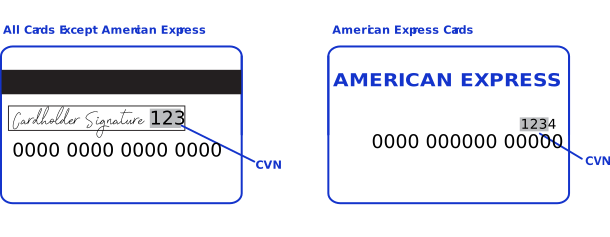
For most cards, the CVN is a three-digit number printed on the back of the card, to the
right of the signature field.
For American Express, the CVN is a four-digit number printed on the front of the
card above the card number.
Figure:
CVN Locations
Each payment card company has its own name for the CVN value:
- Mastercard calls it thecard validation code(CVC2).
- Visa calls it thecard verification value(CVV2).
International Transactions
Consider compliance and merchant remittance funding when processing international
transactions.
Compliance
Accepting payments from a country other than your own requires that you observe the
processing rules and practices of the payment systems in that country. This list describes
areas of compliance that are especially important:
- Merchant descriptor requirements—A merchant descriptor communicates merchant information to customers to remind them of the circumstances that triggered a payment. Merchant descriptors reduce the possibility of a chargeback. Accordingly, the merchant descriptor displayed on a customer’s statement should be a close match to the name on your website. It is not good practice to consolidate multiple websites into a single merchant account and use a generic descriptor that more-or-less covers all offerings.
- Excessive chargebacks—To prevent an excessive number of chargebacks, you must maintain good customer support, rapid problem resolution, a high level of customer satisfaction, and transaction management processes that minimize fraudulent transactions. When payment card chargebacks become excessive, you must change business processes to reduce chargebacks. If chargebacks are not reduced to a satisfactory level, your account can be terminated.
Merchant Remittance Funding
You can request that the transaction proceeds be converted to another currency. Currency
conversion uses a foreign exchange rate to calculate the conversion to the requested currency.
The foreign exchange rate might be explicitly stated as a rate or implicitly stated as a
transaction amount. The funded amount and can vary from day to day. The foreign exchange rate
might also include an increase for the foreign exchange risk, sales commissions, and handling
costs.
Payment Services
Various services are involved in processing payments.
These services enable customers to purchase goods and services. They also enable merchants to
receive payments from customer accounts, to provide refunds, and to void transactions.
Authorization
An authorization confirms that a payment card account holds enough funds to pay
for a purchase. Authorizations can be made online or offline.
Micropayment Authorization
Micropayments are payments for less than one unit in the transaction’s currency.
Cybersource
does not support micropayment authorizations for UATP
.Online Authorization
Online authorizations provide immediate confirmation of funds availability. The customer's
financial institution also reduces the amount of credit available in the customer's account,
setting aside the authorized funds for the merchant to capture at a later time. Authorizations
for most payment cards are processed online. Typically, it is safe to start fulfilling the
order when you receive an authorization confirmation.
An
An online authorization confirmation
and the subsequent hold on funds expire after a specific length of time. Therefore it is
important to capture funds in a timely manner. The issuing bank sets the expiration time
interval, but most authorizations expire within 5 to
7 days.The issuing bank does not inform
Cybersource
when an authorization
confirmation expires. By default, the authorization information for each transaction remains
in the Cybersource
database for 180 days after the authorization date. To
capture an authorization that expired with the issuing bank, you can resubmit the
authorization request.Offline Authorization
Online transactions require an internet connection. In situations where the internet is not
available, for example, due to an outage, merchants can continue to take credit card payments
using offline transactions. An offline authorization is an authorization request for which you
do not receive an immediate confirmation about the availability of funds.
Offline authorizations have a higher level of risk than online transactions because they do
not confirm funds availability or set aside the funds for later capture. Further, it can take
up to 5 days to receive payment confirmations for offline transactions. To mitigate this risk,
merchants may choose to fulfill orders only after receiving payment confirmation.
Authorization Workflow
This image and description show the authorization workflow:

- The customer purchases goods or services from the merchant using a payment card.
- You send an authorization request over secure internet connection toCybersource. When the customer buys a digitally delivered product or service, you can request both the authorization and the capture at the same time. When the customer buys a physically fulfilled product, do not request the capture until you ship the product.
- Cybersourcevalidates the order information then contacts your payment processor and requests authorization.
- The processor sends the transaction to the payment card company, which routes it to the issuing bank for the customer's payment card. Some card companies, including Discoverand American Express, act as their own issuing banks.
- The issuing bank approves or declines the request.
- If funds are available, the issuing bank reserves the amount of the authorization request and returns an authorization approval toCybersource.
- If the issuing bank denies the request, it returns an authorization denial toCybersource.
- Cybersourceruns its own tests then tells you whether the authorization succeeded.
Sale
A sale is a bundled authorization and capture. Some processors and acquirers require a sale
transaction instead of using separate authorization and capture requests. For other processors
and acquirers, you can request a sale instead of a separate authorization and capture when you
provide the goods or services immediately after taking an order.
There are two types of sale processing: dual-message processing and single-message
processing.
Dual-Message Processing
Dual-message processing is a two-step process. The authorization is processed first. If the
authorization is successful, the capture is processed immediately afterward. The response
includes the authorization and the capture information. If the authorization is declined, the
capture is not processed, and the response message includes only the authorization
information.
Capture
A capture is a follow-on transaction to an authorization. It is used to transfer the
authorized funds from the customer's account to the merchant account. To link the
authorization transaction to the capture transaction, you include a request ID in your capture
request. This request ID is returned to you in the authorization response.
Captures are typically not performed in real time. They are placed in a batch file and sent
to the processor, and the processor settles all of the captures at one time. In most cases,
these batch files are sent and processed outside of the merchant's business hours. It usually
takes 2 to 4 days for the acquiring financial institution to deposit the funds into the
merchant account.
When fulfilling only part of a customer’s order, do not capture the full amount of the authorization. Capture only the cost of the delivered items. When you deliver the remaining items, request a new authorization, and then capture the new authorization.
IMPORTANT
It is not possible to perform a capture if a transaction is in a review state, which can
occur if you use a fraud management service. You must accept the transaction prior to capture.
For more information, see the fraud management documentation in
the
Business Center
.Capture Workflow
The capture workflow begins when you send a request for a capture.
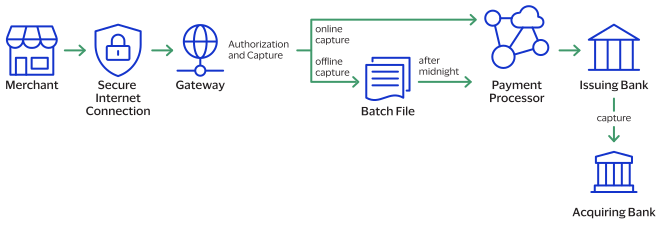
- The merchant sends a request for a capture to theCybersourcegateway.
- For online captures,Cybersourcevalidates the order information then sends an online capture to the payment processor.For offline captures,Cybersourcestores the capture request in a batch file and sends the batch file to the payment processor after midnight.
- The processor validates the request and forwards it to the issuing bank.
- The issuing bank transfers funds to the acquiring bank.
IMPORTANT
The payment processor does not notify
Cybersource
that the money has been transferred. To ensure that all captures
are processed correctly, you should reconcile your capture requests with the capture reports
from your processor.Refund
Refund
Refunds are payment refunds from a merchant to the cardholder after a
cardholder pays for a product or service and that payment is captured by the merchant. When a
refund request is successful, the issuer transfers funds from the merchant bank (acquirer)
account to the customer's account. It typically takes 2 to 4 days for the acquirer to transfer
funds from your merchant account.
There are two types of refunds: a
follow-on refund
that is linked to
an original capture or sale, and a stand-alone credit
that is not linked to an original
capture or sale.WARNING
You should carefully control access to your
refund and
credit services. Do not request this service directly from
your customer interface. Instead, incorporate this service as part of your customer service
process. This process reduces the potential for fraudulent transactions.Follow-on Refund
Follow-on Refund
Refunds, also known as
use the capture
request ID to link the refund to the original transaction. follow-on refunds
,This request ID is returned during the capture request (also known as a
The request ID links the transaction to the customer’s billing and account
information, so you are not required to include those fields in the settlement
) and is used in all subsequent refunds associated with the original
capture.refund
request.When you combine a request for a
refund
with a request for another service, such as the tax calculation service, you
must provide the customer’s billing and account information.Unless otherwise specified,
refunds
must be requested within 180 days of a settlement. You can request multiple
follow-on refunds
against a single
capture or sale transaction as long as the total amount does not exceed the original
purchase amount. To perform multiple follow-on refunds
, use the same request ID in each request.Stand-Alone Credits
Stand-alone credits are not connected to an original transaction. Stand-alone credits do
not have a time restriction, and they can be used to issue refunds more than 180 days after
a transaction settlement.
Refund and Credit Workflow
This workflow applies to follow-on credits, also known as refunds, and stand-alone credits.
It begins when you send a request for a refund or credit.
Refunds and credits do not happen in real time. All of the credit requests for a day are
typically placed in a file and sent to the processor as a single
batch
transaction. In
most cases, the batch transaction is settled overnight.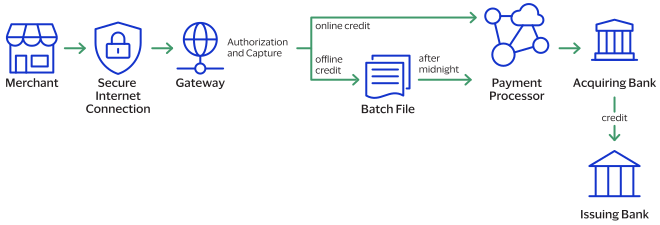
- The merchant sends the refund or credit request toCybersource.
- For online refunds and credits,Cybersourcevalidates the order information then sends the request to the payment processor.For offline refunds and credits,Cybersourcestores the request in a batch file and sends the batch file to the payment processor after midnight.
- The processor validates the request and forwards it to the acquiring bank.
- The acquiring bank transfers funds to the issuing bank.
IMPORTANT
Not all processors support stand-alone credits.
Void
A void cancels a capture or credit request that you submitted to
Cybersource
but has not already been submitted to your processor. Capture and credit requests are usually
submitted to your processor once a day, so your window for successfully voiding a capture or
credit request is small. A void request is declined when the capture or credit request has
already been sent to the processor.After a void is processed, you cannot credit or capture the funds. You must perform a new
transaction to capture or credit the funds. Further, when you void a capture, a hold remains
on the authorized funds. If you are not going to re-capture the authorization,
and if your processor supports authorization reversal after void
(ARAV),
you should request an authorization reversal to release the hold on the unused
funds.A void uses the capture or credit request ID to link the transactions. The authorization
request ID is used to look up the customer’s billing and account information, so there is no
need to include those fields in the void request. You cannot perform a follow-on credit
against a capture that has been voided.
Testing the Payment Services
To ensure that requests are processed correctly, you must test the basic success and error
conditions for each service you plan to use.
Requirements for Testing
Before you can test, contact customer support to activate the credit
card services and configure your account for testing. You must also contact your processor
to set up your processor account.
IMPORTANT
When building your connection to the
Cybersource
payment gateway, ensure that you have implemented controls to prevent card testing or card
enumeration attacks on your platform. For more information, see the best practices guide.
When we detect suspicious
transaction activity associated with your merchant ID, including a card testing or card
enumeration attack, Cybersource
reserves the right to enable fraud
management tools on your behalf in order to mitigate the attack. The fraud team might also
implement internal controls to mitigate attack activity. These controls block traffic that
is perceived as fraudulent. Additionally, if you are using one of our fraud tools and
experience a significant attack, our internal team might modify or add rules to your
configuration to help prevent the attack and minimize the threat to our infrastructure.
However, any actions taken by Cybersource
would not replace the need for you
to follow industry standard best practices to protect your systems, servers, and
platforms.Follow these requirements when you test your system:
- Use your regular merchant ID.
- Use a real combination for the city, state, and postal code.
- Use a real combination for the area code and telephone number.
- Use a nonexistent account and domain name for the customer’s email address.
- REST API test endpoint:POSThttps://apitest.cybersource.com/pts/v2/payments
Test Card Numbers
Use these payment card numbers to test the authorization, capture, and credit services.
Remove the spaces from the test card numbers when sending them to the test system. Do not use
real payment card numbers. To test card types that are not included in the list, use an
account number that is in the card’s BIN range. For best results, try each test with a
different service request and with different test payment card numbers.
IMPORTANT
The test card numbers that are provided are
formatted with Xs for zeroes in the card number. When testing with these card numbers, remove the spaces and replace each X with a 0 (zero).
- American Express—3782 8224 631X XX5
- Discover—6X11 1111 1111 1117
- JCB—3566 1111 1111 1113
- Maestro (International)
- 5X33 9619 89X9 17
- 5868 2416 0825 5333 38
- Maestro (UK Domestic)—the issue number is not required for Maestro (UK Domestic) transactions.
- 6759 4111 XXXX XXX8
- 6759 56XX 45XX 5727 054
- 5641 8211 1116 6669
- Mastercard
- 2222 42XX XXXX 1113
- 2222 63XX XXXX 1125
- 5555 5555 5555 4444
- UATP (CVV not required)
- 1354 1234 5678 911
- 1485 1234 5678 9X5
- Visa—4111 1111 1111 1111
Using Amounts to Simulate Errors
You can simulate error messages by requesting authorization, capture, or credit services with specific amounts that trigger the error messages. These triggers work only on the test server, not on the production server.
Each payment processor uses its own error messages.
For more
information, see:
REST API Testing Guide
Test American Express Card Verification
Before using CVN with American Express, it is strongly recommended that you follow these
steps:
- Contact customer support to have your account configured for CVN. Until you do this, you will receive a1in theprocessorInformation.cardVerification.resultCoderesponse field.
- Test your system in production using a small currency amount, such as one currency unit. Instead of using the test account numbers, use a real payment card account number, and send an incorrect CVN in the request for authorization. The card should be refused and the request declined.
Transaction Timeout Guidance
This topic provides guidance for handling scenarios in which a payment request submitted
to
Cybersource
does not return a definitive status because of a timeout
or other communication failure. It focuses on the most common timeout scenarios and
describes the supported mechanisms for determining the final transaction status.This guidance helps you minimize the operational and financial risks associated with an
uncertain transaction status. It addresses two common risks: how to treat an unknown
status as a failed transaction, which can result in false declines, and retrying a
transaction without first validating its status, which can lead to duplicate
authorizations or duplicate charges.
A timeout represents an unknown transaction status, which is not necessarily a
transaction failure.
Incorrect Timeout Handling Risks
Each payment timeout creates a moment of uncertainty. How your team handles that moment
determines whether it becomes a non-event, a customer complaint, a chargeback, or a lost
sale. This table describes what goes wrong, the customer experience, and your business
risk.
What Goes Wrong | Customer Experience | Business Risk |
|---|---|---|
The timeout is misread as a failure. You retry the transaction
immediately, and it is processed twice. | Customer sees two charges on their statement. | Chargeback, refund cost, trust damage, and potential dispute
fees. |
The timeout is misread as a failure. You present a payment-failed
message, and the customer abandons checkout. | Customer believes the card was declined. The customer tries another
payment method or abandons the purchase. | Lost revenue. The original payment might still be authorized on
the card. |
No unique transaction ID is present. As a result, duplicate detection
fails and multiple authorizations occur. | Multiple holds or charges appear on the same card for one
order. | Disputes, regulatory risk, and manual reconciliation
overhead. |
You configure the client timeout too short. As a result, you drop the
connection and the transaction status is unknown. | A spinner suddenly disappears with no clear result. | Unknown order status, manual intervention, and customer contact
with support. |
IMPORTANT
You must systematically resolve an unknown transaction status before
you take additional payment actions. Each recommendation transforms an uncertain
transaction status into an additional action.
Transaction Flow and Failure Taxonomy
A single payment authorization transaction traverses multiple independent
participants within the payment ecosystem. Each connection point can experience
latency, communication failures, or timeout conditions.
End-to-End Authorization Flow
The transaction passes through these participants:
- Cardholder to Merchant:The cardholder initiates a payment transaction through a website, mobile application, point-of-sale system, or digital wallet.
- Merchant toThe merchant submits the authorization request toCybersource:Cybersourcefor routing and processing.
- Processor routing:Cybersourceforwards the transaction to the appropriate processor.
- Card network routing:The processor routes the request through the applicable payment network.
- Issuer decision:The card issuer evaluates the transaction and returns an authorization decision.
The transaction must follow the same path in reverse to be successful. Any break in
that return path leaves the transaction status unknown to the merchant. This image
shows the end-to-end authorization flow:

These are the reason codes most relevant to timeout handling:
- General system error or server-side failure. The transaction status is unknown. Do not treat as a definitive failure. Perform a status check before any retry or an authorization reversal.ESYSTEM:
- Server-side timeout.ETIMEOUT:Cybersourcereceived the request but could not return a response within the processing window. The transaction status is unknown. Reconcile before retrying.
- Duplicate request declined.DUPLICATE_REQUEST:Cybersourceidentified the authorization as a duplicate of a previous request with the same merchant reference. Do not retry with the same reference, because the original transaction might have succeeded. Perform a status check first.
Timeout Scenarios and Recommended Actions
These are the four distinct timeout scenarios.
Scenario: Request Never Reached Cybersource
Cybersource
- Duplicate risk:none
- Condition:The request never reachedCybersourcebecause of a connection issue. As a result, you received no acknowledgment or response fromCybersource.
- Recommended Action:After a few seconds, perform a transaction status lookup using theclientReferenceInformation.codefield before you resubmit the authorization. If the lookup returns no transaction record, resubmit the original authorization request.
Scenario: Cybersource Internal Failure
Cybersource
Internal Failure- Duplicate risk:low
- Condition:Cybersourcereceives the request but cannot continue processing because a required internal service is timing out, for example Decision Manager, Token Management Service (TMS), Payer Authentication, or internal routing. Because the transaction never progresses into the downstream payment ecosystem,Cybersourcedoes not submit an authorization to the processor, card network, or issuer.Example: Internal Failure ResponseHTTP Status Code:502{ "id": "7871896614436518804807", "submitTimeUtc": "2026-08-20T01:34:21Z", "status": "SERVER_ERROR", "reason": "SERVICE_TIMEOUT", "message": "The request was received, but a service did not finish running in time" }
- Recommended Actions:
- Retry the authorization after a delay of approximately 30 seconds to allow any internal transient issue to resolve.
- If the error persists, place the authorization in a delayed resubmission queue if possible.
- Monitor for recovery by confirming successful processing of subsequent transactions or notification that the service issue is resolved.
- Once recovery is confirmed, resubmit the original authorization request from the delayed resubmission queue.
Scenario: Request Received, Processor Response Took Too Long
- Duplicate risk:high
- Condition:Cybersourceaccepted the request and invoked the authorization request to the processor, but did not get the response within the timeout period. As a result, the transaction might already have been approved even though the final status was not returned to you.Example: Processor Timeout ResponseHTTP Status Code:502{ "id": "7871927193766252604807", "submitTimeUtc": "2026-08-20T02:25:49Z", "status": "SERVER_ERROR", "reason": "SERVER_TIMEOUT", "message": "Error - The request was received but there was a server timeout. This error does not include timeouts between the client and the server." }
- Recommended Actions:
- Retry the authorization.
- For the first transaction since a timeout occurred,Cybersourceproactively initiates an automatic authorization reversal as a protective measure in case the original authorization was approved but the final status could not be confirmed.
- Perform a status lookup using the generated requestidreturned in the first authorization response after some time, and verify the final status of the automatic authorization reversal.
- If the authorization reversal status cannot be confirmed, check with the processor or contactCybersourcecustomer support.
Scenario: Approved, but Confirmation Never Received
- Duplicate risk:highest
- Condition:The authorization was approved, but you did not receive the response because of a connectivity or network issue, or because you use a short timeout window. This is the highest-risk scenario for duplicate charges.
- Recommended Actions:
- If you use a short timeout and plan to retry the authorization, wait up to 60 seconds before you take further action. Perform a transaction status lookup using the originalclientReferenceInformation.codeto determine the status of the original authorization request. If the transaction is found and approved, record the result.
- If you perform a second authorization before verifying the status of the original authorization, you must reverse the original authorization. Use the merchant ID in theclientReferenceInformation.transactionIdfield from the original authorization request to submit an authorization reversal. Alternatively, use merchant reference code in theclientReferenceInformation.codefield in transaction search to get the request ID and process the authorization reversal.Example: Reversal Using the Transaction IDEndpoint: POST /pts/v2/reversals { "clientReferenceInformation": { "transactionId": "987654321" }, "reversalInformation": { "amountDetails": { "totalAmount": "100.00", "currency": "ABC" } } }
Verifying a Transaction Status
There are three methods for determining the accurate status of a transaction before you
act on a timeout.
Transaction Search API
- When a timeout or communication failure occurs, use the REST API transaction search to determine whether the original authorization request was successfully processed.
- Query using the request ID whenever available.
- If the request ID is not available, query using the REST merchant reference codeclientReferenceInformation.codefield.
Transaction Search Best Practices
- Use the minimum date range required to locate a transaction. Avoid broad date-range searches when checking transaction status unless there is a specific business need.
- Do not use transaction search for high-volume or frequent status checks. This can result in rate limiting.
- For ongoing transaction status monitoring, use the payment status API where appropriate.
- Include only the search criteria necessary to identify the transaction.
- When searching for multiple request IDs, use the dedicated request ID filter instead of free-text search fields.
Example: Transaction Search Request
Endpoint: POST /tss/v2/searches
{
  "save": "false",
  "name": "Transaction Recovery Search",
  "timezone": "America/Chicago",
  "query": "clientReferenceInformation.code:{merchant_reference_code} AND submitTimeUtc:[NOW-1HOUR TO NOW/DAY+1DAY]",
  "offset": 0,
  "limit": 100,
  "sort": "id:asc,submitTimeUtc:asc"
}
For the full request and response schema and a list of
supported search fields, see the Transaction Search API
reference.
Business Center
Business Center
Use the
Business Center
when API-based verification is unavailable, or when a timeout
requires closer manual review, for example investigating a customer-reported
duplicate charge.IMPORTANT
Transaction search results might not be available immediately
after a transaction is submitted, because data propagation takes a few
seconds.
- Sign in to theBusiness Centerusing your credentials.
- SelectTransaction Search>Transaction Details.
- Search using the ID returned in theCybersourceresponse for the internal-failure and processor- timeout scenarios. For other scenarios, when there is no response fromCybersource, search using the merchant reference number, known as themerchant reference codein the API.
- Review the returned status, reason code, and timestamp to confirm the actual status.
- Apply the result exactly as an API response would be applied. Record the status, and resubmit only if no record exists.
Figure:
Searching by Request ID for a Failed
Authorization

Figure:
Searching by Request ID for a Failed Authorization and Its Automatic
Authorization Reversal
Searching by request ID returns both the failed authorization and the successful
automatic timeout authorization reversal for the processor timeout scenario.

Figure:
Searching by Merchant Reference
Number
Searching by merchant reference number, when no request ID is available, returns the
successful authorization and
Decision Manager
result.
Automated Payment Status Notifications
The payment events service uses a webhook to publish automated notifications for
transaction statuses to your endpoint. This reduces reliance on the
original synchronous response. This is a safety net that complements, and does not
replace, the transaction status verifications described in this section.
Setup
- Enroll in the payment events service and create a webhook subscription.
- Provide a secure URL that is capable of receiving inbound POST notifications in real time.
- Acknowledge receipt of the notification immediately and process the event data asynchronously.
Behavior
- You submit a transaction and the synchronous response is delayed or lost.
- The transaction completes on theCybersourceside, andCybersourcepublishes the transaction status as a payment event.
- Your webhook endpoint receives the notification, including the transaction ID, merchant reference code, and final transaction status.
- Reconcile the event payload against your own records.
For more information about the webhooks service, see
Webhooks Developer Guide
.Layered Timeout Model
Cybersource
follows a layered timeout model based on a monotonic timeout
hierarchy, where each outer layer waits slightly longer than the layer it depends on.
This ensures that when an inner component times out first, Cybersource
receives a clear timeout response and can take appropriate action. If you reverse the
timeout order, you might abandon a request that is still being processed. This creates
the risk that you incorrectly treat a completed transaction as a failure and retry it.
Cybersource
determines timeout values based on observed production
latency, processor performance characteristics, and operational behavior, and
periodically adjusts them.This table describes each timeout layer, typical wait times, and rationale for the each
time setting.
Layer or Control | Typical Wait Time | Rationale |
|---|---|---|
Merchant to Cybersource | 60 seconds or more | Your timeout should be longer than the Cybersource
processing timeout to ensure that Cybersource can return
a definitive response before you abandon the request. |
Cybersource internal service | 5 to 10 seconds | The Payment Orchestrator uses these timeouts to call internal
services such as Decision Manager and Token Management
Service. |
Cybersource to processor | 30 seconds | Cybersource implements a fail-fast strategy for
processor communications. Cybersource establishes timeout thresholds on a
per-processor basis and evaluates them using processor response
times, timeout rates, transaction volumes, and processor-specific
operational characteristics. This approach aligns with processor
guidance and enables Cybersource to quickly
identify unreachable endpoints while minimizing unnecessary
processing delays. |
Retry and Duplicate Transaction Prevention
Payment timeouts and communication failures can create uncertainty about the status of a
transaction. You might receive a timeout response even though the transaction was
successfully processed by
Cybersource
, the processor, or the issuer. In
these situations, immediately resubmitting the original request can result in duplicate
authorizations, captures, or charges. Implementing retry mechanisms are therefore
essential to balance transaction recovery with duplicate prevention. Before retrying a
payment operation, determine the transaction status whenever possible and apply
controlled retry practices to minimize the risk of duplicate processing.To reduce this risk, use these methods:
- Merchant reference codes to support authorization duplicate detection.
- Transaction IDs to support timeout recovery, transaction lookups, authorization reversals, voids, and reconciliation.
Merchant Reference Code and Duplicate Transaction Detection
For authorization processing,
Cybersource
uses the clientReferenceInformation.code
field that you provided to identify duplicate
authorization requests. A duplicate authorization might be declined with reason code
104
.For the API field description, see API Fields: Merchant Reference Code.
Enabling Block Duplicate Merchant Reference Numbers
Where the capability is supported for your configuration, you can enable your account to
block duplicate merchant reference codes, also known as merchant reference numbers,
rather than submitting a customer support request. This prevents duplicate
authorization requests with the same merchant reference code submitted within 15
minutes of the original authorization.
Follow these configuration steps in the
Business Center
:- Log in to theBusiness Center.
- Go to Template Management or Manage Merchants.
- Locate theBlock Duplicate Merchant Reference Numbersetting.
- SetenableDuplicateMerchantReferenceNumberBlockingtotrue.
- Save and apply the configuration to the merchant profile.
You can also manage this capability programmatically through the
Merchant Boarding API. For more information, see
Merchant Boarding Developer Guide
Transaction ID for Timeout Recovery and Lifecycle Management
The transaction ID in the
clientReferenceInformation.transactionId
field restricts duplicate transaction
processing, locates transactions after a timeout, supports authorization reversal
and void requests, and assists with reconciliation and operational investigations.
Unlike the merchant reference code, which is used primarily for authorization
duplicate detection, the transaction ID remains associated with the transaction
throughout its lifecycle and recovery processes.The transaction ID applies to:
- Authorization
- Credit
- Refund
- Sale
For the API field description, see
Cybersource
API Fields reference:
Transaction ID.IMPORTANT
This capability is broadly available across most payment
processors, except these processors:
- AIBMS
- Barclays
- Cielo
- Comercio Latino
- Elavon
- FDC Compass
- FDC Nashville Global
- Fiserv RapidConnect
- HSBC
- LloydsTSB Cardnet
- Moneris
- Lloyds-OmniPay
- Rede
- Worldpay VAP
Client Retry Backoff
When a request fails because of a temporary network or service issue, avoid immediately
resubmitting the same request multiple times. Instead, space retry attempts with
progressively longer delays between each attempt. This approach helps reduce
pressure on downstream systems during periods of degraded performance, allows them
time to recover, and helps prevent additional load that could worsen the
disruption.
A typical retry backoff strategy includes:
- Initial delay:Wait a short period before the first retry attempt.
- Increasing delays:Increase the wait time between successive retries rather than retrying at a fixed interval.
- Maximum delay:Limit the maximum wait time between retries to avoid excessively long delays.
- Randomized timing (jitter):Introduce small random variations in retry timing to prevent large numbers of clients from retrying simultaneously.
- Retry limits:Cap the number of retry attempts or the overall retry duration before escalating to status validation, reconciliation, or operational review.
Use retry backoff only for transient failures where a subsequent attempt might succeed.
When the status of a payment transaction is unknown, determine the final
transaction status before submitting another payment request.
Reversal Strategy and Recovery Failure Handling
When the status of a payment transaction cannot be fully determined, the objective is to
prevent duplicate charges while ensuring that the final transaction status is accurately
resolved. This happens in two stages: first, choosing and executing the correct recovery
action for the original transaction; second, recognizing that the recovery action itself
is a network operation subject to the same failures, and handling that possibility the
same way.
Select the Correct Recovery Method
Each recovery method applies to a specific point in the transaction lifecycle:
- Authorization reversalreleases an approved authorization that has not yet been captured.
- Voidcancels a transaction that exists but has not yet been submitted for settlement.
- Refundreturns funds for a transaction that has already been captured or settled.
Consider the Transaction Lifecycle
Base your recovery choice on the current transaction lifecycle stage:
- If the transaction is authorized but not captured, an authorization reversal is typically appropriate.
- If the transaction is captured but not yet settled, a void might be supported.
- If the transaction has been settled, a refund is required.
Confirm Transaction Status Before Reversing
Follow these steps before you reverse a transaction:
- Determine whether the original transaction was processed.
- Confirm the current transaction status.
- Execute the appropriate recovery action.
- Verify that the recovery action completed successfully.
Cybersource Automatic Authorization Reversal
Cybersource
Automatic Authorization ReversalFor supported processor integrations,
Cybersource
might automatically
submit an authorization reversal when the authorization status cannot be determined
because of issuer, network, or processor communication failures.IMPORTANT
When a timeout occurs,
Cybersource
designs recovery
mechanisms to preserve Level II and Level III and currency-related transaction data,
reducing the risk of interchange impacts caused by incomplete or lost transaction
attributes. You must include Level II and Level III fields on the original authorization
request so that this data is available in case of an automatic authorization
reversal.When the Status of an Authorization Reversal or Void Request Is Unknown
When the status of a recovery operation is unknown because of a timeout or
communication failure, validate the transaction status using the original
transaction ID and merchant reference code before taking additional action.
This lookup is read-only against
Cybersource
transaction records
and does not require resubmission of the original payment request.Authorization Reversal or Void
Cybersource
permits only one successful authorization reversal or
void per transaction, so a retried request produces one of these results:- IfCybersourceaccepts a retried authorization reversal or void request, it did not successfully process the original authorization or void.
- IfCybersourcerejects a retried authorization reversal or void request because the transaction has already been reversed or voided, it already successfully processed the original authorization reversal or void and correctly prevented the duplicate request.
- In this scenario, no additional authorization reversal or void action is required.
Refund
Refund processing requires additional care to avoid supporting multiple refunds
against the same captured transaction. Consider these points:
- Unlike authorization reversals and voids, a successfully processed refund does not prevent a subsequent refund from being submitted.
- Therefore, when the status of a refund request is unknown, validate the transaction status before submitting another refund.
- Failure to perform a status check might result in an unintended duplicate refund.
- If a duplicate refund is identified before settlement, you might be able to void the refund, subject to processor capabilities and settlement timing.
Reconciliation Sweep
The reconciliation sweep process acts as the final safety net for transactions that
cannot be conclusively resolved through online recovery mechanisms. Reconcile
Cybersource
records against authorization, capture, reversal,
refund, and settlement records using available correlation data such as merchant
reference number, transaction ID, amount, currency, and available payment reference
values.Identify unresolved transactions, duplicate processing activity, and recovery
operations in which the transaction status cannot be confirmed. Based on the
transaction status and processor capabilities, perform one of these actions:
- Initiate an automated late recovery action where permitted.
- Route unresolved cases to an operational review queue for manual investigation and resolution.
Reconciliation provides the final confirmation of transaction status and serves as
the last line of defense against unresolved duplicates, failed recovery actions,
and communication failures.
Recommended Approach
Cybersource
recommends pairing bounded, status-checked retries with
an automated reconciliation sweep against settlement. This combination catches lost
authorization s without requiring manual intervention. Retrying alone, without a
reconciliation process behind it, leaves genuinely charged but unresolved cases
unaddressed.Preventing Queue Cascades and System Overload
Correct handling of individual transaction timeouts is only part of a resilient
payment architecture. Under sustained latency or downstream service degradation,
requests can accumulate across multiple layers.
Cybersource Controls
Cybersource
ControlsCybersource
protects its system stability with bounded queues and
connection pools, circuit breakers that pause traffic to a struggling downstream
dependency and resume it only after recovery, and load shedding that returns
HTTP 429
or HTTP 503
with
Retry-After
guidance rather than accepting more work than it
can handle. Each response indicates whether an operation is safe to retry, and
Cybersource
is set up to avoid a request to hold a processing
resource beyond its allocated timeout.Your Controls
Apply these controls on your side:
- Implement bounded queues and connection pools for all payment traffic.
- Use circuit breakers to protect your applications fromCybersourceslowdowns.
- RespectRetry-Afterand other retry guidance.
- Apply exponential backoff with jitter to all retry operations.
- Cap concurrent in-flight requests during degraded operating conditions.
- Move recovery workflows to asynchronous processing queues rather than user-facing request threads.
Avoiding the Asymmetric Recovery Trap
Apply these safeguards:
- Rate limit recovery operations.
- Control retry traffic independently from new transaction traffic.
- Bound background recovery queue throughput.
- Prioritize correctness over speed in recovery processing.
IMPORTANT
The objective is not to retry failed transactions indefinitely.
The objective is to maintain system stability while enabling safe recovery through
controlled retries, reconciliation, and recovery workflows.
Exception Handling Recommendations
These tables provide detailed, transaction-type-specific guidance for handling
exceptions, timeouts, and recovery scenarios during authorization, capture,
authorization reversal or void, and credit or refund processing. They are operational
reference material intended for engineering, support, and operations teams who are
resolving live exceptions.
Scenario | Expected Behavior | Recommended Actions |
|---|---|---|
The authorization request never reaches Cybersource
because of a network, Domain Name System (DNS), or Transport Layer
Security (TLS) failure. | No transaction record is created at Cybersource . No downstream authorization is
submitted. | Confirm that the failure is client-side. Wait for connectivity.
Perform a status lookup to confirm no record exists. Retry safely using
the same transaction ID. |
A Cybersource internal dependency fails (Decision Manager , Token Management Service , or payer
authentication). | A hard decline is returned immediately. The transaction never
reaches the processor, network, or issuer. | No status check is needed, because the transaction status is known.
Verify the failed dependency, then resubmit with the same transaction
ID. |
A timeout occurs before the processor, network, or issuer
responds. | Cybersource returns 151 or
ETIMEOUT . The status is unknown. An automatic
authorization reversal might be triggered. | Do not retry immediately. Wait for the Cybersource processing window. Perform a status lookup
through the transaction search API. Reconcile if
unresolved. |
The authorization is approved by the issuer, but the response is
lost. | The authorization exists and is valid on the card, but you never
received confirmation. The status is already known and approved. No
automatic authorization reversal condition applies here because
automatic authorization reversal addresses the case where the status is
unknown to Cybersource . | Do not resubmit. Perform a status lookup using the original
transaction ID. Record the result after you confirm it. |
The authorization is declined by the issuer, but the response is
lost. | No charge exists. This is a safe end-state, but you are
unaware. | Perform a status lookup to confirm the decline. Once confirmed,
it is safe to request an alternate payment method. |
You submitted a duplicate authorization before the original is
resolved. | Two authorizations might exist on the card
simultaneously. | Verify the duplicate transaction using a transaction ID or merchant
reference code match. Reverse the duplicate transaction, never the
original. |
The automatic authorization reversal confirmation is lost. | The reversal might have succeeded or failed at the processor. The
status is unknown to Cybersource and you. | Apply the recovery pattern described earlier in this topic: validate
the transaction status on the reversal itself, then submit the
transaction for reconciliation to determine its final status. |
Scenario | Expected Behavior | Recommended Actions |
|---|---|---|
The capture request never reaches Cybersource . | No capture record is created. The authorization remains open or
uncaptured. | Confirm the client-side failure. Perform a status lookup. If no
record exists, retry with the same transaction ID. |
The capture times out downstream. | The settlement status is unknown. The authorization might or
might not have been captured. | Do not retry immediately. Perform a status lookup. Confirm using
the settlement report if still unresolved. Reconcile. |
The capture succeeds, but confirmation is lost. | Funds are captured. Only the response is missing. | A status lookup confirms the captured state. Record the result. No
retry or authorization reversal is needed. |
The capture fails because the authorization expired or the amount
mismatched, and the response is lost. | A real decline occurred, but you see only a timeout. | A status lookup reveals the true decline reason. Address the
root cause before you resubmit. |
The authorization is approved, but the capture timed out. | This is an ambiguous state. The authorization is valid, but the
capture status is unconfirmed. | Treat as approved but unsettled. It might settle or reverse
depending on the downstream status. Verify using the settlement
report, then choose retry-capture or reverse-authorization. |
The capture is retried without a status check. | There is a risk of duplicate capture, or double billing, on the
customer's card. | Always perform a status check before you retry. If a duplicate
occurs, refund or void only the later capture. |
The capture succeeds, but the settlement report shows a later
discrepancy. | The settlement record is different from the status you
expected. | Route to the reconciliation sweep. Match on the merchant ID,
amount, currency, and card reference. |
Scenario | Expected Behavior | Recommended Actions |
|---|---|---|
The reversal or void request never reaches Cybersource . | No reversal record is created. The original authorization
remains active and open. | Confirm that the failure is client-side. Perform a status lookup on
the reversal. If no record exists, resubmit the reversal using the same
transaction IDs. |
The reversal times out downstream (processor, network, or
issuer). | The status of the reversal is unknown. The original
authorization might or might not have been released. | Do not retry immediately. Perform a status lookup through the
transaction search API on the reversal itself. Reconcile, if
unresolved. |
The reversal succeeds, but confirmation is lost. | The authorization was successfully released. Only the response
is missing. | A status lookup confirms the release. Record the result. No
further action is needed. |
The reversal fails because you already captured or settled the
transaction, or the authorization expired, and the response is
lost. | The reversal was rejected outright, a real decline of the reversal
itself, but you see only a timeout. | A status lookup reveals the true rejection reason. If the
transaction has since settled, use refund or credit instead of a
reversal. |
You retry the reversal without a status check. | There is a risk of a duplicate reversal attempt against the same
authorization. | Always perform a status check before you retry. |
An automatic authorization reversal is already in progress when you
submitted a manual reversal. | Two reversal attempts, one automatic and one manual, might race
against the same authorization. | Confirm the automatic authorization reversal status before you submit a manual
reversal. Avoid duplicate reversal attempts on the same
authorization. |
You cannot confirm the reversal status after the recovery
window. | This is a genuinely unresolved state, with a risk that the
authorization remains held on the cardholder's account
indefinitely. | Submit the transaction for reconciliation to determine its final
status. If still unresolved, route to a manual operational
review. |
Scenario | Expected Behavior | Recommended Actions |
|---|---|---|
The refund request never reaches Cybersource . | No refund record is created. The settled transaction remains
unrefunded. | Confirm that the failure is client-side. Perform a status lookup. If
no record exists, retry the refund using the same transaction
ID. |
The refund times out downstream. | The refund status is unknown. It is unclear whether funds were
returned to the cardholder. | Do not retry immediately. Perform a status lookup. Confirm using
the settlement report if unresolved. Reconcile. |
The refund succeeds, but confirmation is lost. | Funds were returned. Only the response is missing. | A status lookup confirms the refunded state. Record the result.
No further refund is needed. |
The refund fails because it was already refunded or the amount
exceeds the captured amount, and the response is lost. | A real decline occurred, such as a duplicate or over-limit refund
attempt, but you see only a timeout. | A status lookup reveals the true decline reason before you
attempt any further recovery action. |
The refund is retried without a status check. | There is a risk of a duplicate refund, with funds returned to
the cardholder twice. | Always perform a status check before you retry, using the same
refund reference. |
Your Integration Responsibilities
This checklist defines your responsibilities for timeout handling. Use it as a
verification checklist during implementation reviews, quality assurance sign-off, and
go-live assessments:
- Set the client read timeout to 60 seconds or more, allowing sufficient time forCybersourceto return a definitive response before you terminate the request.
- Assign a unique merchant reference code in theclientReferenceInformation.codefield to each transaction and use that reference consistently for transaction processing, status validation, recovery activities, and reconciliation to support end-to-end traceability.
- On an unknown status, use the transaction search API and reporting or reconciliation data to determine the final transaction status before submitting another payment request. Avoid immediate resubmission and apply controlled retries with increased delays between attempts. Honor theRetry-Afterreason code and other retry guidance provided byCybersource.
- When a duplicate is identified, reverse the duplicate, not the original. Select void versus refund based on the current transaction lifecycle state. Confirm the charge exists before reversing.
- Implement appropriate resiliency controls, such as bounded concurrency, request throttling, circuit breakers, or asynchronous recovery processing, to prevent recovery activities from affecting customer-facing transaction flows.
- Treat reason codes151,ETIMEOUT, and267(deferred or pending timeout) as unknown, never as a definite failure or a definite success.
Best Practices
Always verify the transaction status through the Transaction Search API or the Business
Center before you retry, reverse, or communicate the transaction status to the customer.
If you identify duplicate transactions, apply an authorization reversal to the duplicate
transaction.
- Timeout events can occur because different participants in the payment ecosystem use different timeout values.
- Do not resubmit a transaction after a timeout without first searching or assessing the potential cause.
- Perform a transaction search to determine the actual status.
- Based on the search results, reverse duplicate transactions if you identify multiple successful transactions, and take no action if the transaction was completed successfully and no duplicate exists.
Standard Payment Processing
This section shows you how to process various authorization, capture, credit, and sales
transactions.
Basic Authorization
This section provides the information you need in order to process a basic
authorization.
All supported card types can process authorizations.
Endpoint
Production:
POST
https://api.cybersource.com
/pts/v2/paymentsTest:
POST
https://apitest.cybersource.com
/pts/v2/paymentsDeclined Authorization
If an authorization is declined, you can use response categories to help you decide whether
to retry or block a declined transaction. These response fields provide additional
information:
- paymentInsightsInformation.responseInsights.category
- paymentInsightsInformation.responseInsights.categoryCode
Category codes have possible values (such as
01
) each of which corresponds to a
category that contains a description. You cannot retry this category code and category:
- 01 ISSUER_WILL_NEVER_APPROVE
- 02 ISSUER_CANNOT_APPROVE_AT_THIS_TIME
- 03 ISSUER_CANNOT_APPROVE_WITH_THESE_DETAILS: Data quality issue. Revalidate data prior to retrying the transaction.
- 04 GENERIC_ERROR
- 97 PAYMENT_INSIGHTS_INTERNAL_ERROR
- 98 OTHERS
- 99 PAYMENT_INSIGHTS_RESPONSE_CATEGORY_MATCH_NOT_FOUND
Required Fields for Processing a Basic Authorization
- paymentInformation.card.type
REST Example: Processing a Basic Authorization
Request
{ "orderInformation": { "billTo": { "country": "US", "lastName": "Kim", "address1": "201 S. Division St.", "postalCode": "48104-2201", "locality": "Ann Arbor", "administrativeArea": "MI", "firstName": "Kyong-Jin", "email": "" }, "amountDetails": { "totalAmount": "100.00", "currency": "usd" } }, "paymentInformation": { "card": { "expirationYear": "2031", "number": "4111111111111111", "expirationMonth": "12", "type": "001" } } }
Response to a Successful Request
{
  "_links" : {
    "authReversal" : {
      "method" : "POST",
      "href" : "/pts/v2/payments/6461731521426399003473/reversals"
    },
    "self" : {
      "method" : "GET",
      "href" : "/pts/v2/payments/6461731521426399003473"
    },
    "capture" : {
      "method" : "POST",
      "href" : "/pts/v2/payments/6461731521426399003473/captures"
    }
  },
  "clientReferenceInformation" : {
    "code" : "1646173152047"
  },
  "id" : "6461731521426399003473",
  "orderInformation" : {
    "amountDetails" : {
      "authorizedAmount" : "100.00",
      "currency" : "usd"
    }
  },
  "paymentAccountInformation" : {
    "card" : {
      "type" : "001"
    }
  },
  "paymentInformation" : {
    "tokenizedCard" : {
      "type" : "001"
    },
    "card" : {
      "type" : "001"
    }
  },
 "paymentInsightsInformation" : {
    "responseInsights" : {
      "categoryCode" : "01"
    }
  },
  "processorInformation" : {
    "systemTraceAuditNumber" : "862481",
    "approvalCode" : "831000",
    "merchantAdvice" : {
      "code" : "01",
      "codeRaw" : "M001"
    },
    "responseDetails" : "ABC",
    "networkTransactionId" : "016153570198200",
    "consumerAuthenticationResponse" : {
      "code" : "2",
      "codeRaw" : "2"
    },
    "transactionId" : "016153570198200",
    "responseCode" : "00",
    "avs" : {
      "code" : "Y",
      "codeRaw" : "Y"
    }
  },
  "reconciliationId" : "6461731521426399003473",
  "status" : "AUTHORIZED",
  "submitTimeUtc" : "2022-03-01T22:19:12Z"
}
Response to a Declined Request
{ "clientReferenceInformation": { "code": "TC50171_3" }, "errorInformation": { "reason": "PROCESSOR_ERROR", "message": "Invalid account" }, "id": "6583553837826789303954","paymentInsightsInformation": { "responseInsights": { "categoryCode": "01", "category": "ISSUER_WILL_NEVER_APPROVE" } },"pointOfSaleInformation": { "amexCapnData": "1009S0600100" }, "processorInformation": { "systemTraceAuditNumber": "004544", "merchantNumber": "1231231222", "networkTransactionId": "431736869536459", "transactionId": "431736869536459", "responseCode": "111", "avs": { "code": "Y", "codeRaw": "Y" } }, "status": "DECLINED" }
Authorization with Line Items
This section shows you how to process an authorization with line items.
The main difference between a basic authorization and an authorization that includes
line items is that the
orderInformation.amountDetails.totalAmount
field, which is included in a basic
authorization, is substituted with one or more line items that are included in a
.lineItem[]
arrayFields Specific to this Use Case
These
fields
are required for each line item that you use:- orderInformation.lineItems[].unitPrice
- orderInformation.lineItems[].quantity
- orderInformation.lineItems[].productCode
- orderInformation.lineItems[].productSku
- Optional whenitem_#_productCodeis set todefault,shipping_only,handling_only, orshipping_and_handling
- orderInformation.lineItems[].productName
- Optional whenitem_#_productCodeis set todefault,shipping_only,handling_only, orshipping_and_handling
At a minimum, you must include the
orderInformation.lineItems[].unitPrice
field in order to include a line
item in an authorization. When this field is the only field included in the
authorization, the system sets:- orderInformation.lineItems[].productCode:default
- orderInformation.lineItems[].quantity:1
For example, these three line items are valid.
"orderInformation": {
  "lineItems": [
    {
      "unitPrice": "10.00"
    },
    {
      "unitPrice": "5.99",
      "quantity": "3",
      "productCode": "shipping_only"
    },
    {
      "unitPrice": "29.99",
      "quantity": "3",
      "productCode": "electronic_good",
      "productSku": "12384569",
      "productName": "receiver"
    }
  ]
}
Endpoint
Production:
POST
https://api.cybersource.com
/pts/v2/paymentsTest:
POST
https://apitest.cybersource.com
/pts/v2/paymentsRequired Fields for Processing an Authorization with Line Items
REST Example: Processing an Authorization with Line
Items
Request
{ "currencyConversion": { "indicator": "Y" }, "paymentInformation": { "card": { "number": "4111111111111111", "expirationMonth": "12", "expirationYear": "2031" } }, "orderInformation": { "amountDetails": { "currency": "USD", "exchangeRate": ".91", "originalAmount": "107.33", "originalCurrency": "eur" }, "billTo": { "firstName": "John", "lastName": "Doe", "address1": "1 Market St", "locality": "san francisco", "administrativeArea": "CA", "postalCode": "94105", "country": "US", "email": "" }, "lineItems": [ { "unitPrice": "10.00" }, { "unitPrice": "5.99", "quantity": "3", "productCode": "shipping_only" }, { "unitPrice": "29.99", "quantity": "3", "productCode": "electronic_good", "productSku": "12384569", "productName": "receiver" } ] } }
Response to a Successful Request
{
  "_links": {
    "authReversal": {
      "method": "POST",
      "href": "/pts/v2/payments/6482385519226028804003/reversals"
    },
    "self": {
      "method": "GET",
      "href": "/pts/v2/payments/6482385519226028804003"
    },
    "capture": {
      "method": "POST",
      "href": "/pts/v2/payments/6482385519226028804003/captures"
    }
  },
  "clientReferenceInformation": {
    "code": "1648238551902"
  },
  "id": "6482385519226028804003",
  "orderInformation": {
    "amountDetails": {
      "authorizedAmount": "117.94",
      "currency": "USD"
    }
  },
  "paymentAccountInformation": {
    "card": {
      "type": "001"
    }
  },
  "paymentInformation": {
    "tokenizedCard": {
      "type": "001"
    },
    "card": {
      "type": "001"
    }
  },
  "processorInformation": {
    "systemTraceAuditNumber": "191521",
    "approvalCode": "831000",
    "merchantAdvice": {
      "code": "01",
      "codeRaw": "M001"
    },
    "responseDetails": "ABC",
    "networkTransactionId": "016153570198200",
    "consumerAuthenticationResponse": {
      "code": "2",
      "codeRaw": "2"
    },
    "transactionId": "016153570198200",
    "responseCode": "00",
    "avs": {
      "code": "Y",
      "codeRaw": "Y"
    }
  },
  "reconciliationId": "6482385519226028804003",
  "status": "AUTHORIZED",
  "submitTimeUtc": "2022-03-25T20:02:32Z"
}
Sale
This section provides the information you need in order to process a sale
transaction.
A sale combines an authorization and a capture into a single transaction.
Endpoint
Production:
POST
https://api.cybersource.com
/pts/v2/paymentsTest:
POST
https://apitest.cybersource.com
/pts/v2/paymentsRequired Fields for a Sale
- Set the value totrue.
REST Example: Sale
Request
{ "processingInformation": { "capture": true }, "orderInformation" : { "billTo" : { "country" : "US", "lastName" : "VDP", "address1" : "201 S. Division St.", "postalCode" : "48104-2201", "locality" : "Ann Arbor", "administrativeArea" : "MI", "firstName" : "RTS", "email" : "" }, "amountDetails" : { "totalAmount" : "100.00", "currency" : "usd" } }, "paymentInformation" : { "card" : { "expirationYear" : "2031", "number" : "4111111111111111", "expirationMonth" : "12", "type" : "001 } } }
Response to a Successful Request
Most processors do not return all of the fields that are shown in this
example.
{
  "_links" : {
    "void" : {
      "method" : "POST",
      "href" : "/pts/v2/payments/6485004068966546103093/voids"
    },
    "self" : {
      "method" : "GET",
      "href" : "/pts/v2/payments/6485004068966546103093"
    }
  },
  "clientReferenceInformation" : {
    "code" : "RTS-Auth"
  },
  "id" : "6485004068966546103093",
  "orderInformation" : {
    "amountDetails" : {
      "totalAmount" : "100.00",
      "authorizedAmount" : "100.00",
      "currency" : "usd"
    }
  },
  "paymentAccountInformation" : {
    "card" : {
      "type" : "001"
    }
  },
  "paymentInformation" : {
    "tokenizedCard" : {
      "type" : "001"
    },
    "card" : {
      "type" : "001"
    }
  },
  "processorInformation" : {
    "systemTraceAuditNumber" : "841109",
    "approvalCode" : "831000",
    "merchantAdvice" : {
      "code" : "01",
      "codeRaw" : "M001"
    },
    "responseDetails" : "ABC",
    "networkTransactionId" : "016153570198200",
    "retrievalReferenceNumber" : "208720841109",
    "consumerAuthenticationResponse" : {
      "code" : "2",
      "codeRaw" : "2"
    },
    "transactionId" : "016153570198200",
    "responseCode" : "00",
    "avs" : {
      "code" : "Y",
      "codeRaw" : "Y"
    }
  },
  "reconciliationId" : "6485004068966546103093",
  "status" : "AUTHORIZED",
  "submitTimeUtc" : "2022-03-28T20:46:47Z"
}
Capture
This section describes how to capture an authorized transaction.
Endpoint
Production:
POST
https://api.cybersource.com
/pts/v2/payments/{id}
/capturesTest:
POST
https://apitest.cybersource.com
/pts/v2/payments/{id}
/capturesThe is the transaction ID
returned in the authorization response.
{id}
Required Fields for Capturing an Authorization
- This field value maps from the original authorization, sale, or credit transaction.
REST Example: Capturing an Authorization
Request
{
    "clientReferenceInformation": {
        "code": "ABC123"
    },
    "orderInformation": {
        "amountDetails": {
            "totalAmount": "100.00",
            "currency": "EUR"
    }
}
Response to a Successful Request
{
    "_links": {
        "void": {
            "method": "POST",
            "href": "/pts/v2/captures/6662994431376681303954/voids"
        },
        "self": {
            "method": "GET",
            "href": "/pts/v2/captures/6662994431376681303954"
        }
    },
    "clientReferenceInformation": {
        "code": "1666299443215"
    },
    "id": "6662994431376681303954",
    "orderInformation": {
        "amountDetails": {
            "totalAmount": "100.00",
            "currency": "EUR"
        }
    },
    "reconciliationId": "66535942B9CGT52U",
    "status": "PENDING",
    "submitTimeUtc": "2022-10-20T20:57:23Z"
}
Follow-On Refund
Refund
This section provides the information you need in order to process a follow-on
refund
, which is linked to a capture or sale. You must request a follow-on refund
within 180 days of the authorization or sale.Endpoint
Production:
POST
https://api.cybersource.com
/pts/v2/payments/{id}
/refundsTest:
POST
https://apitest.cybersource.com
/pts/v2/payments/{id}
/refundsThe is the transaction ID
returned in the capture or sale response.
{id}
Required Fields for Processing a Refund
Refund
REST Example: Processing a Refund
Request
{
    "orderInformation": {
        "amountDetails": {
            "totalAmount": "100.00",
            "currency": "EUR"
        }
    }
}
Response to a Successful Request
{
    "_links": {
        "void": {
            "method": "POST",
            "href": "/pts/v2/credits/6699964581696622603955/voids"
        },
        "self": {
            "method": "GET",
            "href": "/pts/v2/credits/6699964581696622603955"
        }
    },
    "clientReferenceInformation": {
        "code": "1669996458298"
    },
    "creditAmountDetails": {
        "currency": "eur",
        "creditAmount": "100.00"
    },
    "id": "6699964581696622603955",
    "orderInformation": {
        "amountDetails": {
            "currency": "EUR"
        }
    },
    "paymentAccountInformation": {
        "card": {
            "type": "001"
        }
    },
    "paymentInformation": {
        "tokenizedCard": {
            "type": "001"
        },
        "card": {
            "type": "001"
        }
    },
    "processorInformation": {
        "approvalCode": "888888",
        "networkTransactionId": "016153570198200",
        "responseCode": "100"
    },
    "reconciliationId": "61873329OAILG3Q6",
    "status": "PENDING",
    "submitTimeUtc": "2022-12-02T15:54:18Z"
}
Stand-Alone Credit
This section shows you how to process a credit, which
is not linked to a capture or sale. There is no time limit for requesting a credit.
Endpoint
Production:
POST
https://api.cybersource.com
/pts/v2/credits/Test:
POST
https://apitest.cybersource.com
/pts/v2/credits/Required Fields for Processing a Credit
REST Example: Processing a Stand-Alone Credit
Request
{ "orderInformation" : { "billTo" : { "country" : "US", "lastName" : "Kim", "address1" : "201 S. Division St.", "postalCode" : "48104-2201", "locality" : "Ann Arbor", "administrativeArea" : "MI", "firstName" : "Kyong-Jin", "email" : "" }, "amountDetails" : { "totalAmount" : "100.00", "currency" : "eur" } }, "paymentInformation" : { "card" : { "expirationYear" : "2031", "number" : "4111111111111111", "expirationMonth" : "12" } } }
Response to a Successful Request
{
    "_links": {
        "void": {
            "method": "POST",
            "href": "/pts/v2/credits/6663069906146706403954/voids"
        },
        "self": {
            "method": "GET",
            "href": "/pts/v2/credits/6663069906146706403954"
        }
    },
    "clientReferenceInformation": {
        "code": "1666306990717"
    },
    "creditAmountDetails": {
        "currency": "eur",
        "creditAmount": "100.00"
    },
    "id": "6663069906146706403954",
    "orderInformation": {
        "amountDetails": {
            "currency": "eur"
        }
    },
    "paymentAccountInformation": {
        "card": {
            "type": "001"
        }
    },
    "paymentInformation": {
        "tokenizedCard": {
            "type": "001"
        },
        "card": {
            "type": "001"
        }
    },
    "processorInformation": {
        "approvalCode": "888888",
        "networkTransactionId": "016153570198200",
        "responseCode": "100"
    },
    "reconciliationId": "66490108K9CLFJPN",
    "status": "PENDING",
    "submitTimeUtc": "2022-10-20T23:03:10Z"
}
Void a Payment
This section describes how to void a payment that was submitted but not yet processed by the
processor. A payment is also known as a sale, which is an authorization and capture in one API
request. Include the payment ID in the void request endpoint to cancel the payment.
Required Fields for Voiding a Payment
REST Example: Voiding a Payment
Request
{
    "clientReferenceInformation": {
        "code": "123456789012"
    }
}
Response to a Successful Request
{
    "submitTimeUtc": "2025-03-11T16:39:30Z",
    "processorInformation": {
        "approvalCode": "OK1272",
        "responseCode": "000"
    },
    "consumerAuthenticationResponse": {
        "systemTraceAuditNumber": "500036"
    },
    "orderInformation": {
        "amountDetails": {
            "authorizedAmount": "110.00"
        }
    },
    "message": "Successful transaction.",
    "clientReferenceInformation": {
        "code": "123456789012"
    },
    "reconciliationId": "000000050000771",
    "id": "7417111702443232235535",
    "_links": {
        "self": {
            "method": "GET",
            "href": "/pts/v2/voids/7417111702443232235535"
        }
    },
    "status": "VOIDED"
}
Void for a Capture or Credit
This section describes how to void a capture or credit that was submitted but not yet
processed by the processor.
Endpoints
Void a Capture
Production:
POST
https://api.cybersource.com
/pts/v2/captures/{id}
/voidsTest:
POST
https://apitest.cybersource.com
/pts/v2/captures/{id}
/voidsVoid a Credit
Production:
POST
https://api.cybersource.com
/pts/v2/credits/{id}
/voidsTest:
POST
https://apitest.cybersource.com
/pts/v2/credits/{id}
/voidsThe is the transaction ID returned during the
credit response.
{id}
Required Fields for Voiding a Capture or Credit
- Including this field is recommended, but not required.
REST Example: Voiding a Capture or Credit
Request
{
    "clientReferenceInformation": {
        "code": "test123"
    }
}
Response to a Successful Request
{
    "_links": {
        "self": {
            "method": "GET",
            "href": "/pts/v2/voids/6541933390746728203005"
        }
    },
    "clientReferenceInformation": {
        "code": "1654193339056"
    },
    "id": "6541933390746728203005",
    "orderInformation": {
        "amountDetails": {
        "currency": "USD"
        }
    },
    "status": "VOIDED",
    "submitTimeUtc": "2022-06-02T18:08:59Z",
    "voidAmountDetails": {
        "currency": "usd",
        "voidAmount": "100.00"
    }
}