On This Page
Secure Acceptance to Unified Checkout Migration Guide
Secure Acceptance
to Unified Checkout
Migration GuideThis section describes how to use this guide and where to find further information.
- Audience and Purpose
- This migration guide is written for merchants who want to update their payment processing system fromSecure AcceptancetoUnified Checkout. It provides an overview of the differences between the products and describes the migration process toUnified Checkoutand testing and validation procedures.
- Related Documentation
- Visit theCybersourcedocumentation hub to find additional technical documentation.
- Customer Support
- For support information about any service, visit the Support Center:
Recent Revisions to This Document
26.01.01
Updated the fields for migrating to the
Checkout API
. See Unified Checkout Payment Page Options.25.11.02
Removed
Click to Pay
as a supported feature for Secure Acceptance
.25.11.01
Initial release.
Introduction to Migrating from Secure Acceptance to Unified Checkout
Secure Acceptance
to Unified Checkout
Introduction to Unified Checkout
Unified Checkout
Unified Checkout
is an advanced, streamlined payment processing solution designed to enhance the customer experience and simplify merchant operations. This document provides a high-level overview to help existing merchants who use the Secure Acceptance
(Checkout API
and Hosted Checkout Integration
products) transition seamlessly to Unified Checkout
.Value of Unified Checkout
Unified Checkout
- Enhanced User Experience:
- A consistent and intuitive interface across all devices.
- Faster and smoother checkout process, reducing cart abandonment rates.
- Increased Conversion Rates:
- Optimized for mobile and desktop, ensuring higher conversion rates.
- Supports various payment methods, catering to a wider audience.
- Improved Security:
- Robust security features, includingToken Managementand fraud detection.
- Compliance with the latest PCI DSS standards.
- Card testing mitigation protection
- Duplicate transaction protection
- Streamlined Integration:
- Simplified API structure for easier implementation and maintenance.
- ModernRESTAPI interface
- Comprehensive developer resources and support.
- Unified Checkoutnormalizes the integration across payment types making adding payment methods & services simple
- Increased Payment Method Support:Designed to support card, and non-card payment options, offering clients a robust set of payment options and supporting scale both domestically and globally.
- Debit and credit card support for multiple global schemes
- eCheckACH Support (US and Canada)
- Click to Pay(Visa, Mastercard, American Express)
- Apple Pay
- Google Pay
- Paze
- Alternative Payment Methods
- Afterpay
- iDEAL
- Multibanco
Secure Acceptance and Unified Checkout Feature Comparison
Secure Acceptance
and Unified Checkout
Feature ComparisonThis topic provides key differences and a detailed comparison of features between
Secure Acceptance
and Unified Checkout
.Secure Acceptance | Unified Checkout |
|---|---|
Create Hash Value | Generate Capture Context |
Compile post message & post to new Page or embedded post | |
Capture Payment response through redirect | Response captured from Unified checkout JS |
Webhook implement webhook response with NVP | Webhook implement webhook response with JSON |
Feature Comparison
Secure Acceptance | Unified Checkout |
|---|---|
|
* Target availability. |
API Differences
This topic outlines the key differences between
Secure Acceptance
and Unified Checkout
APIs.Endpoint Changes
Secure Acceptance | Unified Checkout |
|---|---|
https://secureacceptance.cybersource.com/pay | https://api.cybersource.com /unified-checkout/v1/sessions |
https://secureacceptance.cybersource.com/token/create | https://api.cybersource.com /unified-checkout/v1/tokens |
Request/Response Format Changes
Secure Acceptance
:- Uses form-encoded data for requests.
- Responses are typically in HTML or form-encoded format.
Unified Checkout
:- Uses JSON for both requests and responses.
- Supports more detailed response structures.
Authentication Method Changes
Secure Acceptance
:- Uses a combination of profile ID, access key, and secret key.
- Requires signing requests with HMAC.
Unified Checkout
:- Uses OAuth 2.0 for authentication.
- Requires obtaining an access token before making API calls.
Migration Prerequisites
These are the account setup prerequisites for migrating from Secure Acceptance to Unified
Checkout:
- Enable Unified Checkout for all merchant IDs
- API keys for Unified Checkout
- Access to developer portal
Unified Checkout Payment Page Options
Unified Checkout
Payment Page OptionsImplementation Options
Unified Checkout
is designed to be placed within your existing
payment experience to offer a seamless payment journey without having to redirect
your clients to external web pages.These are the options depending on your current
Secure Acceptance
integration:Merchants leveraging Secure Acceptance through page redirects
Secure Acceptance
through page redirectsMerchants leveraging
Secure Acceptance
through page redirects have two options:- EmbedUnified Checkouton one of your existing pages
- Create a new payments page to integrateUnified Checkout
Merchants leveraging Secure Acceptance through iframe implementation
Secure Acceptance
through iframe implementationYou should be able to replace your existing
Secure Acceptance
implementation
with Unified Checkout
with minimal changes to your page.Checkout API migration
Checkout API
migrationUnified Checkout
has been created to be highly configurable and can be
tailored to have a very small form factor. If you are using Secure Acceptance
Checkout API
, you can continue to capture all the payment
information from within your own form except for the Payment information (PAN, CVV,
Expiration Date & Cardholder Name). You should replace these elements with
Unified Checkout
. When loading Unified Checkout
, you
can set BillingType=NONE
and
requestShipping=false
, but you must include the address information
in the capture context to ensure that the payment is processed successfully. Figure:
Manual Entry Payment Details
Migration Process: Secure Acceptance to Unified Checkout
Secure Acceptance
to Unified Checkout
Follow these steps to migrate your integration from
Secure Acceptance
to Unified Checkout
.This guide provides a step-by-step process for migrating your payment integration from
Secure Acceptance
to Unified Checkout
. Ensure you have completed the pre-migration checklist before proceeding.- ReviewUnified CheckoutDocumentation
ADDITIONAL INFORMATION
Familiarize yourself with the.Unified CheckoutOverview - Prepare Your Environment
ADDITIONAL INFORMATION
- Configure your Digital Payment options through theBusiness Center.
- Set up necessary REST API credentials from your merchant account using theGetting Started with REST Developer Guide.
- Update Integration
- Frontend Changes
ADDITIONAL INFORMATION
- ReplaceSecure Acceptanceforms withUnified Checkoutforms
- Implement the newUnified CheckoutJavaScript SDK for a seamless user experience
- Backend Changes
ADDITIONAL INFORMATION
- Update server-side code to handle new API endpoints and response structures
- Migrate existing payment flows to theUnified CheckoutAPI
- Test the Integration
ADDITIONAL INFORMATION
- Utilize the Sandbox Environment to test your integration thoroughly.
- Conduct end-to-end testing to ensure all payment flows work as expected.
- Go Live
ADDITIONAL INFORMATION
- Once testing is complete, switch to the production environment.
- Monitor transactions and user feedback to ensure a smooth transition.
Detailed Integration Steps
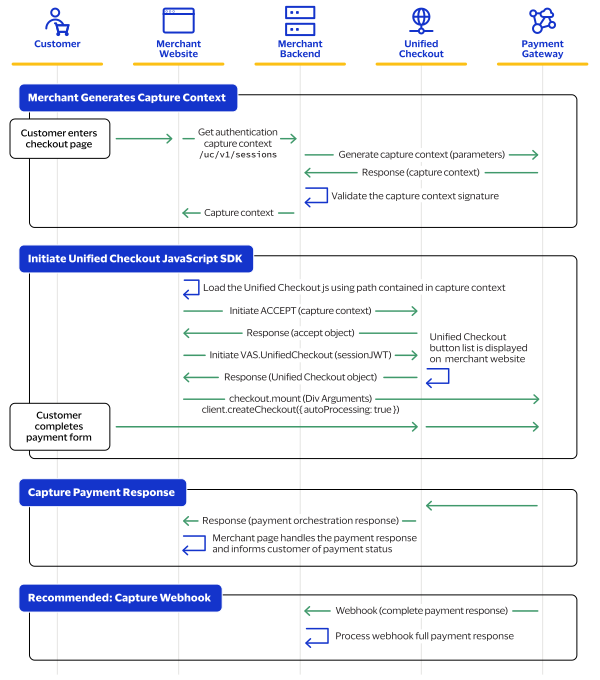
- Create a Capture Context API Call:
- This call replaces yourSecure Acceptancehash value.
- Refer to the Capture Context API Documentation for detailed instructions and examples.
- InitiateUnified Checkoutin Your Web Page:
- Unified Checkoutis initiated using a JavaScript-based application instead of the POST method used inSecure Acceptance.
- Implement theUnified CheckoutSDK on your webpage. See theUnified CheckoutSDK Guide for more information.
- Capture the Response on Your Web Page:
- Ensure your frontend captures the response from theUnified Checkoutprocess.
- Handle the response appropriately to update the user interface and communicate transaction status.
- Refer to the Response Handling Guide for best practices.
- Optional: Webhook implementation:
- Subscribe to theUnified Checkoutwebhook to receive the full payment details
Information that is captured by
Unified Checkout
, including the billing
and shipping address, can be retrieved using the payment details API.This figure shows the
Unified Checkout
payment flow.Figure:
Unified Checkout
Payment Flow Testing and Validation
This topic provides guidance on setting up a test environment, recommended test
scenarios, and how to validate a successful migration from
Secure Acceptance
to Unified Checkout
.Thorough testing and validation are crucial steps in ensuring a smooth migration from
Secure Acceptance
to Unified Checkout
. This process helps identify and
resolve issues before going live with the new integration.- Set up the test environment
ADDITIONAL INFORMATION
- Create a separateUnified Checkoutsandbox account for testing
- Configure your development environment to use the sandbox API endpoints
- Ensure you have test credit card numbers and other payment method details for various scenarios
- Prepare test data
ADDITIONAL INFORMATION
- Create a set of test orders with various amounts, currencies, and payment methods
- Prepare test customer data, including different countries and regions
- Set up test scenarios for successful transactions, declines, and error conditions
- Execute test scenarios
- Test basic payment flows
ADDITIONAL INFORMATION
- Process a successful payment using various payment methods
- Attempt transactions with invalid card numbers or expired cards
- Test behavior with insufficient funds
- Validate3-D Secure2.0 functionality
ADDITIONAL INFORMATION
- Process payments requiring3-D Secureauthentication
- Test both successful and failed3-D Secureauthentications
- Test error handling and edge cases
ADDITIONAL INFORMATION
- Simulate network errors and timeouts
- Test with missing or invalid request parameters
- Verify proper handling of duplicate transactions
- Validate webhook functionality
ADDITIONAL INFORMATION
- Confirm receipt of webhook notifications for various events
- Verify proper handling of webhook payloads in your system
- Perform integration testing
ADDITIONAL INFORMATION
- Test the entire payment flow from your application through toUnified Checkout
- Verify that order information is correctly passed toUnified Checkout
- Ensure that transaction results are properly recorded in your system
- Conduct user acceptance testing (UAT)
ADDITIONAL INFORMATION
- Involve business stakeholders in testing the new integration
- Verify that the checkout experience meets business requirements
- Test on various devices and browsers to ensure responsiveness
- Validate reporting and reconciliation
ADDITIONAL INFORMATION
- Confirm that transaction data is correctly reflected inUnified Checkoutreports
- Verify that your internal reporting systems can properly processUnified Checkoutdata
- Test any custom reconciliation processes you have in place
- Perform security testing
ADDITIONAL INFORMATION
- Conduct penetration testing on your integrated system
- Verify PCI DSS compliance of your new integration
- Test data encryption and tokenization features
- Document test results
ADDITIONAL INFORMATION
- Record the outcomes of all test scenarios
- Document any issues encountered and their resolutions
- Prepare a test summary report for stakeholders
RESULT
After completing these steps, you should have a thoroughly tested and validated
Unified Checkout
integration. Address any issues identified during
testing before proceeding with the production migration.Resources and Support for Unified Checkout Migration
Unified Checkout
MigrationThis topic provides links to key resources and information on how to get support during your migration to
Unified Checkout
.Support and Assistance
Should you need any assistance during the migration process, please reach out to our
support team.
Support: How to contact Client Services
Frequently Asked Questions about Unified Checkout
Unified Checkout
This topic provides answers to frequently asked questions about
Unified Checkout
and the migration process from Secure Acceptance
.Frequently Asked Questions
- How do I enableUnified Checkout?
- Unified Checkoutis enabled by your partner or through Client Support.
- How do I enable the payment methods required forUnified Checkout?
- Digital Payment options must be enrolled onto and configured by the merchant conducting the integration. Details on how to enable digital payment can be found in theUnified CheckoutConfiguration.
- How do I addUnified Checkoutto my mobile applications?
- Unified Checkoutis primarily built for web pages. However, it can be integrated into mobile applications through use of a WebView. Additionally, theCybersourceAcceptance platform has a number of additional products such asFlex APIthat can be used to power acceptance in mobile apps. For more information, visit https://github.com/cybersource
- What card types are supported onUnified Checkout?
- Support is dependent on your processing capability. See the current list atUnified CheckoutCard Types.
- What payment methods are supported onUnified Checkout?
- See the current list of supported payment methods atUnified CheckoutPayment Methods .