On This Page
pilot
Recognized Click to Pay Customer
This section provides an overview of the
Click to Pay
recognized
experience. This interaction occurs when a customer's device is recognized by Unified Click to Pay
using the remember me flow.A customer's device is recognized under these conditions:
- When the customer has usedClick to Payon their device through anyClick to Paychannel.
- If the customer chose to have their device remembered during a previous transaction.
Recognized customer devices use the following payment flow.
Figure:
Journey

- The customer checks theremember mesetting on the card-selection screen.
- Integrators send additional details on compliance settings in the checkout payload.
- On success, theUnified Click to PaySDK saves customer details on the consumer device.
- On the next visit to anyClick to Payinteraction, when passing the same customer details to get cards, the card lists are returned.
Find more details on code changes in the Use Case Dictionary.
Figure:
Recognized
Click to Pay
Customer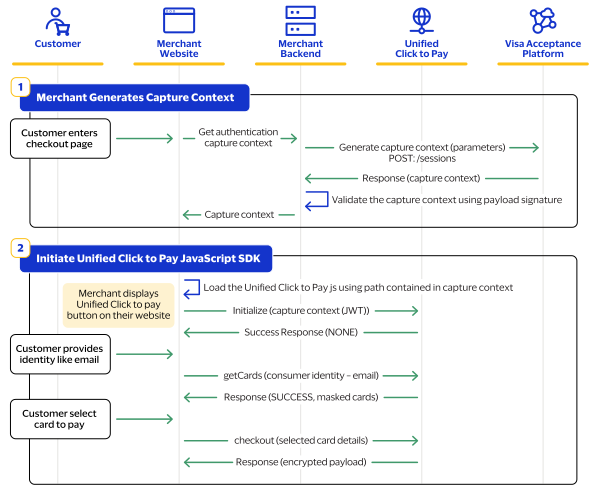
- Set up your server side by generating the capture context. For information about how to set up your server side, see Server-Side Set Up.
- Set up your client side by initiating theUnified Click to PayJavaScript SDK. For a recognized customer, you will load these functions from the SDK:
- initialize(capture context JWT)
- getCards(consumer identity - email)
- checkout(card details)