On This Page
Card Present Connect | Mass Transit Developer Guide
This section describes how to use this guide and where to find further
information.
- Audience and Purpose
- This guide is written for application developers who want to integrate payment processing for mass transit fare collection systems. These services are available using only the REST API.Implementing these services requires software development skills and knowledge and understanding of the card scheme mass transit rules. You must write code that uses the REST API request and response fields to integrate the payment services into your existing mass transit fare collection system.
- Conventions
- This statement is used in this document:IMPORTANTAnImportantstatement contains information essential to successfully completing a task or learning a concept.
- Customer Support
- For support information about any service, visit the Support Center:
Recent Revisions to This Document
26.06.01
- Revised and combined Mass Transit Transactions section and Mass Transit Transaction Workflows section into a new section: Mass Transit Models and Workflows.
26.02.01
- Updated debt recovery workflow descriptions in Debt Recovery Workflows.
- Added response field handling information for authorization requests that return theAUTH_DECLINE_CAPTURE_POSSIBLEvalue in theerrorInformation.reasonfield in Pre-Authorization with a Token.
- Combined two EMV data tables into one in EMV Data Elements and Tags.
25.12.01
This revision contains only editorial changes and no technical
updates.
25.04.1
Added Sample Test Cards. See Transit Test Cards.
Added transaction workflows with graphics. See China UnionPay Mass Transit Workflows.
Introduction to Card Present Connect | Mass Transit
Card Present Connect | Mass Transit is the
Cybersource
solution for
processing transactions using card scheme mass transit models. This solution follows
global card scheme standards for contactless EMV transit transactions.Transit Rider Benefits
These are some transit rider benefits:
- Retail-like contactless payment experience.
- Fast, contactless tap to enter and exit.
- Payment card data protection.
- Single, combined payment for multiple trips during a set period.
- Ability to request journey history and corresponding receipt.
- Travel fare total on payment card statements.
- Consistent fare collection experience across transit systems in various cities and countries.
Transit System Benefits
These are some mass transit systems benefits:
- Lower ticketing overhead that can reduce the need for ticket booths or paper tickets.
- Ability to track riders when they tap to enter and exit.
- Flexible fare management, including:
- Riders pay as they go.
- Fares are aggregated for one payment transaction each travel period.
- Merchant protection such as:
- Encrypted payment data.
- First Ride Risk support in some regions.
- Debt recovery support.
Mass Transit Terminology
- Aggregated
- Transaction in which you calculate the fare based on multiple contactless card taps for trips during a predetermined time period, usually 24 hours, processed as a single transaction.
- Back office
- A component within your transit systems that processes the taps received from transit readers, and that performs any or all journey construction, fare calculation, risk management, and payment processing.
- Card hash
- One-way hash token ID of the payment card data that is used to maintain the deny list.
- Combined data authentication (CDA)
- Authentication technique that uses a combination of card and transaction data.
- Deferred authorization
- Combined authorization and capture request, also known as a sale, for aggregated fare payments.
- Deny list
- List of cards that failed ODA because of an unsuccessful AVR or transit payment. It is used for blocking cards that have not been accepted for travel within your transit system when you are processing aggregated payments, such as the Mastercard PAYG and Visa MTT models.
- Deny list manager
- Manages the deny list and distributes it to the validators.
- First Ride Risk debt recovery
- Under specific and limited conditions established by the card schemes, you can recover the cost of the first ride by capturing a declined authorization. For details, refer to each of the card scheme's rules for mass transit chargeback thresholds and protection. See First Ride Risk.
- Instrument identifier token
- Token Management Servicetoken that stores the payment card number.
- Journey construction
- The process of analyzing individual taps received from transit readers and forming logical journeys performed by cardholders.
- Mobility and Transport Transaction (MTT)
- Visa model for contactless mass transit payments for single or multiple modes of transportation, which includes fixed, distance-based, and time-based fares.
- Offline data authentication (ODA)
- EMV security feature in which payment cards are authenticated offline. ODA is necessary so that cardholders can quickly tap and enter the transit system. It is used for aggregated transactions, such as Mastercard PAYG and Visa MTT.
- Pay As You Go (PAYG) for Mastercard
- Mastercard model in which the fare is not known when the cardholder taps their card for travel. All cardholder taps are recorded to calculate the fare and process an aggregated payment.
- Payment instrument token
- Token Management Servicetoken that stores the instrument identifier token, card expiration date, and billing address.
- Retail
- Transaction in which you process the payment as a standard contactless retail payment.
- Tap
- Refers to the act of presenting a contactless card at a validator.
- Ticket inspection
- Process in which ticket inspectors verify compliance with fare policies by checking paper tickets or using a portable terminal to read the payment card.
- Ticket inspectors
- Transit employees who travel on the transit system to verify passenger travel status.
- Transient token
- Unique, time-limited token ID that is associated with the tokens created by TMS. The validator forwards this ID to your back office to use for payment transactions and to manage tokens.Cybersourceautomatically deletes this token after seven days.
- Travel period
- Period of time during which a traveler can make multiple taps in and out of the transit system, before you submit the final payment transaction for the aggregated amount.
- Validator
- EMV contactless card-present terminal located at an automated turnstile device where cardholders tap their card to enter, and optionally exit from, the transit system. Before allowing the cardholder to enter the transit system, the validator checks the deny list to ensure that the card has not failed ODA.
Mass Transit Prerequisites
Before integrating
Cybersource
services for mass transit, you must have
these systems in place:- Merchant account with an acquirer that is enabled for mass transit transactions onVisa Platform Connect.
- Cybersourceaccount for payment services.
- Payment technology provider (PTP) that is integrated withCybersourceand can perform message-level validation (MLV).
- EMV Level 1 certified transit terminals and EMV Level 2 certified software in preparation for EMV Level 3 Certification.
First Ride Risk
First Ride Risk (FRR) is a feature that addresses the liability for the first use of a
payment credential that fails pre-authorization and might result in a refusal for
travel. Use FRR to capture a transaction even when the pre-authorization fails. In this
case, the merchant or acquirer assumes responsibility for the risk.
First Ride Risk Eligibility Reason Codes
When a failed pre-authorization returns one of these response codes in the
processorInformation.responseCode
field, the transaction is
eligible for FRR and capture: - 01: Refer to card issuers.
- 04: Pick-up.
- 05: ID certification fails.
- 12: Invalid related transaction.
- 13: Invalid amount.
- 14: Invalid card number (no such account).
- 21: Card not initialized.
- 22: Suspected malfunction, related transaction error.
- 34: Fraud.
- 38: PIN try limit exceeded.
- 40: Function requested not supported.
- 41: Lost card.
- 43: Stolen card.
- 57: Transaction not allowed to be processed by cardholder.
- 58: Transaction not allowed to be processed by terminal.
- 59: Suspected fraud.
- 62: Restricted card.
- 68: Issuer response timeout.
- 75: Allowable number of PIN tries exceeded.
- 90: Cutoff is in progress.
- 91: Issuer cannot process.
- 97: ATM/POS terminal number cannot be located.
- 98: Issuer response not received.
- 99: PIN block error.
- 1A: The transaction needs additional customer authentication.
- A0: MAC failed.
- N1: Items not on Bankbook beyond limit, declined.
- P1: Contact phone number of cardholder cannot be found in the issuer’s system.
EMV Data Elements and Tags
You can request these payment services for mass transit with EMV and card data:
- Sale for single fares and debt recovery.
- Authorization and capture for aggregate fares and debt recovery.
- First ride risk.
- Stand-alone credit.
The EMV Data Elements and Tags table lists details about EMV tags that are mandatory (M),
prohibited (P), optional (O), or conditional (C) for
China UnionPay
. Send a
conditional tag when it is present in the card and terminal.Data Element | EMV Tag | Length | Example Data | China UnionPay |
|---|---|---|---|---|
Transaction Currency Code | 5F2A | 02 | 0446 | M |
Application Interchange Profile | 82 | 02 | 2000 | M |
Terminal Verification Result
(TVR) | 95 | 05 | 0000000000 | M |
Transaction Date | 9A | 03 | 240109 | M |
Transaction Type | 9C | 01 | 03 | M |
Transaction Amount / Amount
Authorized | 9F02 | 06 | 000000001000 | M |
Amount Other | 9F03 | 06 | 000000000000 | M |
Issuer Application Data (IAD) | 9F10 | 08 | 0700010300000001 | M |
Terminal Country Code | 9F1A | 02 | 0156 | M |
Application Cryptogram (AC) | 9F26 | 08 | 5E3890A05B8F8BAF | M |
Cryptogram Information Data
(CID) | 9F27 | 01 | 80 | M |
Terminal Capabilities | 9F33 | 03 | 204040 | M |
Application Transaction Counter
(ATC) | 9F36 | 02 | 0006 | M |
Unpredictable Number | 9F37 | 04 | 30373634 | M |
Card Product Identification
Information | 9F63 | 10 | 36323130393433360020650000000000 | M |
Transit Test Cards
Description | Card 01 | Card 02 | Card 03 |
|---|---|---|---|
Test Card Scenario | PIN + Signature PIN preceding Non-matching Currency
Transaction CVM limit = 9999 | PIN + Signature PIN preceding Non-matching Currency
Transaction CVM not required CVM limit =
9999 | Apple Pay device wrong 9F46 Signature Non-matching
Currency Transaction CVM limit = 9999 Card Sequence
Number = 03 9F63 present |
Card Type | Credit | Qusi Credit | Credit |
PAN/Token | 621 094 388 801 5 | 621 094 366 600 002 5 | 817 199 997 700 004 0 |
PAR | / | / | 1D55503030323647324A524F53423858485
9553535364D5946595236564A |
Support ODA | YES | YES | YES |
PAN Len | 13 | 16 | 16 |
Curr | RMB | HKD | RMB |
Track 2 | 6210943888015= 30102010000000000000 | 6210943666000025= 30102010000000000000 | 8171999977000040= 30102010000000000000 |
CA Index | 08 | 9 | 0B |
9F08 | 0030 | 0030 | 0030 |
9F51 | 0156 | 0344 | 0156 |
DF71 | N/A | N/A | N/A |
9F52 | C000 | C000 | C000 |
qUICS CVN | 01 | 01 | 01 |
9F63 | N/A | N/A | 3831373139393939 00 80 30 40 00 00 00 00 |
9F68 | 1020D020 | 1020D020 | 10201020 |
DF61 | 40 | 40 | 40 |
CDCVM | N/A | N/A | N/A |
9F77 | 000000000000 | 000000000000 | 000000000000 |
9F78 | 000000000000 | 000000000000 | 000000000000 |
9F79 | 000000000000 | 000000000000 | 000000000000 |
9F6B | 000000999999 | 000000999999 | 000000999999 |
DF77 | N/A | N/A | N/A |
DF78 | N/A | N/A | N/A |
DF79 | N/A | N/A | N/A |
DF72 | N/A | N/A | N/A |
RSA Len | 768 | 1024 | 1408 |
9F46 | 04 | 04 | 94 |
9F10 | 07010103000000010A01 | 07010103000000010A01 | 07 02 01 03000000 01 0F 07 02 00000000008030400000000000 |
8E | 42031E031F00 | 42031E031F00 | 42031E031F00 |
Description | Card 04 | Card 05 |
|---|---|---|
Test Card Scenario | HCE device Signature Non-matching Currency
Transaction CVM not required CVM limit =
9999 CDCVM performed PAR
available AID=A0000003330101021111111111111110 9F63
present | Signature Non-matching Currency Transaction CVM not
required CVM limit = 9999 BIN NOT in deny
list |
Card Type | Qusi Credit | Credit |
PAN/Token | 621 094 366 600 000 005 6 | 621 094 344 406 6 |
PAR | / | / |
Support ODA | YES | YES |
PAN Len | 19 | 13 |
Curr | RMB | RMB |
Track 2 | 6210943666000000056=30102010000000000 | 6210943444066=30102010000000000000 |
CA Index | 0B | 0B |
9F08 | 0030 | 0030 |
9F51 | 0156 | 0156 |
DF71 | N/A | N/A |
9F52 | C000 | C000 |
qUICS CVN | 01 | 01 |
9F63 | 3632313039343336 00 20 65 00 00 00 00 00 | N/A |
9F68 | 10201020 | 10201020 |
DF61 | 40 | 40 |
CDCVM | YES | N/A |
9F77 | 000000000000 | 000000000000 |
9F78 | 000000000000 | 000000000000 |
9F79 | 000000000000 | 000000000000 |
9F6B | 000000999999 | 000000999999 |
DF77 | N/A | N/A |
DF78 | N/A | N/A |
DF79 | N/A | N/A |
DF72 | N/A | N/A |
RSA Len | 1408 | 1152 |
9F46 | 94 | 04 |
9F10 | 07 02 01 03000000 01 0D A1 00000000 0000000000000000 | 07010103000000010A01 |
8E | 42031E031F00 | 42031E031F00 |
Mass Transit Models and Workflows
The Mass Transit solution supports a variety of payment models and workflows for transit
fare collection and management.
This section describes card-specific mass transit models and workflows. Each card type
has a distinct mass transit model and transaction workflow that defines how fares are
authorized, processed, and settled. Common workflows that are not card specific are also
discussed.
China UnionPay Mass Transit Workflows
China UnionPay
Mass Transit WorkflowsThe Mass Transit solution supports single fare, aggregated fare, and debt recovery workflows
for
China UnionPay
(CUP).China UnionPay Single Fare Transaction Workflow
China UnionPay
Single Fare Transaction WorkflowThe
China UnionPay
(CUP) single fare transaction workflow begins when the rider
taps a payment card on a contactless terminal at a point of access to a transit system.
This workflow is a Pay As You Go (PAYG) model. Tap-in and tap-out data are collected and
sent to the transit system for fare calculation after a single trip. Figure:
Single Fare PAYG Transaction Workflow
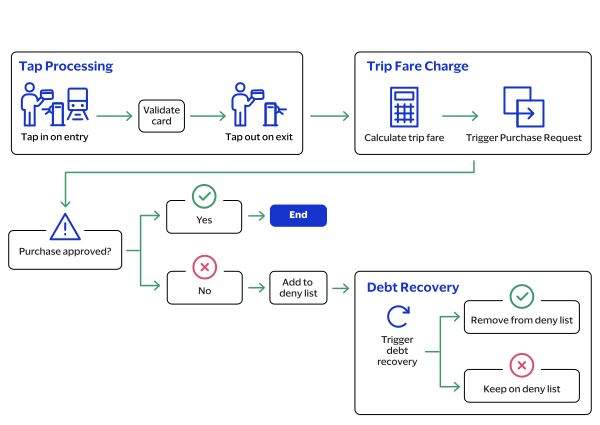
- The cardholder taps the card to enter the transit system.
- The gate validates the card using offline data authentication (ODA), the card expiration date, and the deny list.
- When the card is valid, the gate allows the passenger to enter the transit system.
- When the ODA fails, the card is added to the deny list, and the debt recovery process begins. See Debt Recovery Workflows.
- You send an authorization request for a nominal amount.
- When the authorization is successful, you calculate the fare for the travel period.
- You submit a purchase request viaCybersource.
China UnionPay Aggregated Fare Workflow
China UnionPay
Aggregated Fare WorkflowThe
China UnionPay
(CUP) aggregated fare workflow begins at the at a contactless
terminal of a point of access to the transit system. The final fare that is charged is
not always available at the time of travel. It is calculated at the end of a travel
period, based on journeys made during that period, and typically within 24 hours.Figure:
Aggregated Fare Transaction Flow
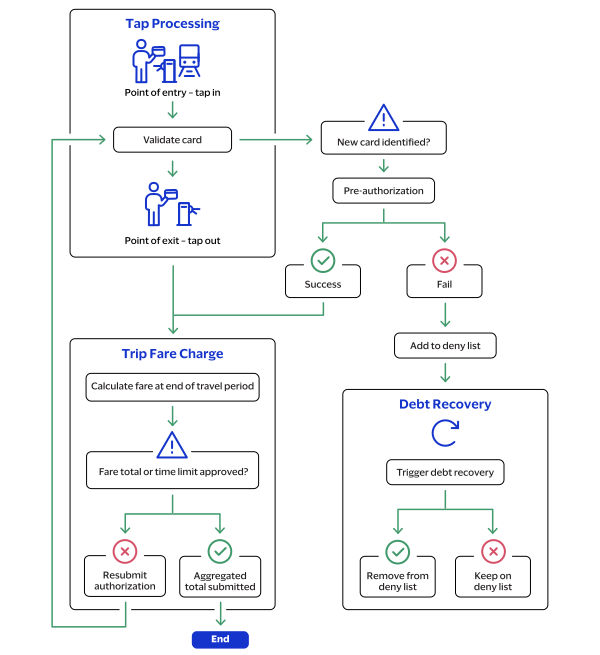
- The cardholder taps the card at a terminal to enter the transit system.
- The gate validates the card using offline data authentication (ODA), the card expiration date, and the deny list.
- You send an authorization request for a nominal amount.
- You calculate and aggregate subsequent trip fares for the customer until the Cumulative Spend Limit (CSL) or Maximum Travel Time (MTT) is reached.
- If the CSL or MTT is exceeded, you request an additional authorization request.
- You submit a purchase request for the cumulative trip fares toCybersourceat the end of the journey.
Debt Recovery Workflows
Debt recovery workflows show how to use debt recovery transactions to collect outstanding
debt when an aggregated end-of-day transaction is declined.
Card schemes require merchants to support merchant-initiated debt recovery. This type of
transaction can also be required to remove a card from a deny list. Each card scheme has
its own transaction-processing rules for debt recovery retry attempts, transaction time
limits, and related mass transit transactions. For more information, see each card
scheme's rules for transit debt recovery retry attempts and transaction time limits.
IMPORTANT
Use a debt recovery transaction to remove a card from a deny list.
This action must be completed within one hour of receiving the authorization
approval.
These debt recovery transactions are supported:
- A scheduled transaction that uses the card number.
- A tap-initiated transaction that uses the EMV track 2 equivalent and EMV tags created when the cardholder re-enters the transit system.
- A cardholder-initiated transaction that the customer requests by contacting you.
When a debt recovery transaction is declined, you can request payment using the First
Ride Risk liability model. For more information, see each card scheme's rules for mass
transit transaction chargebacks.
Scheduled Debt Recovery Transaction Resubmission
A
scheduled debt recovery
transaction is a system-generated transaction that
originates from your back office. This transaction typically uses the card number
and references the original, end-of-day transaction that was declined. Multiple
authorization resubmissions might be triggered within 14 days. Figure:
Scheduled Debt Recovery Workflow
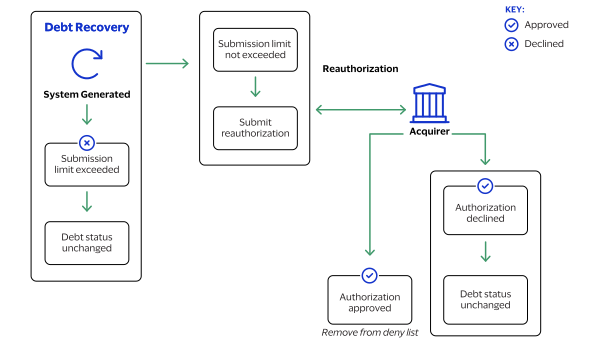
- You configure your payment system to generate scheduled debt recovery authorization requests.
- The scheduled authorizations attempt debt recovery submissions within 14 days of the initial transaction.
- When the number of retry attempts for the scheduled debt transaction exceeds the card scheme’s limit, stop further processing and keep the card on the deny list.
- When the amount is below the debt recovery amount limit, send a sale request.
- When the transaction is declined, keep the card on the deny list.
- When the transaction is successful, remove the card from the deny list.
Tap-Initiated Debt Recovery
A
tap-initiated debt recovery
transaction occurs when the cardholder returns
to the transit gate, and the validator recognizes a new contactless tap. You can deny the rider entrance unless the tap-initiated debt recovery transaction is
attempted in real time while the cardholder is at the gate. The authorization
request includes the EMV track 2 equivalent and EMV tags from the new tap, and a
future capture date.
Figure:
Tap-Initiated Debt Recovery Workflow
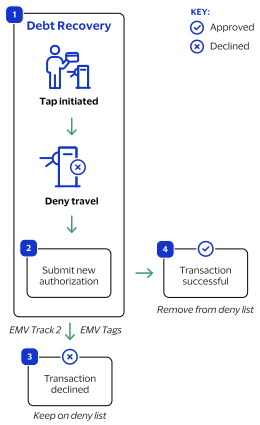
- The cardholder taps their card to enter the transit system.
- You submit a new authorization request using the EMV track 2 equivalent and EMV tags created by the validator and a capture date in the future.
- When the transaction is declined, keep the card on the deny list.
- When the transaction is successful, remove the card from the deny list.
Cardholder-Initiated Debt Recovery
A
cardholder-initiated debt recovery
transaction occurs when the cardholder
contacts you. The method of contact depends on where the transaction occurred such
as on your e-commerce website or by phone or email for a mail order or telephone
order (MOTO) transaction.For information about e-commerce or MOTO payment services, see the
Payments Developer Guide
.Figure:
Cardholder-Initiated Debt Recovery Flow
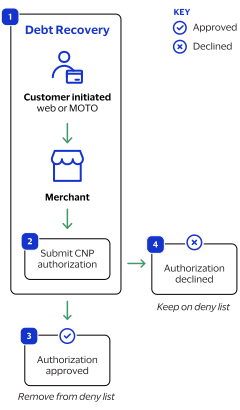
- The cardholder contacts you through your website or by phone or email for a MOTO transaction.
- You process a card-not-present (CNP) authorization.
- When the request is successful, remove the card from the deny list.
- When the request fails, leave the card on the deny list.
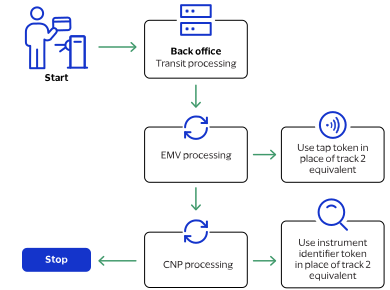
Mass Transit Payment Services Using TMS Tokens
Use TMS tokens to request these mass transit payment services:
- Authorization and capture for aggregate fares and debt recovery
- Sale for single fares and debt recovery
- First ride risk
- Stand-alone credit
In card-present EMV contactless requests, include the transient token ID in the
tokenInformation.jti
field in place of track 2 data. When submitting a tap token creation request, you can include EMV tag-length-value (TLV)
tags in the
paymentInformation.fluidData.value
field or as part of
the payment transaction request within the
pointOfSaleInformation.emv.tags
field. If you send EMV tags in the tap token create request, do not send EMV tags in the
payment transaction request.
When EMV TLV tags are present in both the payment transaction and the token vault,
Cybersource
reads the value provided in the payment transaction
rather than the values stored in the vault.Mastercard EMV transactions include these three field values, which can be handled automatically:
- paymentInformation.card.initiationChannel
- pointOfSaleInformation.emv.cardSequenceNumber
- pointOfSaleInformation.serviceCode
Your account can be configured to read these values automatically from the EMV TLV
tags and track 2 equivalent. When that option is enabled, do not include those three
fields in EMV payment requests.
If any of these values are present in both the separate fields and the EMV
TLV and track 2 equivalent,
Cybersource
reads the value provided in the
separate fields rather than the values present in the EMV TLV and track 2
equivalent.Figure:
Payment Processing with a Token Workflow
Pre-Authorization with a Token
Use this information to process a pre-authorization.
Response Field Handling
When you receive the
AUTH_DECLINE_CAPTURE_POSSIBLE
value in the
errorInformation.reason
field of an authorization response,
it indicates that a capture attempt will not be rejected automatically. Before
processing the capture, verify that it is permitted in this scenario by reviewing
the card scheme’s First Ride Risk and shared‑liability rules.For more information about
the field, see the
errorInformation.reason
field description.Endpoint
Production:
POST
https://api.cybersource.com
/pts/v2/paymentsTest:
POST
https://apitest.cybersource.com
/pts/v2/paymentsRequired Fields for a Pre-Authorization with a Token
- Set this field value toTransitDA BAU nominal value auth.
- Cybersourceprovides the value for this field.
- Set this field to2.
- Set this field tocontactless.
- Set this field to5.
- Set this field to0.
- Set this field totrue.
- Set this field totrue.
- Set this field toretail.
- Set this field totransit.
REST Example: Pre-Authorization with a Token
Request
{
  "clientReferenceInformation": {
    "code": "TransitDA BAU nominal value auth",
    "transactionId": "12845679",
    "partner": {
      "thirdPartyCertificationNumber": "123456789012"
    }
  },
  "pointOfSaleInformation": {
    "operatingEnvironment": "2",
    "terminalPinCapability": "0",
    "catLevel": "2",
    "terminalId": "12345678",
    "entryMode": "contactless",
    "terminalCapability": "5",
    "emv": {
      "cardSequenceNumber": "01"
    }
  },
  "processingInformation": {
    "reconciliationId": "7866535268",
    "commerceIndicator": "retail",
    "industryDataType": "transit",
    "authorizationOptions": {
      "aggregatedAuthIndicator": "true",
      "deferredAuthIndicator": "true"
    }
  },
  "orderInformation": {
    "amountDetails": {
      "totalAmount": "1",
      "currency": "THB"
    }
  },
  "tokenInformation": {
    "jti": "c76392f4-cde4-11aa-b8bc-0242ac14c074"
  },
  "paymentInformation": {
    "card": {
      "type": "062"
    }
  }
}
Response to a Successful Request
{
  "_links": {
    "authReversal": {
      "method": "POST",
      "href": "/pts/v2/payments/7012384708016080703137/reversals"
    },
    "self": {
      "method": "GET",
      "href": "/pts/v2/payments/7012384708016080703137"
    },
    "capture": {
      "method": "POST",
      "href": "/pts/v2/payments/7012384708016080703137/captures"
    }
  },
  "clientReferenceInformation": {
    "code": "TransitDA BAU nominal value auth",
    "transactionId": "12845679"
  },
  "id": "7012384708016080703137",
  "orderInformation": {
    "amountDetails": {
      "authorizedAmount": "1.00",
      "currency": "THB"
    }
  },
  "paymentAccountInformation": {
    "card": {
      "type": "062"
    }
  },
  "paymentInformation": {
    "tokenizedCard": {
      "type": "062"
    },
    "card": {
      "type": "062"
    }
  },
  "processorInformation": {
    "approvalCode": "005290",
    "settlementDate": "0501",
    "responseCode": "00",
    "avs": {
      "code": "2"
    }
  },
  "reconciliationId": "333306641171",
  "status": "AUTHORIZED",
  "submitTimeUtc": "2023-11-29T06:14:33Z"
}
Response to a Successful Request Under First Ride Risk Liability
{ "_links": { "self": { "method": "GET", "href": "/pts/v2/payments/7012384708016080703137" } }, "clientReferenceInformation": { "code": "TransitDA BAU nominal value auth" }, "errorInformation": { "reason": "AUTH_DECLINE_CAPTURE_POSSIBLE", "message": "Authorization Declined. Follow-on Capture can be processed." }, "id": "7078109972977125857011", "paymentInsightsInformation": { "responseInsights": { "categoryCode": "97", "category": "PAYMENT_INSIGHTS_INTERNAL_ERROR" } }, "processorInformation": {"responseCode": "58","avs": { "code": "2" } }, "status": "AUTHORIZED" }
Tap-Initiated Sale for Debt Recovery with a Token
Use this information to process a tap-initiated sale for debt recovery with a token.
A sale transaction combines an authorization and capture. When a cardholder attempts to
use a blocked card at the transit reader, create a fresh debt recovery sale request
using the chip data from the new tap, along with the fare amount of the previous
declined authorization.
Endpoint
Test:
POST
https://apitest.cybersource.com
/pts/v2/paymentsProduction:
POST
https://api.cybersource.com
/pts/v2/paymentsRequired Fields for a Tap-Initiated Sale for Debt Recovery with a Token
- Set this field to01.
- Set this field totrue.
- Set this field totrue.
- Set this field totrue.
- Set this field toretail.
- Set this field totransit.
REST Example: Tap-Initiated Sale for Debt Recovery with a
Token
Request
{
  "clientReferenceInformation": {
    "code": "CUP Purchase Transit",
    "transactionId": "12845674448",
    "partner": {
      "thirdPartyCertificationNumber": "123456789012"
    }
  },
  "processingInformation": {
    "commerceIndicator": "retail",
    "industryDataType": "transit",
    "reconciliationId": "8897YHGTH09Y",
    "linkId": "7007351831836009903681",
    "capture": "true",
    "authorizationOptions": {
      "debtRecoveryIndicator": "true",
      "deferredAuthIndicator": "true"
    }
  },
  "tokenInformation": {
    "jti": "c76392f4-cde4-11aa-b8bc-0242ac14c074"
  },
  "orderInformation": {
    "amountDetails": {
      "totalAmount": "100.00",
      "currency": "THB"
    }
  },
  "pointOfSaleInformation": {
    "operatingEnvironment": "2",
    "terminalId": "3444",
    "catLevel": "2",
    "entryMode": "contactless",
    "terminalCapability": "5",
    "terminalPinCapability": "0",
    "emv": {
      "cardSequenceNumber": "01"
    }
  },
  "paymentInformation": {
    "card": {
      "type": "062"
    }
  }
}
Response to a Successful Request
{
  "_links": {
    "void": {
      "method": "POST",
      "href": "/pts/v2/payments/7012410160086081703137/voids"
    },
    "self": {
      "method": "GET",
      "href": "/pts/v2/payments/7012410160086081703137"
    }
  },
  "clientReferenceInformation": {
    "code": "CUP Purchase Transit",
    "transactionId": "12845674448"
  },
  "id": "7012410160086081703137",
  "orderInformation": {
    "amountDetails": {
      "totalAmount": "100.00",
      "authorizedAmount": "100.00",
      "currency": "THB"
    }
  },
  "paymentAccountInformation": {
    "card": {
      "type": "062"
    }
  },
  "paymentInformation": {
    "tokenizedCard": {
      "type": "062"
    },
    "card": {
      "type": "062"
    }
  },
  "processorInformation": {
    "approvalCode": "005290",
    "settlementDate": "0501",
    "responseCode": "00",
    "avs": {
      "code": "2"
    }
  },
  "reconciliationId": "8897YHGTH09Y",
  "status": "AUTHORIZED",
  "submitTimeUtc": "2023-11-29T06:56:57Z"
}
Merchant-Initiated Sale for Debt Recovery with a Token
Use this information to process a merchant-initiated sale for debt recovery with a
token.
Endpoint
Test:
POST
https://apitest.cybersource.com
/pts/v2/paymentsProduction:
POST
https://api.cybersource.com
/pts/v2/paymentsRequired Fields for a Merchant-Initiated Sale for Debt Recovery with a Token
- Set this field totrue.
- Set this field totrue.
- Set this field totrue.
- Set this field tointernet.
- Set this field totransit.
REST Example: Merchant-Initiated Sale for Debt Recovery with
a Token
Request
{
    "clientReferenceInformation": {
        "code": "CUP Purchase Transit",
        "transactionId": ""12845678",
        "partner": {
            "thirdPartyCertificationNumber": "123456789012"
        }
    },
    "processingInformation": {
        "commerceIndicator" : "internet",
        "industryDataType": "transit",
        "reconciliationId": "897YHGTHJUY",
        "linkId": "7007351831836009903681",
        "capture": "true",
        "authorizationOptions": {
            "debtRecoveryIndicator": "true",
            "deferredAuthIndicator": "true",
            "ignoreAvsResult": "true",
            "ignoreCvResult": "true"
            }
        }
    },
    "paymentInformation": {
        "card": {
            "expirationMonth": "12",
            "expirationYear": "2033",
            "cardType": "062"
        },
        "instrumentIdentifier": {
            "id": "0ABF155EB33E8FC2E0633F36CF0A0220"
        }
    },
    "orderInformation": {
        "amountDetails": {
            "totalAmount": "100.00",
            "currency": "THB"
        }
    }
}
Response to a Successful Request
{
    "_links": {
        "void": {
            "method": "POST",
            "href": "/pts/v2/payments/7012397101156081303137/voids"
        },
        "self": {
            "method": "GET",
            "href": "/pts/v2/payments/7012397101156081303137"
        }
    },
    "clientReferenceInformation": {
        "code": "CUP Purchase Transit",
        "transactionId": "12845678"
    },
    "id": "7012397101156081303137",
    "orderInformation": {
        "amountDetails": {
            "totalAmount": "100.00",
            "authorizedAmount": "100.00",
            "currency": "THB"
        }
    },
    "paymentAccountInformation": {
        "card": {
            "type": "062"
        }
    },
    "paymentInformation": {
        "tokenizedCard": {
            "type": "062"
        },
        "instrumentIdentifier": {
            "id": "0ABF155EB33E8FC2E0633F36CF0A0220",
            "state": "ACTIVE"
        },
        "card": {
            "type": "062"
        }
    "processorInformation": {
        "approvalCode": "005290",
        "settlementDate": "0501",
        "responseCode": "00",
        "avs": {
            "code": "2"
        }
    },
    "reconciliationId": "8897YHGTHJUY",
    "status": "AUTHORIZED",
    "submitTimeUtc": "2023-11-29T06:35:11Z"
}
Mass Transit Follow-On Payment Services
The Mass Transit solution supports these follow-on transactions:
- Capture
- Authorization reversal
- Refund
- Void a capture
- Credit
Capture
Use this information to process a capture.
Use the capture service to
complete a pre-authorization.
When a transaction is below the threshold for First Ride Risk protection, use the capture
service to capture funds from a declined authorization. For more information, see First Ride Risk.
Endpoint
Production:
POST
https://api.cybersource.com
/pts/v2/payments/{id}
/capturesTest:
POST
https://apitest.cybersource.com
/pts/v2/payments/{id}
/capturesThe is the transaction ID
returned in the authorization response.
{id}
Required Fields for a Capture
REST Example: Capture
Request
{
   "clientReferenceInformation": {
        "code": "TCCUP1"
    },
   "orderInformation": {
    "amountDetails": {
      "totalAmount": "5",
      "currency": "THB"
    }
  }
}
Response to a Successful Request
{
    "_links": {
        "void": {
            "method": "POST",
            "href": "/pts/v2/captures/7012404694986081603137/voids"
        },
        "self": {
            "method": "GET",
            "href": "/pts/v2/captures/7012404694986081603137"
        }
    },
    "clientReferenceInformation": {
        "code": "TCCUP1"
    },
    "id": "7012404694986081603137",
    "orderInformation": {
        "amountDetails": {
            "totalAmount": "5.00",
            "currency": "THB"
        }
    },
    "reconciliationId": "333306641171",
    "status": "PENDING",
    "submitTimeUtc": "2023-11-9T06:47:50Z"
}
Authorization Reversal
Use this information to reverse an unnecessary authorization.
Endpoint
Production:
POST
https://api.cybersource.com
/pts/v2/payments/{id}
/reversalsTest:
POST
https://apitest.cybersource.com
/pts/v2/payments/{id}
/reversalsThe is the transaction ID returned in the
authorization response.
{id}
Required Fields for an Authorization Reversal
- Set this field toAuthreversal.
REST Example: Authorization Reversal
Request
{
  "clientReferenceInformation": {
    "code": "FE978755"
  },
  "reversalInformation": {
    "amountDetails": {
      "totalAmount": "999.87"
    },
    "reason": "Authreversal"
  }
}
Response to a Successful Request
{
    "_links": {
        "self": {
            "method": "GET",
            "href": "/pts/v2/reversals/7167830399586147504953"
        }
    },
    "clientReferenceInformation": {
        "code": "FE978755"
    },
    "id": "7167830399586147504953",
    "orderInformation": {
        "amountDetails": {
            "currency": "THB"
        }
    },
    "processorInformation": {
        "responseCode": "000"
    },
    "reversalAmountDetails": {
        "reversedAmount": "999.87",
        "currency": "THB"
    },
    "status": "REVERSED",
    "submitTimeUtc": "2024-05-27T04:10:40Z"
}
Void a Capture
Use this information to void a capture that was submitted but not yet processed by the
processor.
Endpoint
Production:
POST
https://api.cybersource.com
/pts/v2/captures/{id}
/voidsTest:
POST
https://apitest.cybersource.com
/pts/v2/captures/{id}
/voidsThe is the transaction ID returned in the
capture response.
{id}
Required Fields to Void a Capture
REST Example: Void a Capture
{
    "clientReferenceInformation": {
        "code": "FE5690997" },
    "paymentInformation": {
        "card": {
            "expirationYear": "2033"
        }
    }
}
{
    "_links": {
        "self": {
            "method": "GET",
            "href": "/pts/v2/voids/7025612536246445304953"
        }
    },
    "clientReferenceInformation": {
         "code": "FE5690997"
    },
    "id": "7025612536246445304953",
    "orderInformation": {
        "amountDetails": {
            "currency": "THB"
        }
    },
    "status": "VOIDED",
    "submitTimeUtc": "2024-06-02T18:08:59Z",
    "voidAmountDetails": {
        "currency": "THB",
        "voidAmount": "10"
    }
}
Stand-Alone Credit with a Token
Use this information to process a stand-alone credit with a token.
A
stand-alone credit
is a credit that is not linked to a previous transaction.
When you process a stand-alone credit, there is no set limit on the amount because there
is no reference to the original transaction amount. There is no time limit for
requesting a stand-alone credit.IMPORTANT
Restrict access to the stand-alone credit service and do not make it
available directly on your customer-facing interface. Instead, include the feature in
your internal customer-service process to prevent misuse and make sure all requests are
reviewed.
When a stand-alone credit request is successful, the issuing bank for the payment card
takes money out of the merchant bank account and returns it to the customer. It
typically takes two to four days for the acquiring bank to transfer funds from the
merchant bank account.
Endpoint
Production:
POST
https://api.cybersource.com
/pts/v2/credits/Test:
POST
https://apitest.cybersource.com
/pts/v2/credits/Required Fields for a Stand-Alone Credit with a Token
REST Example: Stand-Alone Credit with a Token
Request
{
    "clientReferenceInformation": {
        "code": "1234567hgh8"
    },
    "paymentInformation": {
        "instrumentIdentifier": {
            "id": "D6B858CAD38A1B7CE0531D588D0ADB5D"
        },
        "card": {
            "expirationMonth": "03",
            "expirationYear": "2031",
            "type": "062"
        }
    },
    "orderInformation": {
        "amountDetails": {
            "totalAmount": "225.00",
            "currency": "THB"
        }
    }
}
Response to a Successful Request
{
    "_links": {
        "void": {
            "method": "POST",
            "href": "/pts/v2/credits/6538345097226017503265/voids"
        },
        "self": {
            "method": "GET",
            "href": "/pts/v2/credits/6538345097226017503265"
        }
    },
    "clientReferenceInformation": {
        "code": "1234567hgh8"
    },
    "creditAmountDetails": {
        "currency": "TBH",
        "creditAmount": "225.00"
    },
    "id": "6538345097226017503265",
    "orderInformation": {
        "amountDetails": {
            "currency": "TBH"
        }
    },
    "paymentAccountInformation": {
        "card": {
            "type": "062"
        }
    },
    "paymentInformation": {
        "tokenizedCard": {
            "type": "062"
        },
        "instrumentIdentifier": {
            "id": "D6B858CAD38A1B7CE0531D588D0ADB5D",
            "state": "ACTIVE"
        },
        "card": {
            "type": "062"
        }
    },
    "reconciliationId": "6538345097226017503265",
    "status": "PENDING",
    "submitTimeUtc": "2024-04-25T12:06:44Z"
}
Refund
Use this information to process a refund. A refund is linked to a previous capture or sale. You
must request a refund within 180 days of the authorization.
For
China UnionPay
, use the refund service to reverse
pre-authorization completions and sales.Endpoint
Production:
POST
https://api.cybersource.com
/pts/v2/payments/{id}
/refundsTest:
POST
https://apitest.cybersource.com
/pts/v2/payments/{id}
/refundsThe is the transaction ID
returned in the capture or sale response.
{id}
Required Fields for a Refund
REST Example: Refund
Request
{
  "clientReferenceInformation": {
    "code": "FE56907"
  },
  "orderInformation": {
    "amountDetails": {
      "totalAmount": "200",
      "currency": "THB"
      }
   }
}
Response to a Successful Request
{
  "_links": {
  "void": {
    "method": "POST",
    "href": "/pts/v2/refunds/7025605918856084604951/voids"
    },
    "self": {
      "method": "GET",
      "href": "/pts/v2/refunds/7025605918856084604951"
    }
  },
  "clientReferenceInformation": {
    "code": "FE56907"
  },
  "id": "7025605918856084604951",
  "orderInformation": {
    "amountDetails": {
      "currency": "THB"
    }
  },
  "processorInformation": {
    "approvalCode": "831000"
    "retrievalReferenceNumber": "334813163319",
    "responseCode": "00"
  },
  "reconciliationId": "7025605722066080204951",
  "refundAmountDetails": {
    "currency": "THB",
    "refundAmount": "200"
  },
  "status": "PENDING",
  "submitTimeUtc": "2022-04-18T12:28:23Z",
}