On This Page
Debt Recovery Workflows
Use a debt recovery transaction to collect outstanding debt when the end-of-day
transaction is declined. Each card scheme has its own transaction-processing rules for
debt recovery and other types of transactions. For more information, see each card
scheme's rules for transit debt recovery retry attempts and transaction time limits.
IMPORTANT
Use a debt recovery transaction to remove a card from a deny list.
This action must be completed within one hour of receiving the authorization
approval.
These debt recovery transactions are supported:
- A scheduled transaction that uses the card number.
- A tap-initiated transaction that uses the EMV track 2 equivalent and EMV tags created when the cardholder re-enters the transit system.
- A cardholder-initiated transaction that the customer requests by contacting you.
When a debt recovery transaction is declined, you can request payment using the First
Ride Risk liability model. For more information, see each card scheme's rules for mass
transit transaction chargebacks.
Scheduled Debt Recovery Transaction Resubmission
A
scheduled debt recovery
transaction is a system-generated transaction that
originates from your back office. This transaction typically uses the card number
and references the original, end-of-day transaction that was declined. Multiple
authorization resubmissions might be triggered within 14 days. Figure:
Scheduled Debt Recovery Workflow
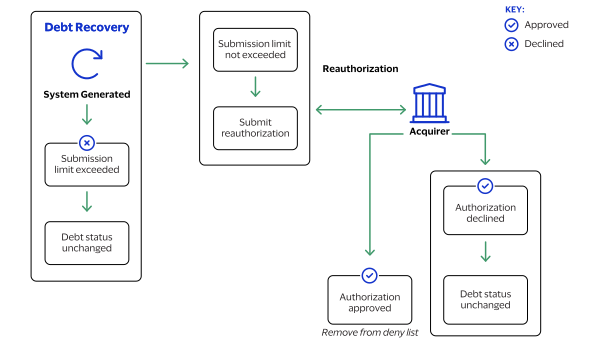
- You configure your payment system to generate scheduled debt recovery authorization requests.
- The scheduled authorizations attempt debt recovery submissions within 14 days of the initial transaction.
- When the number of retry attempts for the scheduled debt transaction exceeds the card scheme’s limit, stop further processing and keep the card on the deny list.
- When the amount is below the debt recovery amount limit, send a sale request.
- When the transaction is declined, keep the card on the deny list.
- When the transaction is successful, remove the card from the deny list.
Tap-Initiated Debt Recovery
A
tap-initiated debt recovery
transaction occurs when the cardholder returns
to the transit gate, and the validator recognizes a new contactless tap. You can deny the rider entrance unless the tap-initiated debt recovery transaction is
attempted in real time while the cardholder is at the gate. The authorization
request includes the EMV track 2 equivalent and EMV tags from the new tap, and a
future capture date.
Figure:
Tap-Initiated Debt Recovery Workflow
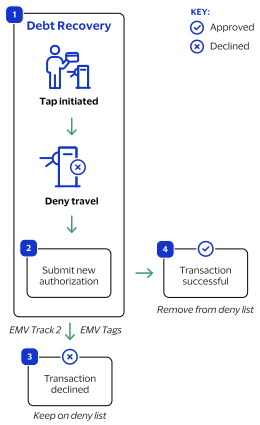
- The cardholder taps their card to enter the transit system.
- You submit a new authorization request using the EMV track 2 equivalent and EMV tags created by the validator and a capture date in the future.
- When the transaction is declined, keep the card on the deny list.
- When the transaction is successful, remove the card from the deny list.
Cardholder-Initiated Debt Recovery
A
cardholder-initiated debt recovery
transaction occurs when the cardholder
contacts you. The method of contact depends on where the transaction occurred such
as on your e-commerce website or by phone or email for a mail order or telephone
order (MOTO) transaction.For information about e-commerce or MOTO payment services, see the
Payments Developer Guide
.Figure:
Cardholder-Initiated Debt Recovery Flow
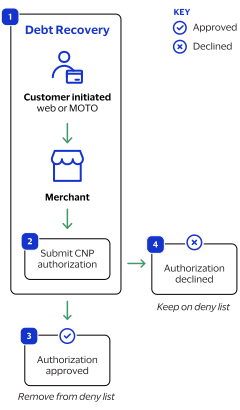
- The cardholder contacts you through your website or by phone or email for a MOTO transaction.
- You process a card-not-present (CNP) authorization.
- When the request is successful, remove the card from the deny list.
- When the request fails, leave the card on the deny list.