On This Page
FILTER BY TAG
Construct Messages Using JSON Web Tokens
WARNING
As of
February 2026
, there are new requirements for constructing
a JWT. This section explains how to update your system to remain in compliance. You must
update how your system constructs JWTs by March 2027
to remain compliant. You
risk transaction failure if you do not update your system.To construct a message using JWTs, you must set the required HTTP headers, define the JWS
header and body claims, calculate the token signature, and combine these elements into a
request. This section describes how to create each element and construct the completed
JWT message in the following subsections.
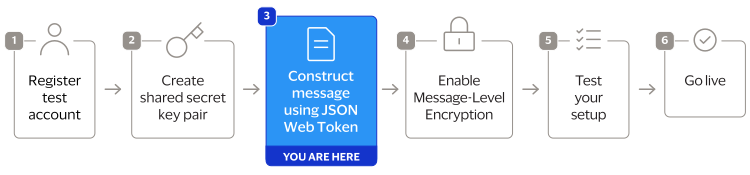
Figure:
JWT Construction Steps
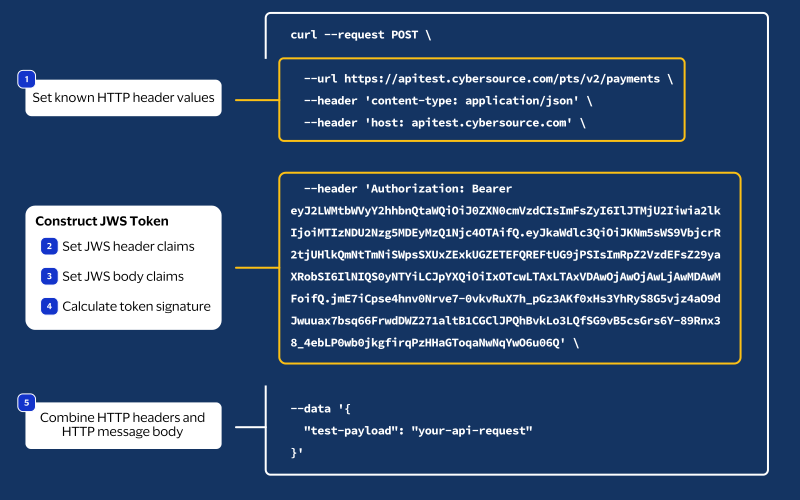
JSON Web Token Message Elements
A REST API request authenticated with a JWT consists of HTTP headers and an HTTP message
body.
- HTTP Message Elements
- Your HTTP message header must include these elements:
- HTTP Message Header ElementsHTTP Header ElementDescriptioncontent-typeThe media or file type of the request, which is also known as the Multipurpose Internet Mail Extension (MIME) type. Example:application/jsonhostThe transaction endpoint. Example:api.cybersource.comauthorizationThe JSON Web Signature (JWS) bearer token. Format:Bearer <JWS token>. Steps 3B–3D explain how to create this token.
- HTTP Message Body
- Your API request.
Step 3A: Set Known HTTP Headers
Set the values for these HTTP header elements. These header values do not require any
calculation.
- content-type
- Set to the media or file type resource.
- host
- Set to theCybersourceAPI endpoint.
The
authorization
header value is a JWS token. How you construct the
JWS token is described in Steps 3B – 3D. A JWS token consists of three segments
separated by the period character
(.
).<Base64URL-encoded JWS header>.<Base64URL-encoded JWS body claims>.<Base64URL-encoded signature>
Step 3B: Set the JWS Header Claims
This step begins the process of constructing a
JSON Web Signature
(JWS)
token. To construct a JWS token, you must first create the JWS header by setting its
header claim values. After creating the JWS header, use Base64URL to encode it. The
encoded header claim value is the first segment of the JWS token.These header claim values do not require calculation.
Header Field | Description |
|---|---|
alg | The symmetric algorithm you use to sign the token header. These
algorithms are supported:
|
kid | The key ID you use to digitally sign the JWT. It must be registered
with the authorizing server. The key ID is from your shared secret key pair. For more information,
see Create a Shared Secret Key Pair. |
typ | The token type. Set to JWT . |
Step 3C: Set the JWS Body Claims
After you set the JWS header values, you must create the JWS body by setting
these body claim values. After the body claims are created, use Base64URL to encode
it. The encoded body claim value is the second segment of the JWS token.
JWS Body Claim Field | Description | Data Type | Field Value Format |
|---|---|---|---|
digest | A Base64-encoded hash of the message payload. Do not include the digest field if the request message
is empty, such as during a GET or DELETE request. | String | Base64-encoded string: uppercase, lowercase, digits,
+ , / , and optional
= padding |
digestAlgorithm | The algorithm used to hash the message payload. The message payload should be hashed using the SHA-256
algorithm. Do not include the digestAlgorithm field if the
digest field is not included. | String | Lowercase |
exp | The time at which the JWS token expires. IMPORTANT
Field values
cannot exceed two minutes after the message issue date,
which is the iat field value.This field is an HTTP-date value as defined in RFC7231. For
example, 01/01/2020 at 00:02:00 is
1577836920 . | String | Numeric |
iat | The date and time at which the message is issued. This field
uses a NumericDate value as defined in RFC 7519,
which is the number of seconds since
1970‑01‑01T00:00:00Z (Unix epoch).For example, 01/01/2020 at 00:00:00 is
1577836800 . | String | Numeric |
iss | The issuer identifier for the JWS token.
Set
to the merchant ID that created the shared secret key
pair. This value is used to validate the
issuer. | String | Lowercase alphanumeric |
jti | The unique token ID. This value is used for replay
prevention. Format the value using UUID version 4. For example:
6643fb9a-8093-47c6-95d3-8d69785b5e62 | String | Lowercase alphanumeric |
request-host | The endpoint hostname for the HTTP request, excluding the
protocol and path. https://api.cybersource.com /pts/v2/paymentsapi.cybersource.com . | String | Lowercase alphanumeric with periods |
request-method | The HTTP request method. For example, post ,
get , put ,
patch , or delete . | String | Lowercase |
request-resource-path | The endpoint path for the HTTP request, excluding the
domain. For example, to send a message to the https://api.cybersource.com /pts/v2/payments/pts/v2/payments . | String | Lowercase alphanumeric |
v-c-jwt-version | The Visa JWT scheme version number. Set to
2 . | String | Numeric |
v-c-merchant-id | Your Cybersource transacting merchant ID
(MID).If you are a portfolio or merchant account user, set this to
the transacting merchant ID you send requests on behalf
of. | String | Lowercase alphanumeric |
v-c-response-mle-kid | The message-level encryption response key ID, also known as
the REST–API Response MLE key. | String | Lowercase alphanumeric |
The value of the
digest
JWS claim is a hashed version of the HTTP
message body that you must calculate. Cybersource
uses this hash
value to validate the integrity of your message body.Follow these steps to calculate the digest hash:
- Generate the SHA-256 hash of the JSON payload (message body).
- Encode the hashed string to Base64.
- Add the message body hash to thedigestJWS body claims.
- Add the algorithm used to hash the digest in thedigestAlgorithmJWS body claims.
Example: Creating a Message Hash Using the Command Line
shasum
Toolcat <<'EOF' | tr -d '\n' | shasum -a 256 { "clientReferenceInformation": { "code": "TC50171_3" }, "paymentInformation": { "card": { "number": "4111111111111111", "expirationMonth": "12", "expirationYear": "2031" } }, "orderInformation": { "amountDetails": { "totalAmount": "102.21", "currency": "USD" }, "billTo": { "firstName": "John", "lastName": "Doe", "address1": "1MarketSt", "locality": "sanfrancisco", "administrativeArea": "CA", "postalCode": "94105", "country": "US", "email": "", "phoneNumber": "4158880000" } } } EOF
Example: Creating a Message Hash Using the Command Line
base64
Toolecho -n "6ae5459bc8a7d6a4b203e8a734d6a616725134088e13261f5bbcefc1424fc956" | base64
Example: Creating a Message Hash Using C#
public static string GenerateDigest()
{
    var digest = "";
    var bodyText = "{ your JSON payload }";

    using (var sha256hash = SHA256.Create())
    {
        byte[] payloadBytes = sha256hash.ComputeHash(Encoding.UTF8.GetBytes(bodyText));
        digest = Convert.ToBase64String(payloadBytes);
    }

    return digest;
}
Example: Creating a Message Using Java
public static String GenerateDigest() throws NoSuchAlgorithmException {
    String bodyText = "{ your JSON payload }";

    MessageDigest md = MessageDigest.getInstance("SHA-256");
    md.update(bodyText.getBytes(StandardCharsets.UTF_8));
    byte[] digest = md.digest();

    return Base64.getEncoder().encodeToString(digest);
}
Step 3D: Calculate the JWS Signature
You can now calculate the JSON Web Signature (JWS). The JWS consists of the JWS header and
claim set hashes in the following format. They are encrypted with the private key.
[JWS Header].[Claim Set]
Follow these steps to calculate the signature:
- Concatenate the JWS header and claim set hash strings with a period character (.) between the hashes:[JWS Header].[Claim Set]
- Generate an encoded version of the text file using your shared secret key from the key pair. For more information, see Create a Shared Secret Key Pair.
- Base64-encode the signature output.
- After calculating the signature, you can construct a complete JWS token by combining the JWS header claims, body claims, and signature.
Example: Encoding Headers and Body
  printf "%s.%s" \
    "$(echo -n '{"alg":"HS256","typ":"JWT","kid":"1234567890"}' | base64 | tr -d '\n' | tr '+/' '-_' | tr -d '=')" \
    "$(echo -n '{"digest":"Yjg0NGIxOTMxMzQ2NzhlYjdiMDdhMWZmYjZiYzUzNzlkMTk5NzFmNjAzNWRmMThlNzk0N2NhY2U0YTEwNzYyYQ==","digestAlgorithm":"SHA-256","iat":1709845200,"exp":1709845320,"request-method":"post",
  "request-resource-path":"/pts/v2/payments","request-host":"api.cybersource.com","iss":"merchantid","jti":"12345678-1234-1234-1234-123456789012","v-c-jwt-version":"2","v-c-merchant-id":"merchantid"}' |
  base64 | tr -d '\n' | tr '+/' '-_' | tr -d '=')" \
    > signing_input.txt
Code Example: Encoding the Signature File Using OpenSSL
Generate the HMAC signature using the openssl tool and the signing_input.txt
generated above. The tr commands convert standard Base64 output to Base64URL
encoding as required by JWT specification RFC 7515.
openssl dgst -sha256 -mac HMAC -macopt key:"$(echo 'YOUR_BASE64_ENCODED_SECRET' | base64 -d)" -binary signing_input.txt | base64 | tr -d '\n' | tr '+/' '-_' | tr -d '='
- Result
- The result of this step is the encoded signature, which is the third segment of the JWS token. You have now created all three segments of the JWS token. The completed JWS token is the HTTPauthorizationheader value.
- <Base64URL-encoded JWS Header>.<Base64URL-encoded JWS Body Claims>.<Base64URL-encoded Signature>
Step 3E: Complete the Message with JWTs
Combine the completed JWS token from Steps 3B–3D with the other HTTP headers from Step 3A and
your HTTP message body to construct your authenticated REST request message:
Host: api.cybersource.com
Content-Type: application/json
Authorization: Bearer <Base64URL-encoded JWS header>.<Base64URL-encoded JWS body claims>.<Base64URL-encoded signature>

{
  "clientReferenceInformation": {
    "code": "refnum-123456"
  },
  "paymentInformation": {
    "card": {
      "number": "411111111111XXXX",
      "expirationMonth": "12",
      "expirationYear": "2031"
    }
  }
}